


Transparent Histograms

Viewing 3 posts - 1 through 3 (of 3 total)

  • Author
    Posts
  • #112360 quote
    Bard
    Participant
    Master

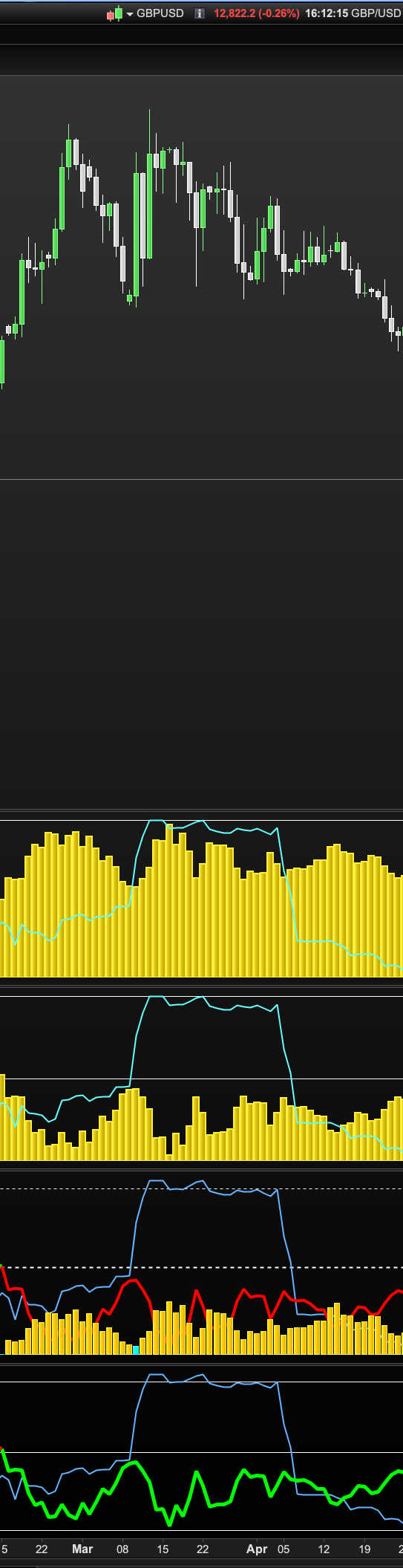
    Hi, what I can’t figure from the image posted below is why I can see the aqua blue line over the top of the yellow histogram in the the top two indicators but with the third indicator the green/red line indicator is obscured by the orange histogram? Is there a way to make histograms in indicators more transparent in colour? I ask because I want to be able to see a line displayed for another result/output in this indicator but without the histogram bar obscuring it. I tried lots of different colours and adding “a” as in “rgba” but it doesn’t work (fourth indicator at bottom)? Thanks.

    transparent.png transparent.png
    #112362 quote
    robertogozzi
    Moderator
    Master

    Use the optional T (transparency or fade) value. It’s the 4th parameter with COLOURED (0=invisible, 255=100% visibility):

    COLOURED(r,g,b,t)
    Bard thanked this post
    #112364 quote
    GraHal
    Participant
    Master

    Above useful tip added as Log 185 to here …

    Snippet Link Library

    robertogozzi thanked this post
Viewing 3 posts - 1 through 3 (of 3 total)
  • You must be logged in to reply to this topic.

Transparent Histograms


ProBuilder: Indicators & Custom Tools

New Reply
Author
author-avatar
Bard @brad Participant
Summary

This topic contains 2 replies,
has 3 voices, and was last updated by GraHal

6 years, 3 months ago.

Topic Details
Forum: ProBuilder: Indicators & Custom Tools
Language: English
Started: 11/07/2019
Status: Active
Attachments: 1 files
Logo Logo
Loading...
