


Transparent Histograms

Viewing 3 posts - 1 through 3 (of 3 total)

  • Author
    Posts
  • #112360 quote
    BardBard
    Participant
    Master

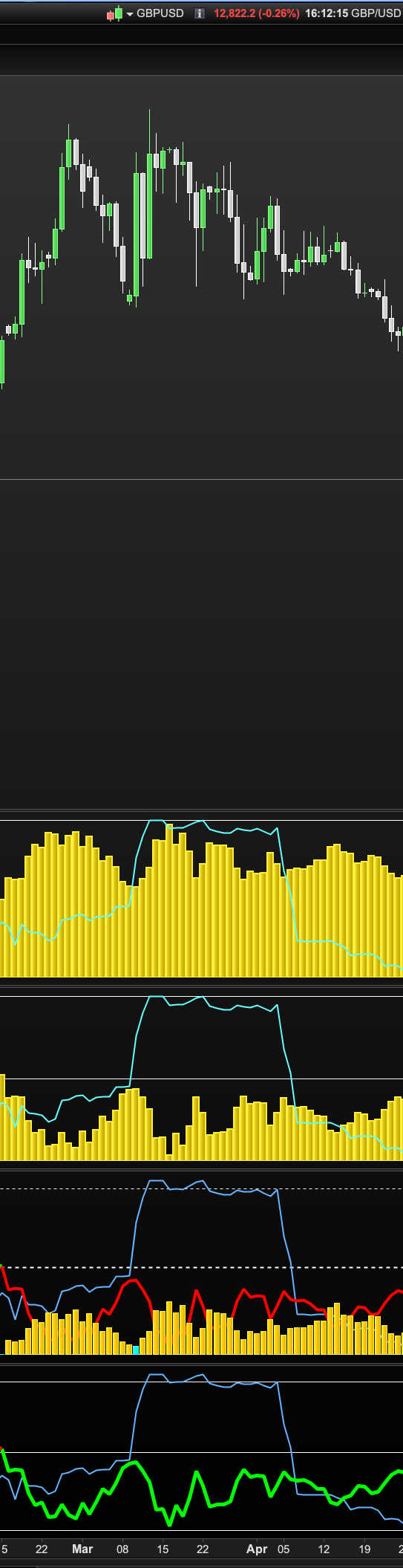
    Hi, what I can’t figure from the image posted below is why I can see the aqua blue line over the top of the yellow histogram in the the top two indicators but with the third indicator the green/red line indicator is obscured by the orange histogram? Is there a way to make histograms in indicators more transparent in colour? I ask because I want to be able to see a line displayed for another result/output in this indicator but without the histogram bar obscuring it. I tried lots of different colours and adding “a” as in “rgba” but it doesn’t work (fourth indicator at bottom)? Thanks.

    transparent.png transparent.png
    #112362 quote
    robertogozzirobertogozzi
    Moderator
    Legend

    Use the optional T (transparency or fade) value. It’s the 4th parameter with COLOURED (0=invisible, 255=100% visibility):

    COLOURED(r,g,b,t)
    Bard thanked this post
    #112364 quote
    GraHalGraHal
    Participant
    Legend

    Above useful tip added as Log 185 to here …

    Snippet Link Library

    robertogozzi thanked this post
Viewing 3 posts - 1 through 3 (of 3 total)
  • You must be logged in to reply to this topic.

ProRealAI ProRealAI New

Stuck on this ProBuilder code?

Describe what this topic is trying to build, in plain English, and ProRealAI writes the ProRealTime™ indicator, screener or system for you.

Available in 7 languages
Try ProRealAI

Transparent Histograms


ProBuilder: Indicators & Custom Tools

New Reply
Author
author-avatar
Bard @brad Participant
Summary

This topic contains 2 replies,
has 3 voices, and was last updated by GraHalGraHal

6 years, 11 months ago.

Topic Details
Forum: ProBuilder: Indicators & Custom Tools
Language: English
Started: 11/07/2019
Status: Active
Attachments: 1 files
ProRealCode ProRealCode
Loading...

