Traduzione codice TW Liquidity swings

Viewing 3 posts - 1 through 3 (of 3 total)
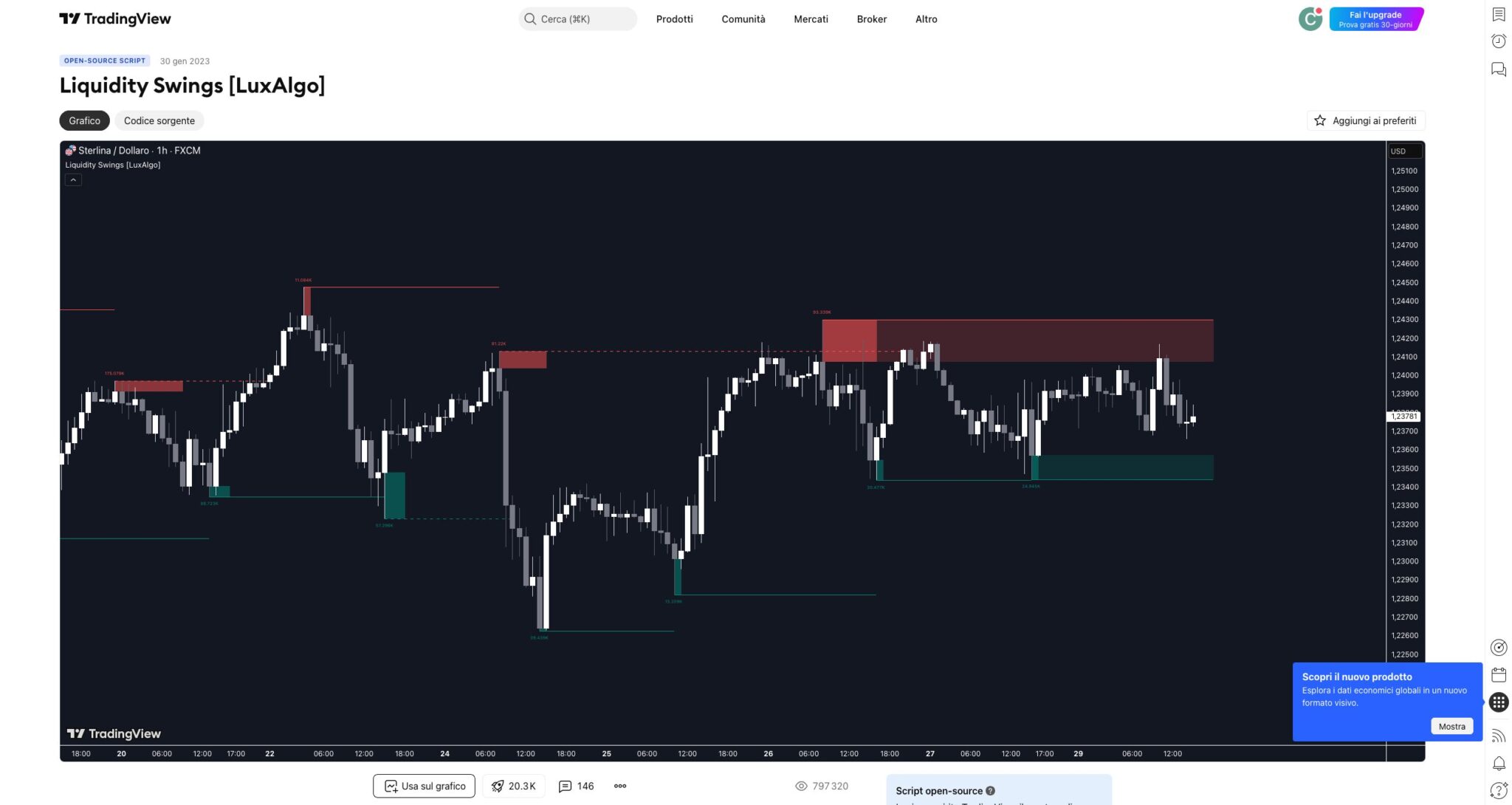
  • Author
    Posts
  • #250260 quote
    Msport71Msport71
    Participant
    Senior
    #250374 quote
    Iván GonzálezIván González
    Moderator
    Legend

    ecco:

    //-----------------------------------------//
    //PRC_Liquidity Swings
    //version = 0
    //05.09.2025
    //Iván González @ www.prorealcode.com
    //Sharing ProRealTime knowledge
    //-----------------------------------------//
    defparam drawonlastbaronly=true
    //-----------------------------------------//
    // --- Parámetros de Configuración ---
    //-----------------------------------------//
    length = 14 // Pivot Lookback
    areaType = 1 // Swing Area: 1 = Wick Extremity, 2 = Full Range
    filterValue = 2 // Mostrar solo zonas con un conteo/volumen mayor a este valor
    // --- Estilos ---
    showTop = 1
    topAreaAlpha = 30 //0 - 255
    showBtm = 1
    btmAreaAlpha = 30 //0 - 255
    //-----------------------------------------//
    // --- Inicialización de Arrays ---
    //-----------------------------------------//
    ONCE phCount = 0
    ONCE plCount = 0
    //-----------------------------------------//
    // --- FASE 1: Creacion de Arrays
    //-----------------------------------------//
    isPivotHigh = (high[length] = HIGHEST[2*length+1](high))
    isPivotLow = (low[length] = LOWEST[2*length+1](low))
    // Almacenar nuevo Pivote Alto
    IF isPivotHigh THEN
    $phTop[phCount] = high[length]
    IF areaType = 1 THEN
    $phBtm[phCount] = MAX(close[length], open[length])
    ELSE
    $phBtm[phCount] = low[length]
    ENDIF
    $phLeft[phCount] = barindex[length]
    $phRight[phCount] = barindex[length-1]
    $phCrossed[phCount] = 0
    $phTouchCount[phCount] = 0
    $phTouchVolume[phCount] = 0
    phCount = phCount + 1
    ENDIF
    // Almacenar nuevo Pivote Bajo
    IF isPivotLow THEN
    $plBtm[plCount] = low[length]
    IF areaType = 1 THEN
    $plTop[plCount] = MIN(close[length], open[length])
    ELSE
    $plTop[plCount] = high[length]
    ENDIF
    $plLeft[plCount] = barindex[length]
    $plRight[plCount] = barindex[length-1]
    $plCrossed[plCount] = 0
    $plTouchCount[plCount] = 0
    $plTouchVolume[plCount] = 0
    plCount = plCount + 1
    ENDIF
    //-----------------------------------------//
    // --- FASE 2: Dibujo
    //-----------------------------------------//
    IF islastbarupdate  THEN
    // Procesar Zonas de Resistencia
    if showTop then
    FOR i = 0 TO phCount-1 DO
    dist=barindex-$phLeft[i]
    // Localizar el punto de ruptura
    for j=dist downto 1 do
    if $phCrossed[i] = 0 and close[j] > $phTop[i] then
    $phCrossed[i] = 1
    $phRight[i] = barindex[j]
    break
    elsif $phCrossed[i] = 0 and high[j] > $phBtm[i] and low[j]<$phTop[i]  then
    $phTouchCount[i] = $phTouchCount[i]+1
    $phTouchVolume[i] = $phTouchVolume[i]+volume[j]
    endif
    next
    //Dibujar el nivel de liquidez
    vol=$phTouchVolume[i]
    if $phCrossed[i]=1 and $phTouchCount[i]>filterValue then
    drawsegment($phLeft[i],$phTop[i],$phRight[i],$phTop[i])style(dottedline)coloured("red")
    drawrectangle($phLeft[i],$phTop[i],$phRight[i],$phBtm[i])coloured("red",0)fillcolor("red",topAreaAlpha)
    drawtext("#vol#",$phLeft[i],$phTop[i]+range[1])coloured("darkred")
    elsif $phCrossed[i]=0 and $phTouchCount[i]>filterValue then
    drawsegment($phLeft[i],$phTop[i],barindex,$phTop[i])style(line)coloured("red")
    drawrectangle($phLeft[i],$phTop[i],barindex,$phBtm[i])coloured("red",0)fillcolor("red",topAreaAlpha)
    drawtext("#vol#",$phLeft[i],$phTop[i]+range[1])coloured("darkred")
    endif
    NEXT
      endif 
    //-----------------------------------------//
    // Procesar Zonas de Soporte
    if showBtm then
    
    FOR i = 0 TO plCount - 1 DO
    dist2=barindex-$plLeft[i]
    // Localizar el punto de ruptura
    for j=dist2 downto 1 do
    if $plCrossed[i] = 0 and close[j] < $plBtm[i] then
    $plCrossed[i] = 1
    $plRight[i] = barindex[j]
    break
    elsif $plCrossed[i] = 0 and low[j]<$plTop[i] and high[j]>$plBtm[i] then
    $plTouchCount[i] = $plTouchCount[i]+1
    $plTouchVolume[i] = $plTouchVolume[i]+volume[j]
    endif
    next
    //Dibujar el nivel de liquidez
    vol2=$plTouchVolume[i]
    if $plCrossed[i]=1 and $plTouchCount[i]>filterValue then
    drawsegment($plLeft[i],$plBtm[i],$plRight[i],$plBtm[i])style(dottedline)coloured("green")
    drawrectangle($plLeft[i],$plBtm[i],$plRight[i],$plTop[i])coloured("green",0)fillcolor("green",btmAreaAlpha)
    drawtext("#vol2#",$plLeft[i],$plTop[i]-range[1])coloured("darkgreen")
    elsif $plTouchCount[i]>filterValue then
    drawsegment($plLeft[i],$plBtm[i],barindex,$plBtm[i])style(line)coloured("green")
    drawrectangle($plLeft[i],$plBtm[i],barindex,$plTop[i])coloured("green",0)fillcolor("green",btmAreaAlpha)
    drawtext("#vol2#",$plLeft[i],$plTop[i]-range[1])coloured("darkgreen")
    endif
    NEXT
     endif
      
    ENDIF
    //-----------------------------------------//
    RETURN
    Msport71 thanked this post
    #250377 quote
    Msport71Msport71
    Participant
    Senior

    Grazie!!!

Viewing 3 posts - 1 through 3 (of 3 total)

  • You must be logged in to reply to this topic.

ProRealAI ProRealAI New

Stuck on this ProBuilder code?

Describe what this topic is trying to build, in plain English, and ProRealAI writes the ProRealTime™ indicator, screener or system for you.

Available in 7 languages
Try ProRealAI

Traduzione codice TW Liquidity swings


ProBuilder: Indicatori & Strumenti Personalizzati

New Reply
Author
author-avatar
Msport71 @carlo-pasca Participant
Summary

This topic contains 2 replies,
has 2 voices, and was last updated by Msport71Msport71
1 year ago.

Topic Details
Forum: ProBuilder: Indicatori & Strumenti Personalizzati
Language: Italian
Started: 09/02/2025
Status: Active
Attachments: 1 files
ProRealCode ProRealCode
Loading...