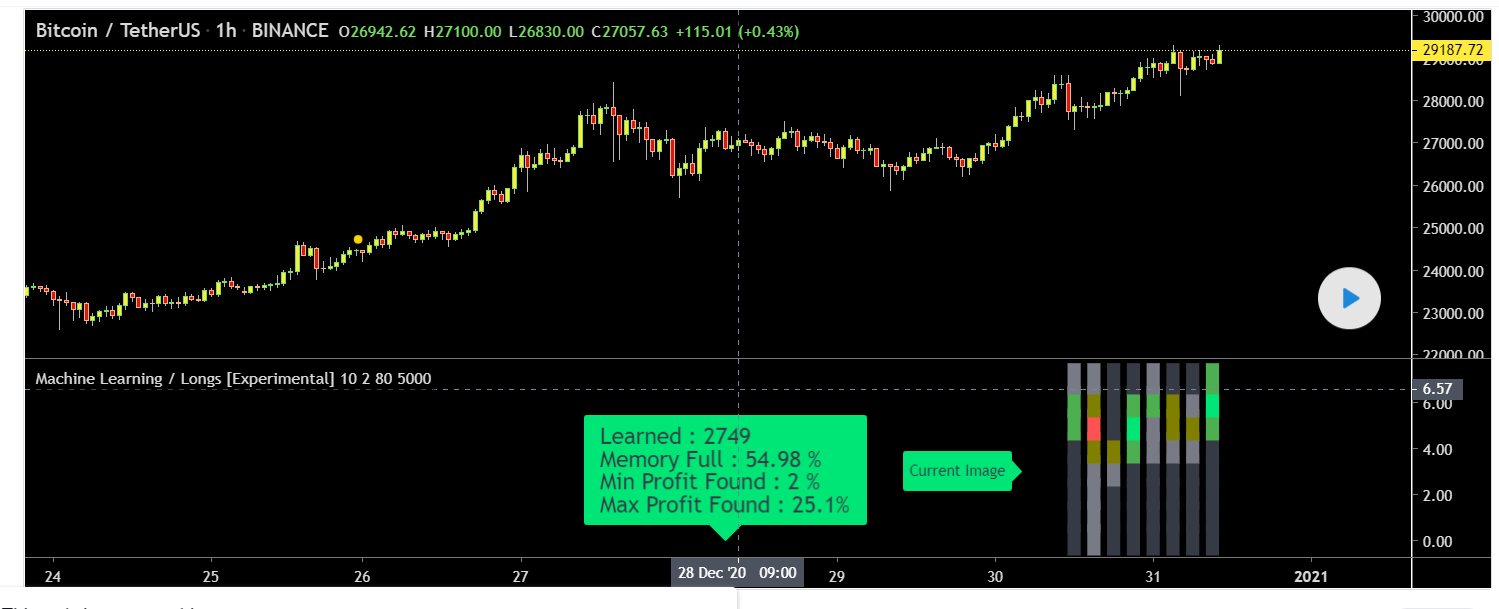
A ver si alguien es tan amable de pasar a PRT este indicador interesante basado en aprendizaje automático. Toda la información está en este enlace:
https://www.tradingview.com/script/YI9gYy82-Machine-Learning-Longs-Experimental/
El script solo funciona para posiciones largas. Ahora veamos cómo funciona: En cada vela crea una imagen de las últimas 8 velas. antes de crear la imagen, encuentra los niveles más alto / más bajo de 8 velas y crea una cadena con longitudes de 64 (8 * 8). Y para cada cuadrado, comprueba si contiene mecha, cuerpo verde o rojo, cuerpo verde o rojo con mechas. IMAGEN: Cada cuadrado obtiene el valor: 0: nada en él 1: solo mecha en ella 2: solo cuerpo rojo en él 3. solo cuerpo verde en él 4: cuerpo rojo y mecha en él 5: cuerpo verde y mecha en él Y luego verifica si el precio subió igual o más alto que el beneficio definido por el usuario. Si es así, agrega la imagen a la memoria / matriz. Y llamo a esta parte como parte de aprendizaje. si hay 1 o más elementos en la memoria, crea una imagen para las 8 velas actuales y verifica la memoria si hay imágenes similares. Si la imagen tiene una similitud más alta que el nivel de similitud definido por el usuario, entonces si muestra la etiqueta “Coincidido” y la tasa de similitud y la imagen en la memoria. si encuentra alguno con la tasa de similitud es igual / mayor que el nivel definido por el usuario, entonces deja de buscar más.
CÓDIGO:
// This source code is subject to the terms of the Mozilla Public License 2.0 at https://mozilla.org/MPL/2.0/
// © LonesomeTheBlue

//@version=4
study("Machine Learning / Longs [Experimental]", max_lines_count  = 150)
prd = input(defval = 10, title="Period", minval = 5, maxval = 30) // period: if there possible profit higher than user-defined minimum profit in that period, it checks 2 to X bars
minchange = input(defval = 2.0, title = "Min Profit", minval = 0.1, step = 0.1) / 100  // exptected minimum profit
simrate = input(defval = 80., title = "Similarity Rate", minval = 20., maxval = 99.) // minimum similarity, 80 or higher number would be better
maxarraysize = input(defval = 5000, title = "Max Memory Size", minval = 100, maxval = 10000) // how many images it will keep
changebarcol = input(defval = true, title = "Change Bar Color?")

// mamory to keep images
var longs = array.new_string(0)

// define dymamic image size
h_ = highest(8)
l_ = lowest(8)
cw = (h_ - l_) / 8

get_str_array(my_str)=>
    s1 = str.replace_all(my_str, "", ",")
    s_array = str.split(s1, ",")
    array.remove(s_array, array.indexof(s_array, ""))
    s_array

// is in channel
included(t1, t2, t3, t4)=> (t3 >= t1 and t3 <= t2) or
                           (t4 >= t1 and t4 <= t2) or
                           (t3 <= t1 and t4 >= t2)

// get part of the image, in this fuction we create filter for the square.
// normally we should use 4x4 or similar filters but the problem is we have a lot of different images. so we try to make it simplier
// Each square gets the value:
// 0: nothing in it
// 1: only wick in it
// 2: only red body in it
// 3. only green body in it
// 4: red body and wick in it
// 5: green body and wick in it
get_filter(t1, t2, j)=>
    btop = max(close[j], open[j])
    bbot = min(close[j], open[j])
    wick_included = included(t1, t2, btop, high[j]) or included(t1, t2, low[j], bbot)
    body_included = included(t1, t2, bbot, btop)
    col = close[j] >= open[j] ? 1 : 0
    chr = wick_included and body_included ? 4 + col : wick_included ? 1 : body_included ? 2 + col : 0
    tostring(chr)

// calculate the image, in this function we create filter for the image
create_filter()=>
    string img = ""
    b = l_
    t = l_ + cw
    for i = 0 to 7  // 8 * 8 matrix, we may get better results with more squares such 20x20 especially for the images in that we have long candles, but it's hard to get result in expected time
        for j = 0 to 7
            img := img + get_filter(b, t, j)
        b := b + cw
        t := t + cw

    img

// draw the image
draw_image(image, base)=>
    var imglinearray = array.new_line(64)
    for x = 0 to 63
        line.delete(array.get(imglinearray, x))

    img = get_str_array(image) //str.split(image, "")
    ind = 0
    for y = 0 to 7
        for x = 0 to 7
            i = array.get(img, ind)
            array.set(imglinearray, ind,
                      line.new(x1 = bar_index - x * 3 ,
                               y1 = y + base,
                               x2 = bar_index - x * 3 - 2,
                               y2 = y + base,
                               color = i == "2" ? color.red : i == "4" ? color.olive : i == "3" ? color.lime : i == "5" ? color.green : i == "1" ? color.gray : color.black, width = 25))
            ind := ind + 1

// get current image and draw it, here actually we create filter according to squares of the image
image = create_filter()
draw_image(image, 0)

// search the image in memory, in this function the filter created for current image is searhed in filters the momory
// the main issue is that we have a lot of images in the memory, but not a few images (like, a car image or apple image).
// so we created filter for all of them and we need to search all of them
search_image(image)=>
    img_array = get_str_array(image) // str.split(image, "")
    sim = 0.
    fimg = ""
    for i = 0 to array.size(longs) - 1
        limg_array = get_str_array(array.get(longs, i)) //str.split(array.get(longs, i), "")
        sim := 100.
        for j = 0 to 63
            // actually we need to use -1.5625 if the filter is not macthes, but the main issue we have a lot of images/filters in the memory. not only a few images
            sim := sim - (array.get(img_array, j) != array.get(limg_array, j) ? 1.5625 : 0)
            if sim < simrate
                break
        if sim >= simrate
            fimg := array.get(longs, i)
            break
    [sim, fimg]

// check if price incresed higher than user-defined profit in user-defined period
// if yes then this is a new image that we need to save, so we add this filter to the memory
var minprofit = 100.
var maxprofit = 0.
if maxarraysize > array.size(longs)
    for x = 2 to prd // there must be a candle for entry, so started from 2
        profit = (close - close[x]) / close[x]
        if profit >= minchange
            // we check if the price went below the lowest level of the image
            not_sl = true
            for y = 0 to x - 1
                if low[y] < l_
                    not_sl := false
            if not_sl and array.size(get_str_array(image)) == 64 and not array.includes(longs, image[x]) // array.size(str.split(image, "")) == 64
                minprofit := min(minprofit, profit)
                maxprofit := max(maxprofit, profit)
                array.unshift(longs, image[x])
                break

// search for current image/filter in the database if it matches
simm = 0.
fm = ""
if barstate.islast and array.size(longs)> 0
    [sim, fimg] = search_image(image)
    simm := sim
    fm := fimg

var label flabel = na
var label currentimagelab = label.new(bar_index - 30, 3, text = "Current Image", style = label.style_label_right, color = color.lime, textcolor = color.black)
label.set_x(currentimagelab, bar_index - 30)

// found an image with enough profit
if fm != ""
    label.delete(flabel)
    flabel := label.new(bar_index - 30, 18, text = "Matched " + tostring(simm, '#.##') + " %", style = label.style_label_right)
    draw_image(fm, 15)

var label infolab = label.new(bar_index - 75, 0, text = "", color = color.lime, textcolor = color.black, textalign = text.align_left, size = size.large)
label.set_text(infolab, "Learned : " + tostring(array.size(longs)) +
                       "\nMemory Full : " + tostring(100 * array.size(longs)/maxarraysize, '#.##') +
                       " %\nMin Profit Found : " + tostring(minprofit*100, '#.#') +
                       " %\nMax Profit Found : " + tostring(maxprofit*100, '#.#') + "%")

label.set_x(infolab, bar_index - 75)

barcolor(color = changebarcol and fm != "" ? color.white : na)