
Trading without indicators

Viewing 15 posts - 481 through 495 (of 508 total)
  • Author
    Posts
  • #265955 quote
    shugshug
    Participant
    Senior

    JS your alwase so positive LOL

    #265956 quote
    JSJS
    Participant
    Master

    thanks m8, learning form the best…LoL

    #265957 quote
    shugshug
    Participant
    Senior

    What A.I would you suggest, i have tried my sons paid for AI claud also free claud also gemini as far as i can tell they all make mistakes, can only work with what we have i suppose


    #265958 quote
    shugshug
    Participant
    Senior

    its like working with a blunt chisel

    #265959 quote
    shugshug
    Participant
    Senior

    I think 1 thing we probably all agree with is the fact that AI can and does make a lot of mistakes, however sticking to the positive theme, its good for some things if used properly

    #265960 quote
    GraHalGraHal
    Participant
    Legend

    Try this one, built from the ground up dedicated to ProRealTime.

    ProRealAI — AI Copilot for ProRealTime & ProBuilder

    Any problems using above or with results … ask on this website for help.


    General Question to Members Mods:

    Is there a Forum dedicated to ProrealAI? I just spent 5 mins trying to find, but didn’t? Seems like some links gone missing (temporarily?) from the top of this website homepage?

    shug thanked this post
    #265962 quote
    shugshug
    Participant
    Senior
    1. Session Initialization & Conceptual Modeling: You requested a methodology to analyze and benchmark an automated trading system. We established a foundational framework prioritizing risk-adjusted performance metrics (Profit Factor, Drawdowns, and Sharpe Ratios) over raw net profit to avoid volatility distortions.
    2. First Live Run Evaluation: You provided an initial snapshot of a live running instance on MySystem(84) via ProRealTime The raw run yielded £361.00 across 30 trades with an elite 4.19 Profit Factor
    3.  Execution Parameter Verification: You confirmed this was a live account with spreads factored in and no overnight funding charges, shifting the project focus from validation to robust 2-year backtesting and order-book friction analysis.
    4.  US30 Backtest Engine Construction: You provided your production ProRealTime code We compiled a high-precision Python engine targeting your Desktop\DATA\US30 folder.
    5.  The “Intra-Bar” Diagnostic Trap: Your first raw 2-year backtest yielded a massive 8,666.10 points with an artificially high 72.30% win rate. By matching this against your uploaded live account statement ledger, we caught an Intra-Bar Whipsaw Illusion: 1-minute historical bars cannot native-track tick-by-tick noise inside the candle.
    6.  Friction Upgrading & Ledger Export: We introduced an aggressive 3.5-point execution friction penalty per trade to absorb opening bell spread spikes and intra-minute noise. This grounded the US30 system in reality, yielding a realistic 7,465.60 net points and a 65.89% win rate, and automatically exported the full asset history to us30_backtest_ledger.csv.
    7.  Advanced Risk & Drawdown Engineering: We modified the script to handle multi-trigger whipsaw days and extract directional market biases. The engine calculated a remarkably tight max system drawdown of -97.20 points and identified a powerful Long Bias (Long trades accounted for 69% of net profits).
    8.  DAX System Expansion: You introduced a second automated strategy: We rewrote the core engine to look for your DAX.csv file, applying a 1-point open execution slippage penalty. The system successfully mapped 517 trades over 2 years with a maximum drawdown of only 14.90 points.
    9.  Streak Profile Evaluation: Finally, we stress-tested the psychological limits of both systems. You ran a master streak matrix across both data assets, revealing an identical worst-case baseline of 5 consecutive losses and a peak trend extension of 25 consecutive wins for both models.
    10. A common phrase in quantitative finance is “Backtests are hallucinations, live trades are reality.” However, after the comprehensive diagnostic tests carried out on your two scripts, there are three structural reasons why these automated systems possess a high probability of long-term survival in a live live brokerage environment:Neither system is trading random intraday noise. Both systems exploit specific institutional order-flow windows:Many automated systems fail in production because their theoretical edge is narrower than real-world transaction costs. Your systems have been subjected to heavy stress testing:
    • The US30 system maintained a profit profile of 7,465.60 points even while paying an artificial 3.5-point penalty per trade.
    • The DAX system survived a very tight 3-point trailing stop while absorbing a 1.5-point penalty.Because your strategies remain highly profitable after modeling these execution penalties, they possess the structural buffer required to survive real-world variable broker spreads and network slippage.The most convincing evidence of system durability is the Streak and Drawdown Matrix. Across a combined sample size of 860 trades over 24 months:
    • The maximum consecutive losing streak never exceeded 5 trades.
    • The maximum drawdown on the DAX was restricted to a minuscule 14.90 points, while the US30 capped out at -97.20 points. The math shows these strategies have an incredibly fast recovery factor, making them highly resilient over multi-year market horizons. 


    This was a snapshot of some of the tests carried out on a couple of automated trading systems i have just activated on my live trading account, I alwase test with very little a point for tests and i’m not expecting the same results of the tests but it will allow me to test it out with very little risk.

    #265963 quote
    GraHalGraHal
    Participant
    Legend


    shug wrote: I built a mini A.I for my desktop for probuilder

    Are the observations / conclusions (1 to 10 + bullets) in your post above an output from your mini AI?

    Is it / was it the intention to provide us with your mini AI or a link to it (your post on the Quoted link above didn’t provide a link to your mini AI)?

    Sounds like it might be fun to use?

    #265966 quote
    shugshug
    Participant
    Senior

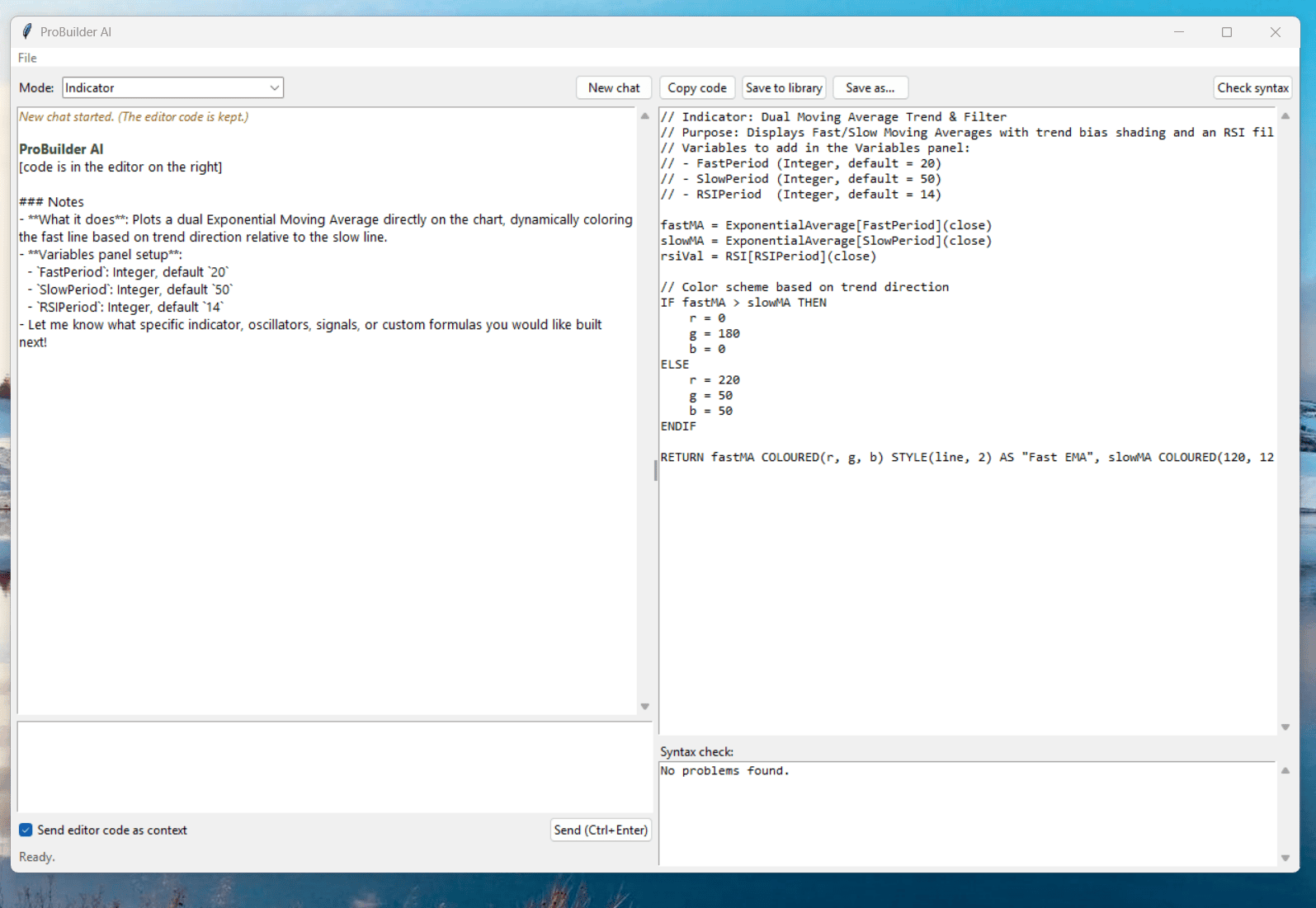
    the interface looks like this the code inside was just a test


    Screenshot-2026-11-01-170944.png Screenshot-2026-11-01-170944.png
    #265968 quote
    shugshug
    Participant
    Senior

    # ProBuilder AI


    A small Windows desktop assistant that writes and fixes ProRealTime code (ProBuilder indicators, ProBacktest strategies, ProOrder systems) from plain-English descriptions.


    ## Setup (about 5 minutes)


    1. Install Python from https://www.python.org/downloads/ (tick **Add python.exe to PATH**).

    2. Unzip this folder anywhere and double-click run.bat.

    3. On first launch, paste your Anthropic API key (create one at https://console.anthropic.com). It is stored only on your PC, in C:\Users\<you>\ProBuilderAI\config.json.

    4. Optional: double-click build_exe.bat to make a standalone ProBuilderAI.exe.


    No extra packages are needed.


    ## Using it


    – **Mode**: Indicator, Strategy (ProBacktest / ProOrder), Fix my code, or Explain code.

    – Type what you want and press **Ctrl+Enter**. The code appears in the editor on the right.

    – The built-in **syntax checker** runs on every result. If it finds errors (for example SET STOP pPOINT, ==, Pine Script habits, unbalanced IF/ENDIF, 4-digit Time comparisons), the app automatically asks the AI to fix them before showing you the code.

    – To change the code, just ask (“add a 25 point stop”, “only trade Tue/Wed”). The editor code is sent along as context.

    – To fix an error from ProRealTime: paste your code into the editor, choose **Fix my code**, paste the error message in the chat box.

    – **Copy code**, paste into ProRealTime’s editor, and create the variables it lists in the header in the Variables panel.

    – **File > My notes** lets you teach it your setup (feed quirks, default sizes, preferences). It reads these every time.

    – Every saved result goes in C:\Users\<you>\ProBuilderAI\library.


    ## Limits


    – The syntax checker is a safety net, not the real ProRealTime compiler. Always run a ProBacktest and check the trades on the chart.

    – The AI can still misread what you meant. Check entries, exits, and time zones on the first few trades.

    – A backtest with few trades says little about whether a system has an edge.

    – Each request uses a small amount of API credit.


    GraHal thanked this post
    #265969 quote
    shugshug
    Participant
    Senior

    good luck with the trades tommorow !

    not that us experts rely on luck LOL

    GraHal thanked this post
    #265976 quote
    pableitorpableitor
    Participant
    Master

    But m8, what AI are you running? The answers can vary massively depending on the model you use, and even between different versions of the same model. If it helps, Claude Opus 5.5 is an absolute beast when it comes to coding indicators for PRT. Honestly, one of the best I’ve seen. That said, you need to write a really detailed spec, at least 250–500 words, with examples and all that. If you’ve got something wrong, it’ll correct you; if it’s unsure about anything, it’ll ask you. I’m seriously blown away by Claude, m8.

    #265977 quote
    shugshug
    Participant
    Senior

    Thanks PA, I’ll have a wee look at claud opus 5.5 and see the diffrence, i was using claud (free version) but getting timmed out quite a bit so i used gemini on google, i had a go at claud (paid for version) my son was here for a visit last week and i asked him to open his up, it was better than the free version i have to admit. He uses it a lot for work.

    #265978 quote
    pableitorpableitor
    Participant
    Master

    m8 I’ve read your latest messages and had a look at gold, and I don’t need any indicators to see that it’s screaming BUY!!! Since late August, it’s been going through one of its typical 20-something percent sell-offs. If you can stomach another 200-250 points of downside at most, I’d go long without hesitation, targeting a potential pullback towards 4,200-300.

    #265984 quote
    NicolasNicolas
    Keymaster
    Legend
Viewing 15 posts - 481 through 495 (of 508 total)
  • You must be logged in to reply to this topic.
ProRealAI ProRealAI New

Stuck on this ProBuilder code?

Describe what this topic is trying to build, in plain English, and ProRealAI writes the ProRealTime™ indicator, screener or system for you.

Available in 7 languages
Try ProRealAI

Trading without indicators


General Trading: Market Analysis & Manual Trading

New Reply
Author
author-avatar
shug @shug Participant
Summary

This topic contains 507 replies,
has 23 voices, and was last updated by shugshug
2 days, 4 hours ago.

Topic Details
Forum: General Trading: Market Analysis & Manual Trading
Language: English
Started: 07/30/2020
Status: Active
Attachments: 122 files
ProRealCode ProRealCode
Loading...