 NDT
NDTParticipant
Junior
Hi All,
I’ve been messin around with Trading View for quiet some time, but I’m coming back to Prorealtime as it’s just, well – better!
The question I have is I’ve built a strategy using Trading Views language which is called “Pine” but does anyone have any experience in converting this language into ProRealTime?
happily share the code with you all of it helps, just wanted to check if it’s pissible first without wasting anyone’s time.
Thanks in advanced ☺️
If you have written this strategy and know exactly what it does, it should be possible to rebuild it in probuilder. Can you describe the entry and exit rules?
I’m used to convert PineScript into ProRealTime, share the code here and it should be no complicated to be translated.
Next time use the form from this page to request for a code conversion: Ask for a free code conversion
NDTParticipant
Junior
Hi Both,
Thank you so much for your replies. 🙂
Please find below the code followed by a brief over view:
//@version=3
strategy("Refined CandleCounter Strategy by Matthew", overlay=true)
stoploss = input(title="Stop Loss", type=integer, defval=0) //Stop loss input - default value 0 - 0 means disabled.
takeprofit = input(title="Take profit", type=integer, defval=0) //Take profit input - default value 0 - 0 means disabled.

// how many candles to count
NUM_CANDLES = 7

// determine candle direction
candle_dir = close > open ? 1 : (round(close-open) == 0 ? 0 : -1)

// return # of candles with a given direction
count_candles(dir, max) =>
    count = 0
    for i = 0 to max
        if candle_dir[i] == dir
            count := count + 1
    count

ups = count_candles(1, NUM_CANDLES)
dns = count_candles(-1, NUM_CANDLES)
neu = count_candles(0, NUM_CANDLES)

indic = ups-dns


if indic > 0
    indic := indic+neu
else
    indic := indic-neu

plotarrow(neu, title="UP vs DN")

longCondition = (indic) > 0
shortCondition = (indic) <= 0

strategy.entry("buy", strategy.long, 1, when = longCondition and not shortCondition)
strategy.entry("sell", strategy.short, 1, when = shortCondition and not longCondition)

if takeprofit > 0
    strategy.exit("takeprofit",qty=1, profit=takeprofit)

if stoploss > 0
    strategy.exit("stoploss",qty=1, loss=stoploss)
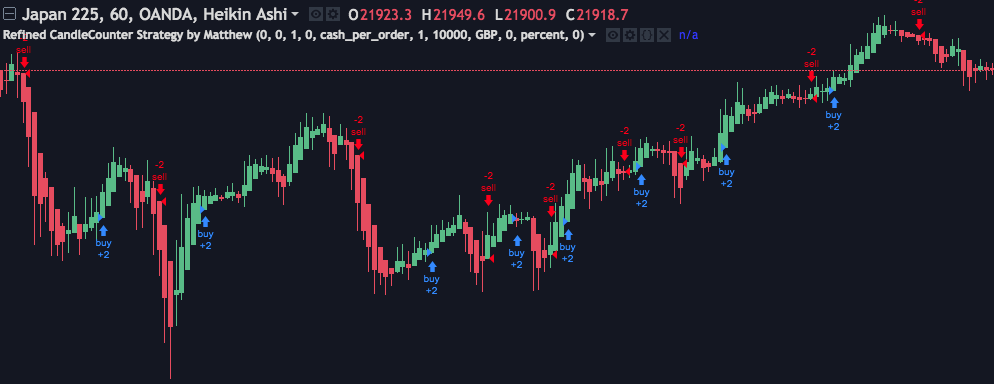
This system basically counts Heikin Ashi Candles and enters after the number of candles has been met and colour has been met- long or short. Unfortunately I don’t have any screen shots of it working on Pro Real Time, but I do on trading view which is attached below in a screen shot.
I’m really grateful for you responses so I hope you can help me 🙂
Best wishes
Matthew
Not tested a lot, I let you make your own investigations if it works like the way it should and like it does in tradingview:
defparam cumulateorders=false

stoploss = 0//Stop loss input - default value 0 - 0 means disabled.
takeprofit = 0 //Take profit input - default value 0 - 0 means disabled.

// how many candles to count
NUMCANDLES = 7

//heiken ashi candlesticks definition
haclose=(open+close+low+high)/4
haopen=(haopen[1]+haclose[1])/2

ups=0
dns=0
neu=0
for i = 0 to NUMCANDLES do
if haclose[i]>haopen[i] then
ups=ups+1
elsif haclose[i]=haopen[i] then
neu=neu+1
else
dns=dns+1
endif
next

indic = ups-dns

longCondition = (indic) > 0
shortCondition = (indic) <= 0

if not longonmarket and longcondition and not shortcondition then
buy 1 contract at market
endif

if not shortonmarket and shortcondition and not longcondition then
sellshort 1 contract at market
endif

if takeprofit>0 then
set target pprofit takeprofit
endif
if stoploss>0 then
set stop ploss stoploss
endif
NDTParticipant
Junior
Nicholas, thank you so, so much! I’m so grateful for that! I’ll let you know how I get on. 🙂
Is there anyone on this forum who can convert Prorealtime into MT4? Any introductions would be gratefully received. 🙂
Thank you again Nicholas.
This website is dedicated to prorealtime programming only. But you can also send private job query with the form in this page: Programming services
NDTParticipant
Junior
Thank you again for pointing me in the right direction for programming services.
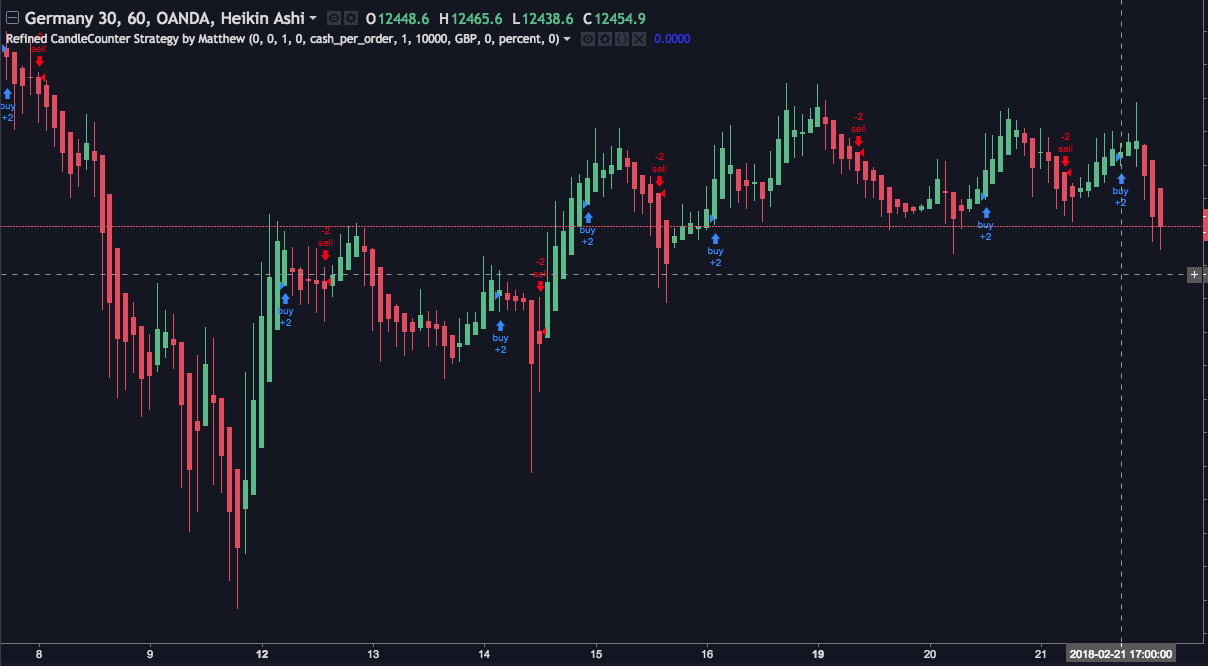
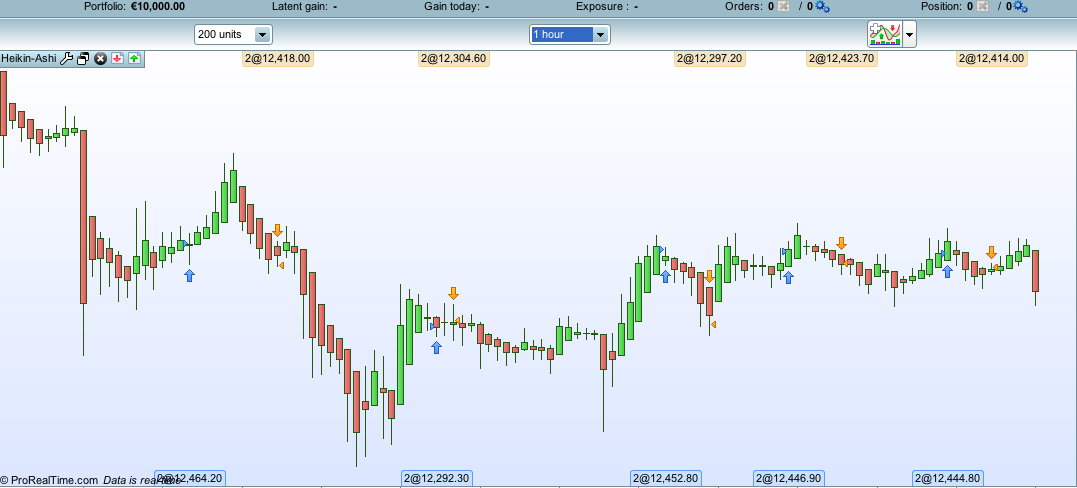
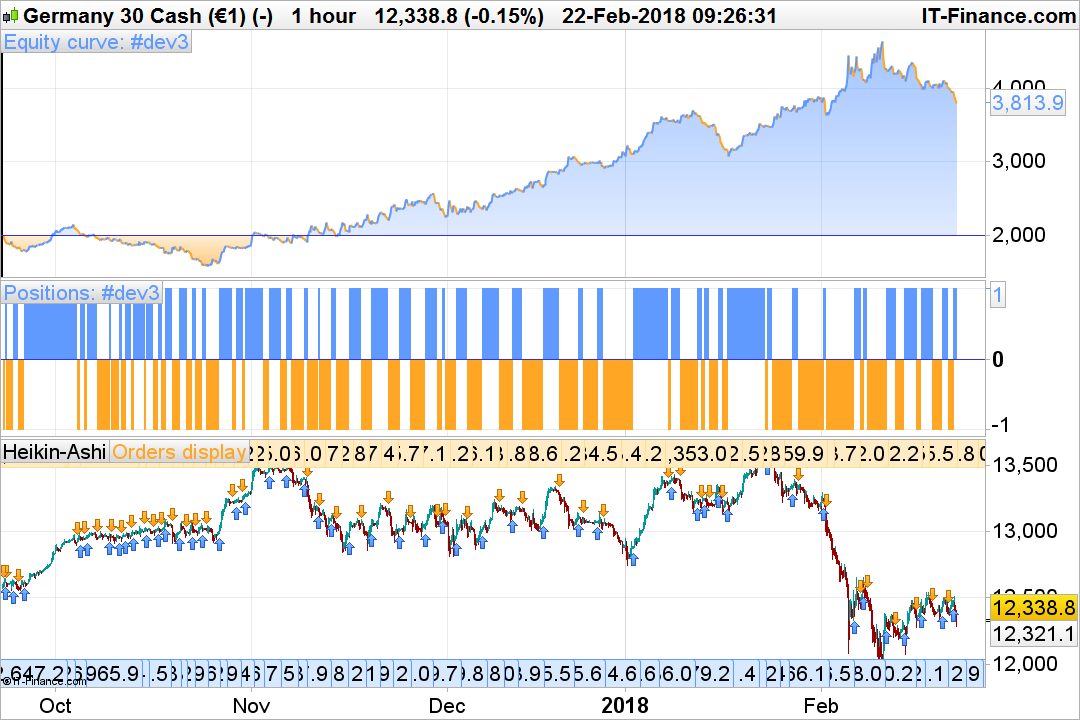
I’ve run some quick tests on the conversion code from trading view to Pro Real Time, and it looks like the entry and exit points are slightly slower than that when applied on trading view, perhaps 2-3 hours late. Here are some screen shots; All on the DAX (GERMANY 30) on the one hour time frame.
Trading View:
[attachment file=63456]
ProRealTime
[attachment file=63457]
I’ve adjusted and tested some inputs but it either returns a N/A backtest result or I get a lot of sintax errors. The results are still great with no adjustment! But I just can’t seem to get the system to exactly mirror what appears on trading view as it would seem that it’s entering trades too late.
I’m sure it’s something simple but I can’t see what’s wrong….
Thanks again for all your help so far. 🙂
Matthew
Sorry, I think I know why, I omitted a statement of the original code, here is the correct code:
defparam cumulateorders=false

stoploss = 0//Stop loss input - default value 0 - 0 means disabled.
takeprofit = 0 //Take profit input - default value 0 - 0 means disabled.

// how many candles to count
NUMCANDLES = 7

//heiken ashi candlesticks definition
haclose=(open+close+low+high)/4
haopen=(haopen[1]+haclose[1])/2

ups=0
dns=0
neu=0
for i = 0 to NUMCANDLES do
if haclose[i]>haopen[i] then
ups=ups+1
elsif haclose[i]=haopen[i] then
neu=neu+1
else
dns=dns+1
endif
next

indic = ups-dns

if indic > 0 then
indic = indic+neu
else
indic = indic-neu
endif

longCondition = (indic) > 0
shortCondition = (indic) <= 0

if not longonmarket and longcondition and not shortcondition then
buy 1 contract at market
endif

if not shortonmarket and shortcondition and not longcondition then
sellshort 1 contract at market
endif

if takeprofit>0 then
set target pprofit takeprofit
endif
if stoploss>0 then
set stop ploss stoploss
endif
Bear in mind, that orders are always put on market at next open, that’s why you’ll see a 1 period delay on the price chart. It is a simple strategy but has the merit of being quite correct, it could be refined with the usual bells and whistles, trailing stop, breakeven, money management, etc.
NDTParticipant
Junior
Awesome, thank you so much!
You don’t need to apologies, 🙂 you’ve helped me out so much already, so thank you 🙂
I’ll report back and give you a shout if I need any further assistance.
Matthew