The same Code doing different things

Viewing 3 posts - 16 through 18 (of 18 total)
  • Author
    Posts
  • #157866 quote
    PeterSt
    Participant
    Master

    Nicolas – again thank you for your help.

    All graphing is done by the Backtest program. No indicators (graphing) of either in Backtest or in Paper running same program.
    Example of a Graph command :

    If Graph1 then
    graph (((Gain))) Coloured (128,255,128, 255) as "Gain"   // 02-05-2018,PS. 05-01-2020,PS, ((( for easy replacing the active ones.
    //// SOFT-GREEN (was WHITE, 255,255,255).
    endif

    The comment you see tells about me needing to comment-out the Graph commands for the Live/Paper environment, because they are not allowed there.


    MODERATORS EDIT: Image deleted. Do not insert images into your posts as previously requested.


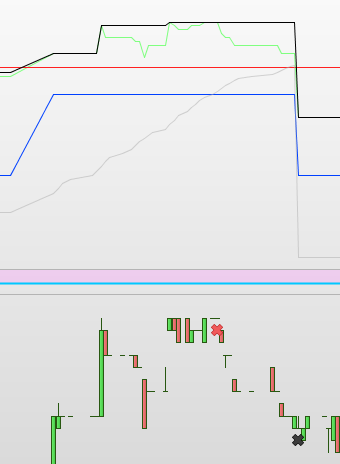
    The black line is unimportant for this issue. But it would indicate maximum gain that occurred during this order (not taken).

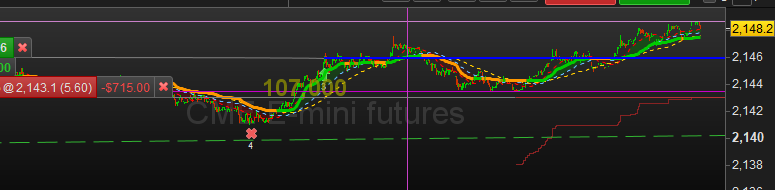
    The Grey line is a Trailing line similar to how PRT would show *and* use it (see red line in the 2nd attachment and more explanation below).

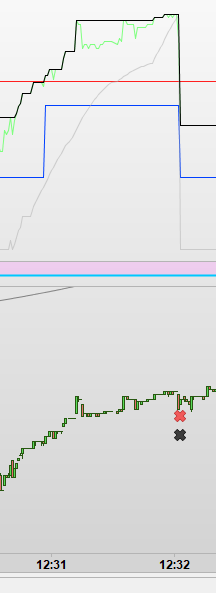
    The Green line is the current Gain in “net” (netto) sense. It includes perceived Commission and perceived Spread. When the Grey line crosses over the Green line, the order will Exit. Difference with the normal PRT Trailing, is that this one can be made as “intelligent” as I am myself (which is limited). The intelligence is there to maximise profit per trade. All sorts of shapes can come from this (and you have seen a few by now). For fun, in the 3rd attachment quite a different shape, from the same “run”.

    All lines fall to a virtual zero when the order Exits.

    Before you ask, the Blue line is “up” when the order is allowed to Exit (take its gain).

    Kind regards,
    Peter

    image_2021-01-14_170301.png image_2021-01-14_170301.png image_2021-01-14_171357.png image_2021-01-14_171357.png image_2021-01-14_172258.png image_2021-01-14_172258.png
    #157941 quote
    Nicolas
    Keymaster
    Master

    When the Grey line crosses over the Green line, the order will Exit.

    Please give infos on how you calculate those lines.

    Grey line is a Trailing line

    Of what price? you are trailing what exactly?

    Green line is the current Gain in “net” (netto) sense. It includes perceived Commission and perceived Spread.

    You can’t get exactly what is the value of it as the broker doesn’t send that information.

    #166713 quote
    s00071609
    Participant
    Senior

    I am seeing similar issue – Same code – trade placed at same candle. In live trade it closed partial position, while in running backtest, it did not. As per the code backtest is supposed to be correct, see below code snippet used for partial exit,

    Obviously, I wanted it to exit only if 1 hr candle closes under the hourly supertred. It closed it on spike below supertrend. This should not occur as per the code.

    Timeframe (1 hour, updateonclose)
    GoBuy1HC, GoSe1HC, QMPTrend1HC, iLow1HC, iHigh1HC = CALL "QMP_Return"(close)
    HourlyCLose=Close
    Hrsupertrend, trendHr= Call "SupertrendStop"[3,10]
    HourlySuper=Supertrend
    STUExitCondition= HourlyCLose crosses under (HourlySuper-4*pipsize)

    Here is the real trade (still open with partial exit) and backtest on same spot, same code,

    https://www.evernote.com/l/ApVhHfQ4w9xFwYfJseFy4Rm8Z-_gG2bwZz0/

Viewing 3 posts - 16 through 18 (of 18 total)
  • You must be logged in to reply to this topic.

The same Code doing different things


ProOrder: Automated Strategies & Backtesting

New Reply
Author
author-avatar
PeterSt @peterst Participant
Summary

This topic contains 17 replies,
has 4 voices, and was last updated by s00071609

4 years, 10 months ago.

Topic Details
Forum: ProOrder: Automated Strategies & Backtesting
Language: English
Started: 01/14/2021
Status: Active
Attachments: 20 files
Logo Logo
Loading...