Test input conditions in the optimizer

Viewing 6 posts - 16 through 21 (of 21 total)
  • Author
    Posts
  • #176195 quote
    phoentzs
    Participant
    Master

    Ok, I’ll give it a try this way. Thanks. Does the wave diver still work? I haven’t tried it in a while.

    #176197 quote
    robertogozzi
    Moderator
    Master

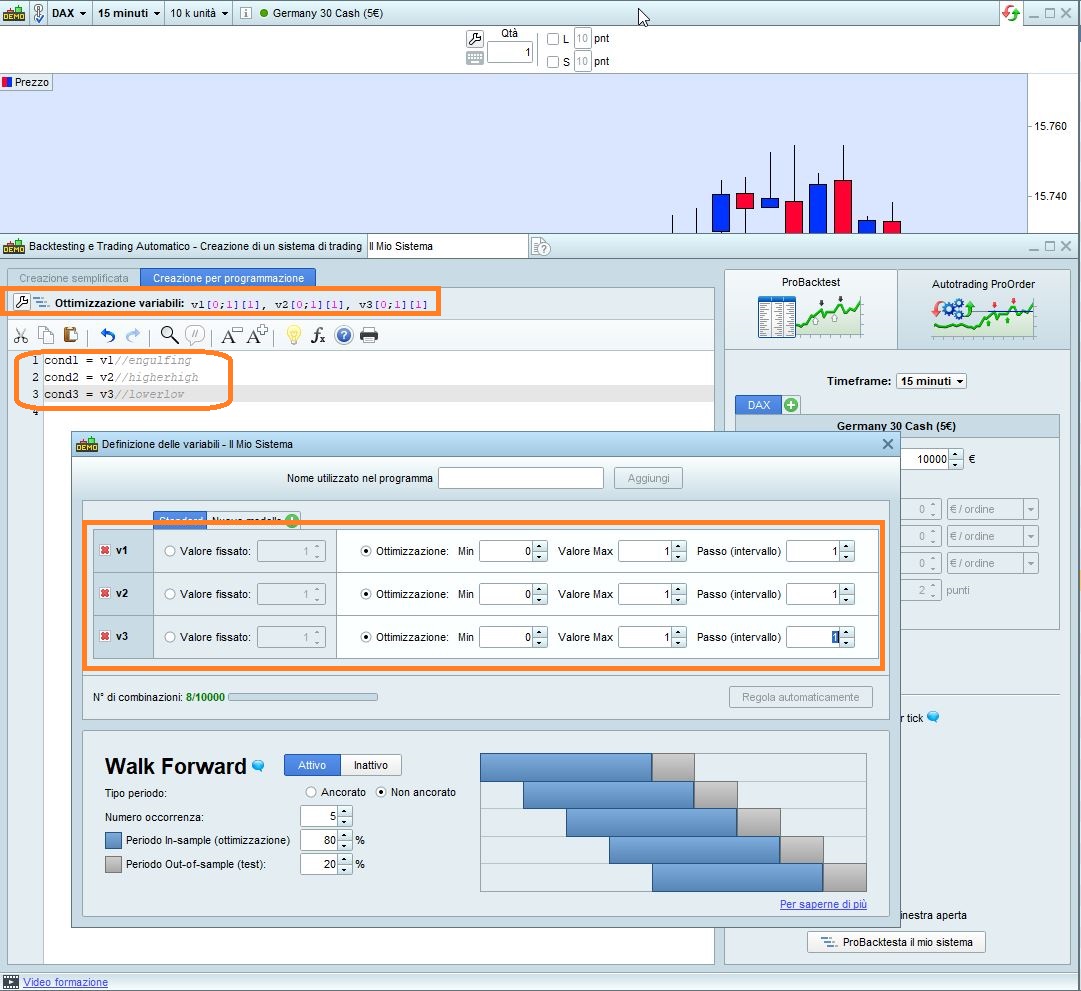
    Do as shown in my pic.

    But optimizing conditions doesn’t make sense, as they are logical (boolean) values returned when conditions are met or not met, you can’t change the returned value for:

    c1 = close CROSSES OVER Average[20,0](close)

    this way (setting start=0, end=1 and step 1), it simply can’t work as the optimizer tells you (which one is the best, 0 or 1?):

    c1 = v1//close CROSSES OVER Average[20,0](close)

    rather, you can optimize 20 (the number pf periods) and 0 (the type of MA) because they are values of your choice that you want to optimize to make crossovers being tested differently each time, but when a crossover occurs…. it simply occurs even if the optimizer tells you that it would be better not to!

    As to the above example, simply run the optimizer 3 times, commenting out two of the three lines at at a time to see what results any one of those conditions yields.

    #176496 quote
    Swingueur
    Participant
    Average

    Hello,

    To illustrate my previous messages with concrete example, here is a strategy that was recently published, with different conditions.

    https://www.prorealcode.com/prorealtime-trading-strategies/3-lines-break-reversal-strategy-on-trending-stocks/

    The variable strategy is fixed to 2 in the code, but you can delete it and transform it into an optimization variable to make it vary and test several conditions in the same system.


    @nonetheless
    don’t be freaked out, this is my very first code published, lol!

    #176504 quote
    nonetheless
    Participant
    Master

    this is my very first code published

    I’m sure it’s wonderful, but what instrument do you run it on – equities?

    #176510 quote
    Swingueur
    Participant
    Average

    yes, equities on a daily timeframe

    nonetheless thanked this post
    #192419 quote
    SkippyTrader
    Participant
    New

    how can I code that so that it can be used in the optimiser?

    Currently the way i do that is select two variables for each condition in the optimiser, one would turn-it on, and another one that is just so extreme that it would actually never trigger that indicator or that makes it always true – so its like the way to enter / omit each different condition or indicator from your strategy in a back test to optimise what ones (or combination of indicators) works best,

    for example:

    Cond1 = (ADX[14] >= NUM1) // [min 19, max 200, step181]
    Cond2 = Average[20](close) > Average[NUM2](close) // [min50, max100050, step 1000000], 
    
    set stop %loss NUM3 // [min 2, max 110, step 108],


    Another thing i’ve tried to do is to do loops like below, which seems to work with certain conditions BUT i think i’m still getting errors with some conditions. For conditions ive coded myself it works wonderfully, same results as if i inout or delete that conditions from my BUY conditions myself one by one.  But it appears the in-built indicators within PRT is where the errors occur. Probably due to the type of variable’s or something in the blackbox algorithms  ? So would like to figure out how to improve this approach to optimisation:

    ONCE Cond1 = 0  // 1=enable,  0=disable
    ONCE Cond2 = 0     
    ONCE Cond3 = 0
    ONCE Cond4 = 0  
     
    IF ADX >= 20 THEN
    Cond1 = NUM1 // Optimising conditions for NUM1 = min:0, max: 1, steps 1; 0 disables and 1 turns on this condition
    Elsif  ADX <20 THEN 
    Cond1 = 0 // Return to 0 once condition no more.
    
    IF average[20](close) > average[50](close) THEN
    Cond2 = NUM2 // NUM2  = min:0, max: 1, steps 1
    Elsif  average[20](close) <= average[50](close) THEN
    Cond2 = 0
    
    IF STRONGUPRANGE THEN
    Cond3 = NUM3 // NUM3  = min:0, max: 1, steps 1
    Elsif NOT STRONGUPRANGE THEN
    Cond3 = 0
    
    IF WEAKUP THEN
    Cond4 = NUM4 // NUM4 = min:0, max: 1, steps 1
    Elsif NOT WEAKUP THEN
    Cond4 = 0
    
    /// etc....., and i just continue with as many loops as you want, for every indicator or condition that i want to test, for every sell condtions eg. trailing, stoplose, PSAR trailing, etc..

    and leave it to run overnight.

    By the way Ive tried it before but the PRT program has always closed down before i wake up and lost all the information too. It is as if it has a kill switch at like 5am every day or something?. Any suggestions how to force it to stay open overnight whilst i sleep?

    phoentzs thanked this post
Viewing 6 posts - 16 through 21 (of 21 total)
  • You must be logged in to reply to this topic.

Test input conditions in the optimizer


ProOrder: Automated Strategies & Backtesting

New Reply
Author
author-avatar
phoentzs @phoentzs Participant
Summary

This topic contains 20 replies,
has 6 voices, and was last updated by SkippyTrader

3 years, 9 months ago.

Topic Details
Forum: ProOrder: Automated Strategies & Backtesting
Language: English
Started: 08/24/2021
Status: Active
Attachments: 1 files
Logo Logo
Loading...