All right. I know you did not refer to this text below. But I think it helps me :
Please can any users of V12 tell me if it is possible to filter / show performance per week / per day of running Systems? (An easy quick way I mean … not by opening each separate System Detailed Report.)
I emphasized “running”.
No, I don’t see how that is possible.
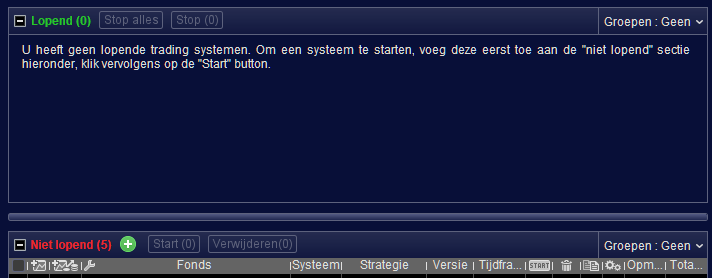
When you’d include the not-anymore-running systems, this thus is possible (per the situation with the green screens I showed, which situation you showed too – I think). To end this endeavour, that was the screen you see below. Thus, per time period (controlled by that widget) and for all AutoTrading systems only BUT also the old ones, not running.
So it goes wrong for you with the latter.
GraHal would like to have a Statistics form with besides the drop down “All Trading” which currently has in there the existing option “Auto Trading” – the sub option to that “Auto Trading Currently Running Systems” (hence a checkbox).
If you put it like that, everybody would immediately know what to add to the Statistics forms (possibly all of then and there are quite many) and it would even lead to a doable (SQL) query.
I myself – for myself – would like to add :
And allow for a wildcard filter on the AutoTrading System Name.
I would untick the mentioned checkbox which would allow me to observe the results of past AutoTrading Systems, which currently vanish into deep space when I once again have to clean the ProOrder form from Not Running systems (because of a lack of space – max 150 IIRC).
My strong desire expressed in as few words as possible? 🙂
I want to sort (using Gain column) running Systems by highest Gain this week.
To achieve the above, I need a period button in order to select current week.
A picture is worth a 1000 words. But not this time !
🙂
No, I never understood that.
Anyway, no, really not. Nothing changed in there that I can see.
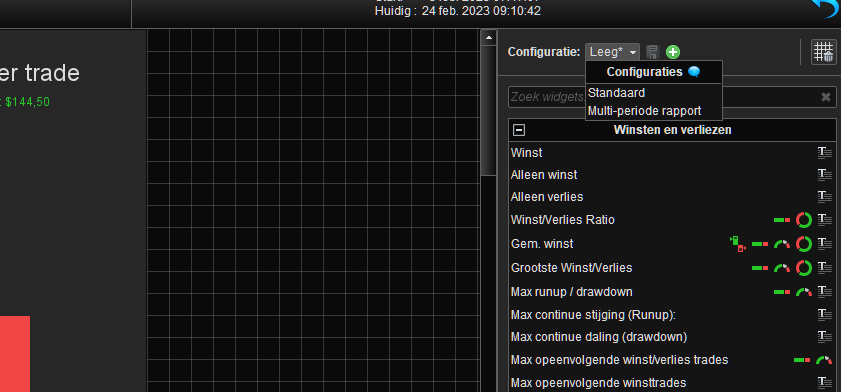
In the first pic you see that this instance of the Statistics form does not show saved configurations.
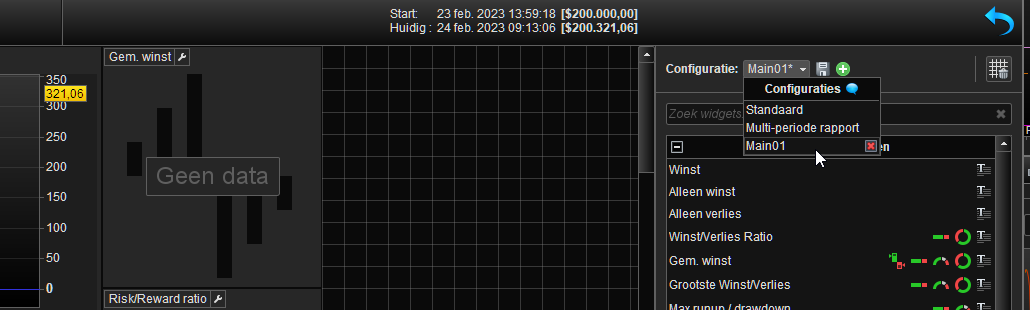
In the 2nd pic you see that that instance of the Statistics form
does shows saved configurations.
These are two instances of the Statistics form of which a virtual countless exist. Each month I seem to be able to find a new one. But let’s stick to 5 to be “normal”. Now :
None of these 5 is able to get the Configuration from each of the others. Thus, I create a nice layout, takes an hour or so, save it, and it can’t be used elsewhere. Thus, I run into one of the others, want to see exactly the same, have to make the same adjustments (put the other one forward in edit mode so I can see what I did), spend another 30 minutes, save the Config in there for at least the reason I lose the layout – which happens more than often, and again can’t re-use that elsewhere. 3 more to go (that is
at least). So, this took me a nice 3 hours of my time.
Do I want to change something ? then I obviously need to change that 5 times. Small problem : where the heck are the other 4, or were it 7 ?
I suppose it is two years ago by now that I filed a ticket for this. I suppose it is way too difficult for people somewhere in France to a. come up with this themselves, and b. to improves this for a good reason. Especially when we take this into
account (;-) ):
- I have 5 accounts with luckily only one sponsored IG account.
- 4 of these accounts also have a Paper account – for IG this is Demo.
I counted 10 environments where I need to do the same everywhere. What was that by the way ? ah, right, spend 3 hours to configure some Statistics forms.
I think this comes down to 10 x 5 = 50 of these configurations; that is 49 x 30 minutes plus the initial one = 25.5 hours.
Maybe in V12 this can be exported and imported (because V12 contains more of these things). Of course this V12 environment must have its example first.
The totally annoying part is not that this needs to be done, no, the annoying part is that this configuration is saved and sits somewhere unusable. Maybe even more annoying is that no matter it is filed as an “issue” 2 years ago, it is at least more important than developing V12 with in there … I don’t know. So let’s say that I am waiting to be debunked because this was solved in V12.
As a separate annoying explicit subject, it is more than annoying that the most simple stuff – officially put to Paris – is just never solved. It would take 5 minutes for myself to make the software adjustment and all, but in Paris just nothing ever happens. One example out of countless (not costing much time and not endangering the financial working of PRT) :
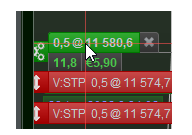
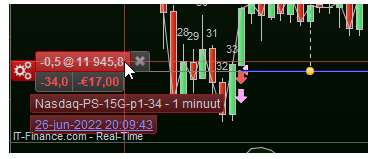
The z-order of the order labels being upside down. Thus, when hovering the labels the System name shows, but it shows under the labels of other orders close to it. So you can’t see which System it is making the profit or loss etc. It is just impossible (scrolling or zooming does not help, obtaining a huge monitor put on its side (1m20 of height) does help – and I really do that now as a kind of pathetic solution).
1st pic shows what shows. 2nd pic shows what should show (the System name).
Do I want to change something ? then I obviously need to change that 5 times.
I agree! I got excited (good at my age! 😉 ) when the user-configurable Stats Dashboard was introduced.
I did one to perfection, took me ages! Like you, I have several Accounts and so to do the same separately on all Accounts … life’s too short, so I gave up!
For maybe 2 years now I’ve had a mish-mash of Stats Dashboard configurations across several Accounts and so a great idea quickly died a death in my eyes / usage due to ‘PRT
user not-friendly / not-export-import across Accounts’.
Even the PRT native / default layout has to be either re-configured else I have to scroll side/ up / down as the default Stats Dashboad fills about 1.5 screens, even on my 28-inch monitor!
Instead of ‘bells & whistles’ on v12, I would prefer if basic essential annoying functions are fixed, but they remain unfixed version after version (we have been asking / Suggesting for years!) 🙁
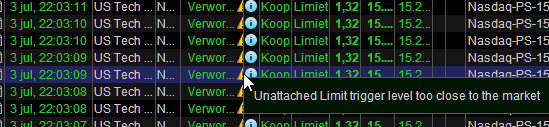
Long time. But here’s I think) a new one. Mind you, this is for Entry. So is this now the proof that something really s*cks in there ? So what do you mean “Limit (trigger) level too close to the market” ?
The novelty of this one could be that the real (Future/Index) markets were closed long gone (19:15 Amsterdam) while this occurs just after 22:00 which would be stock markets closing time (which closed at 19:00). I guess IG is hiring …
Yesterday was a public holiday in the USA?
occurs just after 22:00
My guess is that is an easy way for IG to prevent trades being opened during out of market hours?
I have long been curious … has anybody had a trade opened or closed at a price (very much different) from quoted price due to having ticked the box –
Adjust Stops – when starting an Algo.
My guess is that when stops are adjusted on our Algo’s (due to ticking the box) then trades are not opened or closed until
‘distance’ gets back to what is coded in the Algo.
The adjust stop thing is just a way to stop Algo’s getting Rejected / Stopped??
Yesterday was a public holiday in the USA?
That’s why the adjusted closing times (like 19:00 / 19:15). But not for IG; IG continues “ETH” (for the Indices).
Running a backtest and a setting the backtest period from “Earliest date displayed” until today but the backtest is not running from earliest date displayed, instead you have to manually set the start date. Yep that’s annoying.
Well weird … Algo been located for ‘ages’ in the lower non- running section of the Auto-Trading window. However, when I click (on the icon with the yellow money) to show past performance … this System shows as still trading … like as if it is located in the RUNNING Section.
What is more, since Monday 11 Sep 23, position size varies between 1 and 5 (as if MM in the code) but there is no MM and pos size is fixed at 1. Somehow it looks like this Algo is being driven by another Algo’s code.
I guess it’s all part of the fallout from last weeks weirdness!?
Is it my PC or are others experiencing a lag after clicking the mouse before the requested action occurs??
For example, when trying to File > Quit … nothing happens for over 30 seconds before the Save and Exit / Exit without saving window shows??