Support/Resistance for all timeframes

Viewing 14 posts - 1 through 14 (of 14 total)

  • Author
    Posts
  • #86430 quote
    FriendFriend
    Participant
    Average

    Hello Nicolas and others,
    Is it possible to make an indicator that does the following on all timeframes.
    At a price bar preceded by 4 higher lows and followed by 2 higher lows, then display a green support line. It starts at the lowest low and stops until the line is later crossed or when a new support is formed later.

    The same for a red resistance line at a price bar with 4 lower Highs before and followed by 2 lower Highs.

    The 4 or 2 lower/higher bars do not have to have an order, the only criterion is lower / higher

    I hope you can help me, it turned out to be an excellent help in my previous software.

    SupRes.png SupRes.png
    #86442 quote
    NicolasNicolas
    Keymaster
    Legend

    The lower highs or higher lows don’t have to be consecutive? If I understand well how they are plotted on your example.

    #86460 quote
    FriendFriend
    Participant
    Average

    Yes, Nicolas, that’s right. They don’t have to be consecutive lower or higher. Only higher or lower.

    #86502 quote
    robertogozzirobertogozzi
    Moderator
    Legend

    There you go:

    DEFPARAM CalculateOnLastBars = 1000
    //DEFPARAM DrawOnLastBarOnly   = true
    PivotBAR     = 2                      //2  bars AFTER  pivot
    LookBack     = 4                      //3  bars BEFORE pivot
    BarLookBack  = PivotBAR + 1
    IF low[PivotBAR] < lowest[LookBack](low)[BarLookBack] THEN
       IF low[PivotBAR] = lowest[BarLookBack](low) THEN
          MySupport     = BarIndex - PivotBAR
          SupportPrice  = low[PivotBAR]
       ENDIF
    ENDIF
    IF high[PivotBAR] > highest[LookBack](high)[BarLookBack] THEN
       IF high[PivotBAR]  = highest[BarLookBack](high) THEN
          MyResistance    = BarIndex - PivotBAR
          ResistancePrice = high[PivotBAR]//high[BarIndex - MyResistance]
       ENDIF
    ENDIF
    DRAWSEGMENT(MyResistance,ResistancePrice,BarIndex,ResistancePrice) COLOURED(255,0,0,255)
    DRAWSEGMENT(MySupport,SupportPrice,BarIndex,SupportPrice) COLOURED(0,128,0,255)
    RETURN

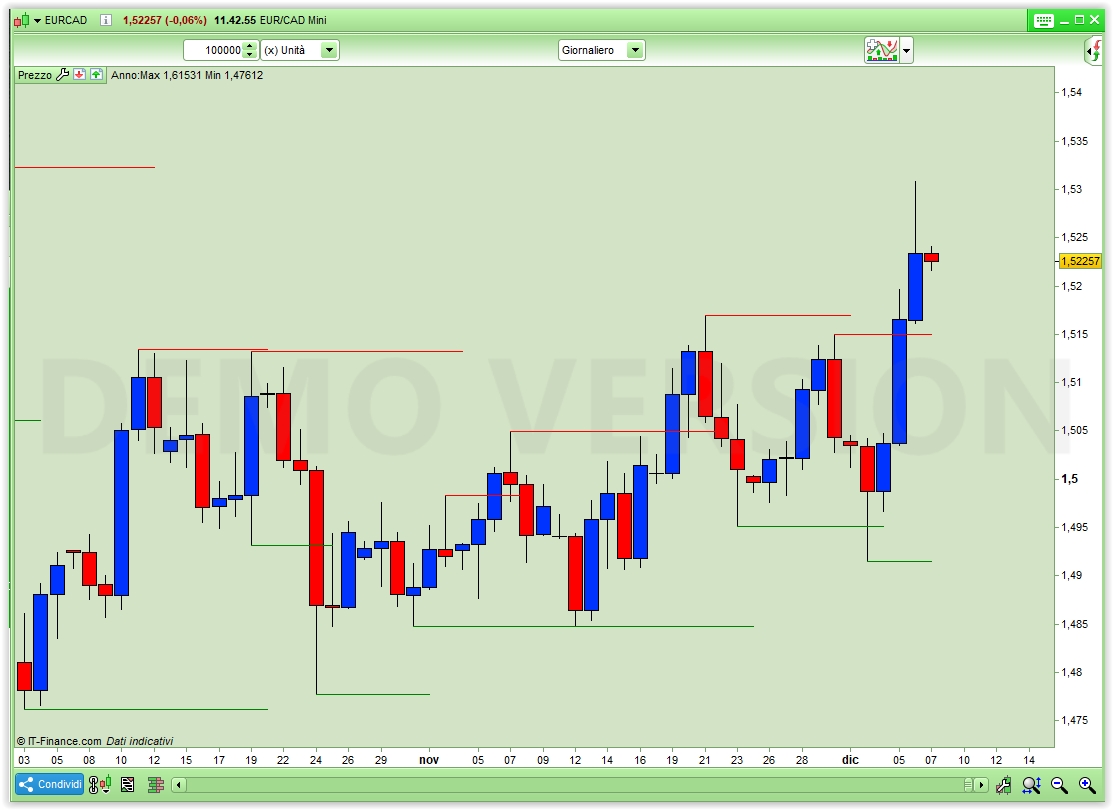
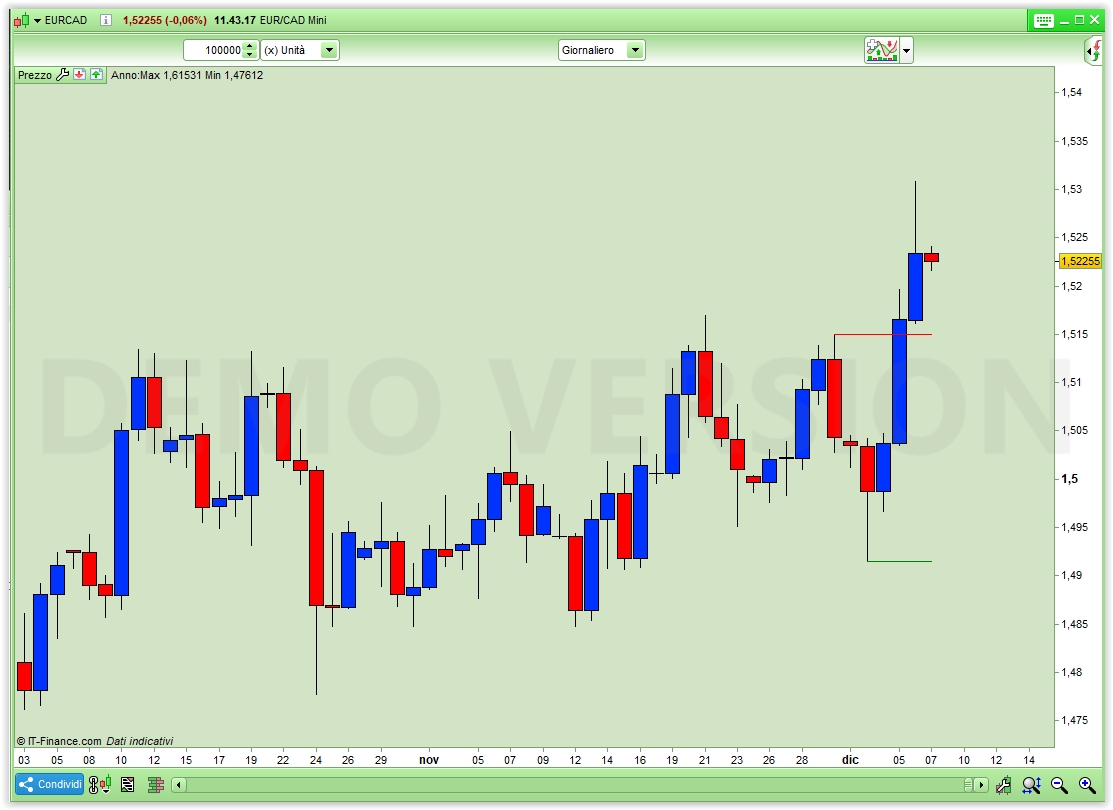
    Pic X1 shows the outcome.

    If you prefer pic X2 just uncomment line 2.

    Nicolas and pableitor thanked this post
    x1-2.jpg x1-2.jpg x2-2.jpg x2-2.jpg
    #86510 quote
    FriendFriend
    Participant
    Average

    Thank you very much, Mr. Roberto Gozzi !!!
    This looks great!
    Very helpful for me, and maybe for others too.

    #97520 quote
    pableitorpableitor
    Participant
    Master

    Hi, would it be possible to extend the drawing of  support/resistance lines not just  until the next pivot but for a fixed length , like 100 bars  or so ?

    thanks

    #97528 quote
    robertogozzirobertogozzi
    Moderator
    Legend

    Uncommenting line 2 does a similar job easily, can this do?

    #97533 quote
    pableitorpableitor
    Participant
    Master

    Uncommenting line 2 does a similar job easily, can this do?

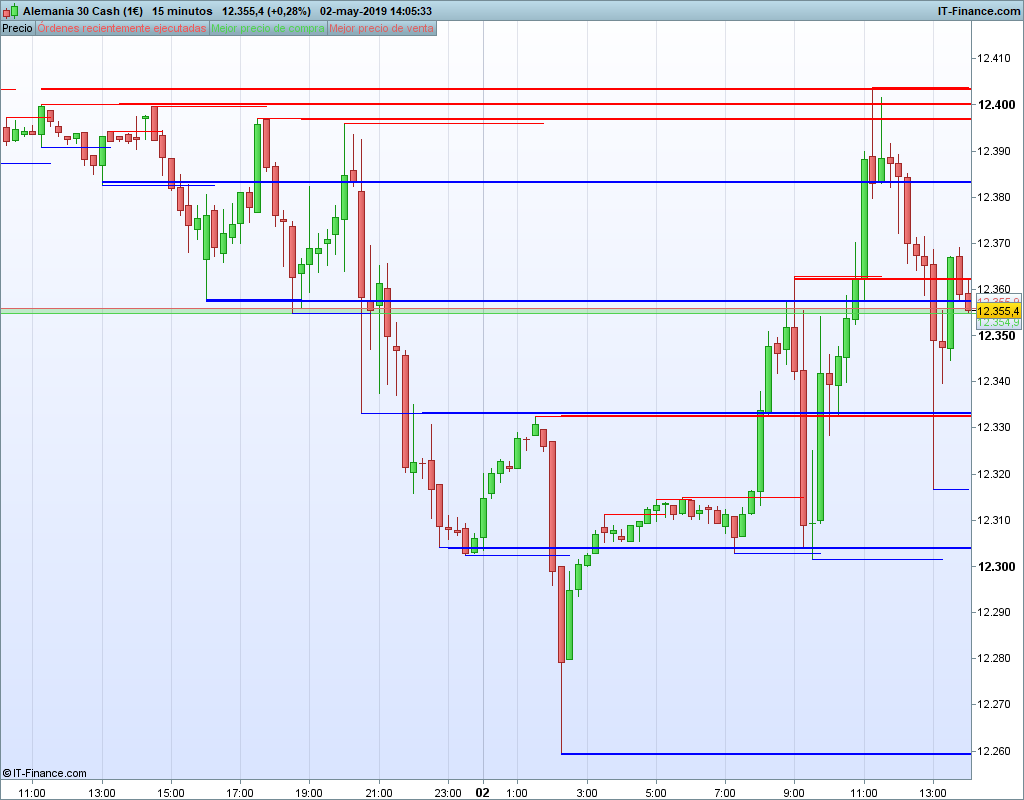
    Well , not exactly…if uncommenting line 2 it will just draw the latest S/R.  I mean I would like it to extend ALL the S/R lines for X bars .  Why you may ask? I work on the 15 min TF and I found that the S/R are usually valid for 1 or 2  days, that its like 100/200 bars in a 15m TF.  (pls check pic of the DAX today with hand drawn S/R)

    DAX.png DAX.png
    #97537 quote
    GraHalGraHal
    Participant
    Legend

    Added the code to here Snippet Link Library

    robertogozzi thanked this post
    #97540 quote
    robertogozzirobertogozzi
    Moderator
    Legend

    PRT does not support arrays so it’s difficult to draw many lines in the past.

    I modified the above code to show, in addition to the most recent S & R lines, the previous ones too.

    You can add more if you need, with some coding effort.

    DEFPARAM CalculateOnLastBars = 1000
    DEFPARAM DrawOnLastBarOnly   = true
    PivotBAR    = 2                      //2   bars AFTER  pivot
    LookBack    = 4                      //3   bars BEFORE pivot
    BarLookBack = PivotBAR + 1
    IF low[PivotBAR] < lowest[LookBack](low)[BarLookBack] THEN
    IF low[PivotBAR] = lowest[BarLookBack](low) THEN
    PrevSupp      = MySupport
    PrevSuppPrice = SupportPrice
    MySupport     = BarIndex - PivotBAR
    SupportPrice  = low[PivotBAR]
    ENDIF
    ENDIF
    IF high[PivotBAR] > highest[LookBack](high)[BarLookBack] THEN
    IF high[PivotBAR]  = highest[BarLookBack](high) THEN
    PrevRes         = MyResistance
    PrevResPrice    = ResistancePrice
    MyResistance    = BarIndex - PivotBAR
    ResistancePrice = high[PivotBAR]
    ENDIF
    ENDIF
    DRAWSEGMENT(PrevRes,PrevResPrice,BarIndex,PrevResPrice) COLOURED(255,0,0,255)
    DRAWSEGMENT(PrevSupp,PrevSuppPrice,BarIndex,PrevSuppPrice) COLOURED(0,128,0,255)
    DRAWSEGMENT(MyResistance,ResistancePrice,BarIndex,ResistancePrice) COLOURED(255,0,0,255)
    DRAWSEGMENT(MySupport,SupportPrice,BarIndex,SupportPrice) COLOURED(0,128,0,255)
    RETURN
    pableitor, swapping and jaginho thanked this post
    #97546 quote
    pableitorpableitor
    Participant
    Master

    Ok, I get your idea, thanks Roberto!

    #146833 quote
    phoentzsphoentzs
    Participant
    Master

    Hallo,

    wenn ich diesen Code als meinen SL verwenden möchte, wo genau füge ich diese Bedingungen in meinen Code ein?

    Hi, if I want to use this code as my SL, where exactly do I put these conditions in my code?

    #146842 quote
    robertogozzirobertogozzi
    Moderator
    Legend

    Only post in the language of the forumthat you are posting in. For example English only in the English speaking forums and French only in the French speaking forums.

    Thank you 🙂

    #146843 quote
    robertogozzirobertogozzi
    Moderator
    Legend

    As a common rule, I’d say:

    • If you go LONG below SupportPrice
    • If you go SHORT above ResistancePrice.

    How many pips is just a matter of personal choices and and risk aversion attitude.

Viewing 14 posts - 1 through 14 (of 14 total)
  • You must be logged in to reply to this topic.

ProRealAI ProRealAI New

Stuck on this ProBuilder code?

Describe what this topic is trying to build, in plain English, and ProRealAI writes the ProRealTime™ indicator, screener or system for you.

Available in 7 languages
Try ProRealAI

Support/Resistance for all timeframes


ProBuilder: Indicators & Custom Tools

New Reply
Author
author-avatar
Friend @friend Participant
Summary

This topic contains 13 replies,
has 6 voices, and was last updated by robertogozzirobertogozzi
6 years ago.

Topic Details
Forum: ProBuilder: Indicators & Custom Tools
Language: English
Started: 12/06/2018
Status: Active
Attachments: 4 files
ProRealCode ProRealCode
Loading...