supertrend multi time frame

Viewing 10 posts - 1 through 10 (of 10 total)

  • Author
    Posts
  • #146115 quote
    Gabriele Battista
    Participant
    Senior
    timeframe(4 hour,updateonclose)
    STH4=Supertrend[3,10]
    timeframe(1 day,updateonclose)
    STD1=Supertrend[3,10]
    timeframe(1 week,updateonclose)
    STW1=Supertrend[3,10]
    RETURN STH4 as "SuperTrend H4", STD1 as "SuperTrend D1", STW1 as "SuperTrend W1"

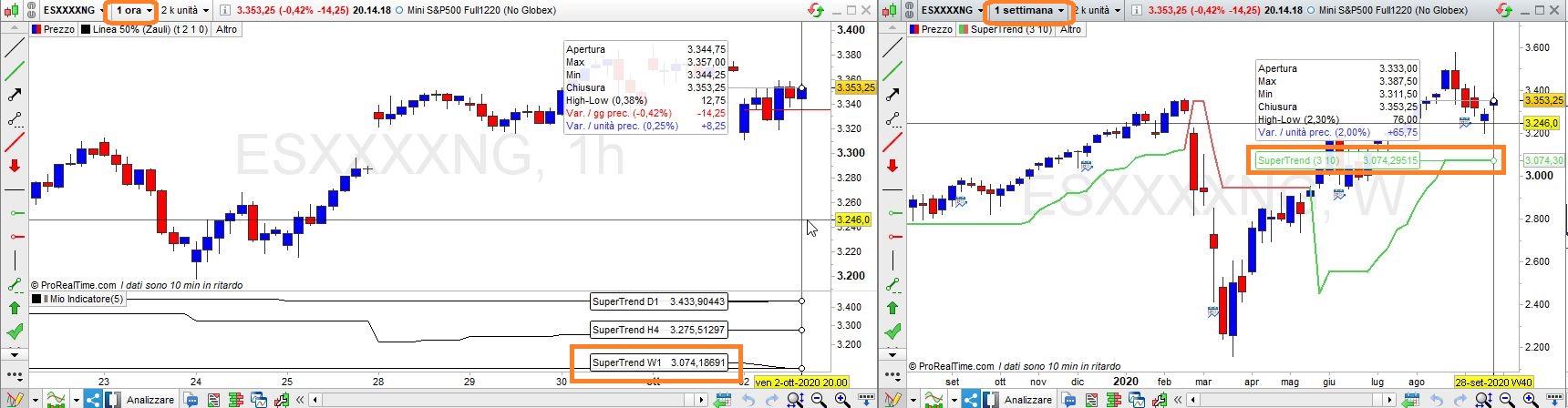
    Vorrei inserire su un time frame inferiore, ho provato su h1 ma non ho gli stessi valori che trovo sui singoli grafici, il weekly è molto diverso. Dove sbaglio? E’ possibile inserirlo in un grafico a volumi ?

    #146156 quote
    Nicolas
    Keymaster
    Master

    Prova ad espandere le unità visualizzate disponibili sul grafico per ottenere le barre settimanali sufficienti per calcolare correttamente il Supertrend.

    #146229 quote
    Gabriele Battista
    Participant
    Senior

    Fatto ma sul week è sempre diverso

    #146230 quote
    Gabriele Battista
    Participant
    Senior

    non so perchè ma non riesco a caricare il file , comunque ho usato 3k unità.

    #146231 quote
    Gabriele Battista
    Participant
    Senior

    sul TF h1

    #146242 quote
    robertogozzi
    Moderator
    Master

    A me funziona, c’è una piccola differenza nei decimali, ma credo sia impossibile essere precisi su TF diversi.

    x-1.jpg x-1.jpg
    #146245 quote
    Gabriele Battista
    Participant
    Senior

    Hai ragione sono troppo pignolo!

    #200206 quote
    Viger
    Participant
    New

    Buonasera Roberto

    come si fa applicare etichetta di descrizione (tipo h1-h4 ecc) sulla linea del super trend per riconoscerlo ?

    Grazie

    #200212 quote
    Nicolas
    Keymaster
    Master

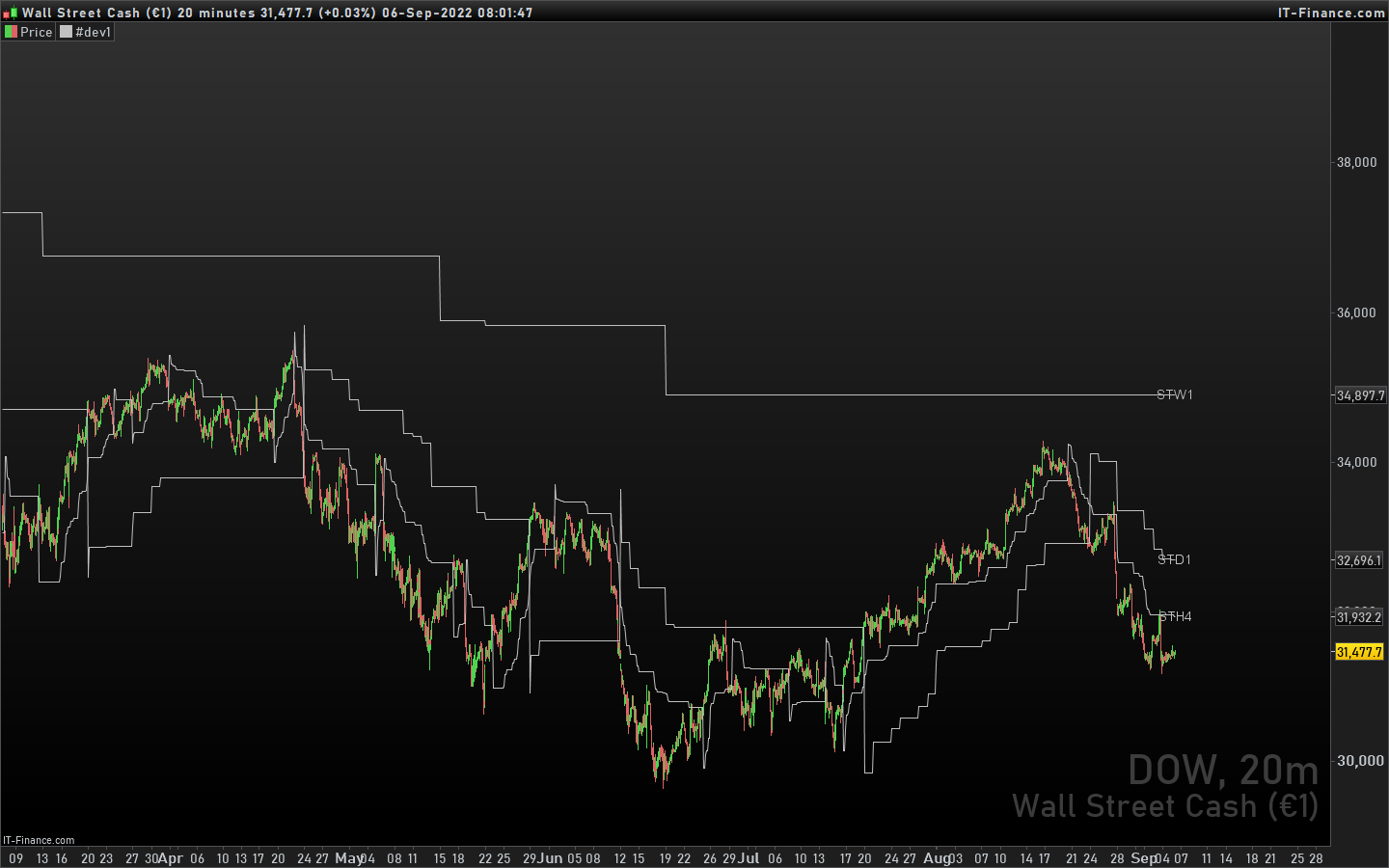
    Il codice seguente aggiunge il testo prima di ogni riga:

    defparam drawonlastbaronly=true
    
    timeframe(4 hour,updateonclose)
    STH4=Supertrend[3,10]
    
    timeframe(1 day,updateonclose)
    STD1=Supertrend[3,10]
    
    timeframe(1 week,updateonclose)
    STW1=Supertrend[3,10]
    
    timeframe(default)
    drawtext("STH4",barindex+5,sth4)
    drawtext("STD1",barindex+5,std1)
    drawtext("STW1",barindex+5,stw1)
    
    RETURN STH4 as "SuperTrend H4", STD1 as "SuperTrend D1", STW1 as "SuperTrend W1"
    text-on-supertrend.png text-on-supertrend.png
    #200249 quote
    Viger
    Participant
    New

    grazie mille Nicolas !

Viewing 10 posts - 1 through 10 (of 10 total)
  • You must be logged in to reply to this topic.

supertrend multi time frame


ProBuilder: Indicatori & Strumenti Personalizzati

New Reply
Summary

This topic contains 9 replies,
has 4 voices, and was last updated by Viger

3 years, 6 months ago.

Topic Details
Forum: ProBuilder: Indicatori & Strumenti Personalizzati
Language: Italian
Started: 10/01/2020
Status: Active
Attachments: 2 files
Logo Logo
Loading...