"Style" is not working in Standard deviation Channel

Viewing 8 posts - 1 through 8 (of 8 total)
  • Author
    Posts
  • #102066 quote
    Partha BanerjeePartha Banerjee
    Participant
    Junior

    Hello Nicholas,
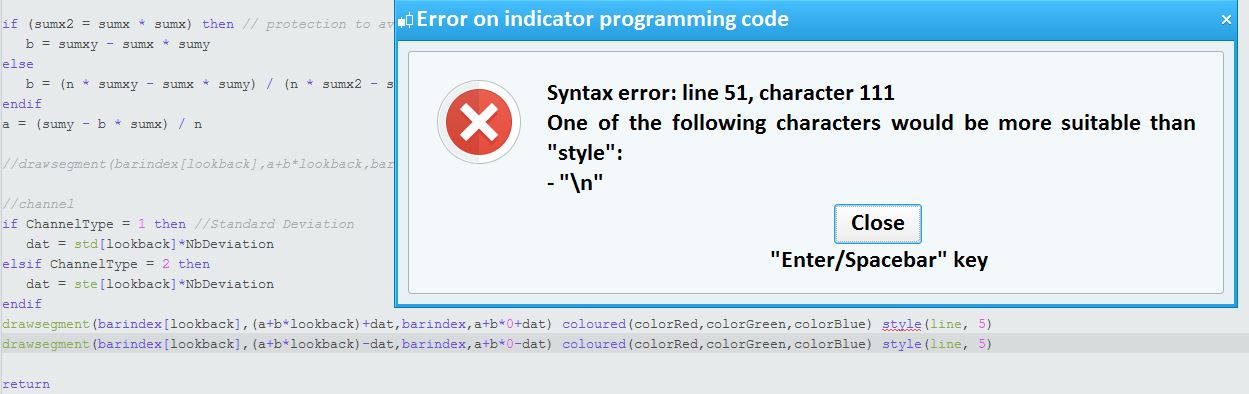
    When I am using style(line,5) in your below written code it is providing error. Appreciate if you please tell me how to incorporate style(line,5) in the following code:

    //PRC_Std and Ste LinRegChannel | indicator
    //Standard Deviation and Standard Error
    //Linear Regression Channel
    //12.03.2019
    //Nicolas @ www.prorealcode.com
    //Sharing ProRealTime knowledge
    
    defparam drawonlastbaronly=true
    defparam calculateonlastbars=1000
    // --- settings
    // chnlper = 200, sdsr = 1, devmul = 1.62, c1 = 153, c2 = 51, c3 =0
    lookback= chnlper //channel period
    ChannelType = sdsr //1= Standard Deviation ; 2= Standard Erro
    NbDeviation = devmul //Deviation multiplier
    colorRed = C1
    colorGreen = C2
    colorBlue = C3
    // --- end of settings
    
    sumx = 0
    sumy = 0
    sumxy = 0
    sumx2 = 0
    
    for cmpt = lookback downto 0 do
    tmpx = cmpt
    tmpy = close[cmpt]
    sumy = sumy+tmpy
    sumx = sumx+tmpx
    sumx2 = sumx2 + (tmpx*tmpx)
    sumxy = sumxy + (tmpy*tmpx)
    next
    
    n = lookback+1
    
    if (sumx2 = sumx * sumx) then // protection to avoid infinite values
    b = sumxy - sumx * sumy
    else
    b = (n * sumxy - sumx * sumy) / (n * sumx2 - sumx * sumx)
    endif
    a = (sumy - b * sumx) / n
    
    //drawsegment(barindex[lookback],a+b*lookback,barindex,a+b*0) coloured(colorRed,colorGreen,colorBlue)
    
    //channel
    if ChannelType = 1 then //Standard Deviation
    dat = std[lookback]*NbDeviation
    elsif ChannelType = 2 then
    dat = ste[lookback]*NbDeviation
    endif
    drawsegment(barindex[lookback],(a+b*lookback)+dat,barindex,a+b*0+dat) coloured(colorRed,colorGreen,colorBlue)
    drawsegment(barindex[lookback],(a+b*lookback)-dat,barindex,a+b*0-dat) coloured(colorRed,colorGreen,colorBlue)
    
    return
    Style.jpg Style.jpg
    #102069 quote
    swappingswapping
    Participant
    Master

    read here https://www.prorealcode.com/documentation/drawsegment/


    it is not possible to use the style function with drawsegment

    #102070 quote
    robertogozzirobertogozzi
    Moderator
    Legend

    >> For clarity of messages on ProRealCode’s forums, please use the “insert code PRT” button to separate the text of the code part! Thank you! <<
    Only lines plotted with RETURNed data can be customized with STYLE or with the indicator’s properties.

    #102073 quote
    Partha BanerjeePartha Banerjee
    Participant
    Junior

    Thank you, however how to increase the width of the channel?

    #102081 quote
    robertogozzirobertogozzi
    Moderator
    Legend

    You can increase a or b, or both, with a multiplier, such as 1.1 to increase 10%, or 1.01 to increase 1%.

    #102088 quote
    robertogozzirobertogozzi
    Moderator
    Legend

    You’d better use a multiplier with DAT, just after line 50, before it’s used.

    #102116 quote
    NicolasNicolas
    Keymaster
    Legend

    FYI, STYLE will be added to graphical instructions in a future update (dont know when).

    swapping thanked this post
    #102130 quote
    Partha BanerjeePartha Banerjee
    Participant
    Junior

    Thank you for the responses.
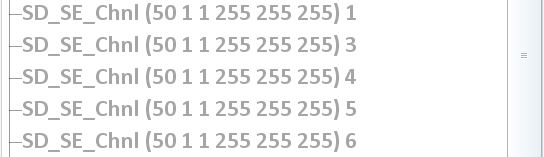
    I am using a crude way to get the same effect, i.e. instead of one call to the indicator, I am using 5 times (as shown below). This is increasing the thickness. But anyway, will wait for the updated release.

    Style-5-times.jpg Style-5-times.jpg
Viewing 8 posts - 1 through 8 (of 8 total)

  • You must be logged in to reply to this topic.

ProRealAI ProRealAI New

Stuck on this ProBuilder code?

Describe what this topic is trying to build, in plain English, and ProRealAI writes the ProRealTime™ indicator, screener or system for you.

Available in 7 languages
Try ProRealAI

"Style" is not working in Standard deviation Channel


ProBuilder: Indicators & Custom Tools

New Reply
Author
Summary

This topic contains 7 replies,
has 4 voices, and was last updated by Partha BanerjeePartha Banerjee
7 years, 3 months ago.

Topic Details
Forum: ProBuilder: Indicators & Custom Tools
Language: English
Started: 07/07/2019
Status: Active
Attachments: 2 files
ProRealCode ProRealCode
Loading...