Standard Deviation OVERLAY on Volume Indicator

Viewing 6 posts - 1 through 6 (of 6 total)

  • Author
    Posts
  • #191329 quote
    justadudejustadude
    Participant
    New

    Hi there,

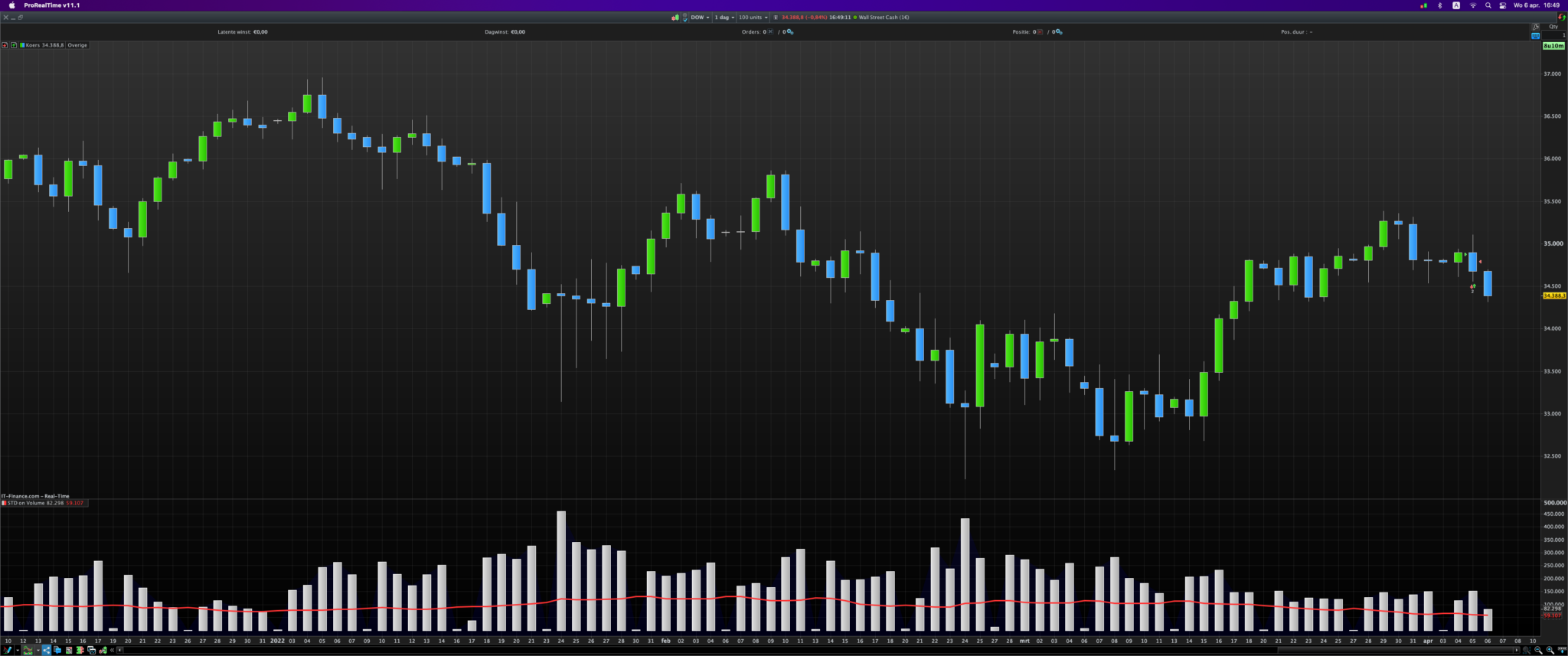
    Standard Deviation (SD) cannot be overlaid on the volume indicator (it opens in a new window), would it be possible to code an indicator so that I can create a strategy which reads the standard deviation of the volume?

    Thanks

    #191330 quote
    JC_BywanJC_Bywan
    Moderator
    Master

    Hi,

    sthg like that?

    x=STD[20](volume)
    
    return volume as "volume" style(histogram), x as "standard deviation of volume"
    #191335 quote
    justadudejustadude
    Participant
    New

    Thanks, not sure if my lack of experience with ProRealCode is holding me back, but I can’t get it to work.
    When I click add to the indicator I get the following error:

    “Line 3 characters missing. Suggestions: End of code”

    Thanks

    #191339 quote
    JSJS
    Participant
    Master
    x=STD[20](volume)
     
    return volume style(histogram) as "volume" , x as "standard deviation of volume"
    
    Schermafbeelding-2022-04-06-om-16.49.11.png Schermafbeelding-2022-04-06-om-16.49.11.png
    #191361 quote
    justadudejustadude
    Participant
    New

    Awesome thank you very much

    #191367 quote
    JC_BywanJC_Bywan
    Moderator
    Master

    Sorry, my bad, I jumped the gun on a couple of new features first deployed on PRT soft to be followed by other PRT accounts:

    – Allow out-of-order options for indicator return and backtest graph & graphonprice

    – Allow out-of-order drawing options

    As I was checking these were deployed on an IG demo account yesterday, I thought by now it was deployed everywhere. Apparently not yet. Wait for a few more days and order of options in the “return” line shouldn’t matter anymore on your account too.

    JS thanked this post
Viewing 6 posts - 1 through 6 (of 6 total)
  • You must be logged in to reply to this topic.

ProRealAI ProRealAI New

Stuck on this ProBuilder code?

Describe what this topic is trying to build, in plain English, and ProRealAI writes the ProRealTime™ indicator, screener or system for you.

Available in 7 languages
Try ProRealAI

Standard Deviation OVERLAY on Volume Indicator


ProBuilder: Indicators & Custom Tools

New Reply
Author
author-avatar
justadude @justadude Participant
Summary

This topic contains 5 replies,
has 3 voices, and was last updated by JC_BywanJC_Bywan

4 years, 5 months ago.

Topic Details
Forum: ProBuilder: Indicators & Custom Tools
Language: English
Started: 04/06/2022
Status: Active
Attachments: 1 files
ProRealCode ProRealCode
Loading...