"Style" is not working in Standard deviation Channel

Viewing 8 posts - 1 through 8 (of 8 total)
  • Author
    Posts
  • #102066 quote
    Partha Banerjee
    Participant
    Junior

    Hello Nicholas,
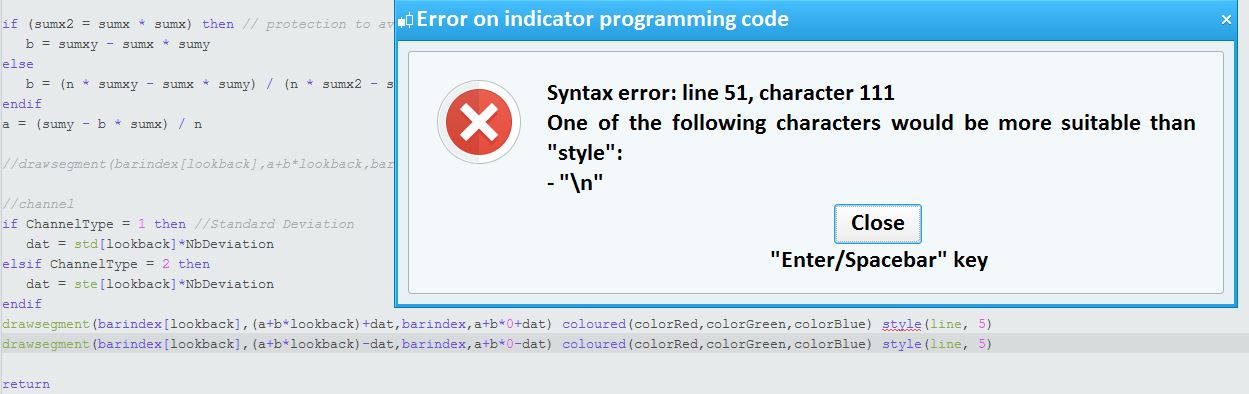
    When I am using style(line,5) in your below written code it is providing error. Appreciate if you please tell me how to incorporate style(line,5) in the following code:

    //PRC_Std and Ste LinRegChannel | indicator
    //Standard Deviation and Standard Error
    //Linear Regression Channel
    //12.03.2019
    //Nicolas @ www.prorealcode.com
    //Sharing ProRealTime knowledge
    
    defparam drawonlastbaronly=true
    defparam calculateonlastbars=1000
    // --- settings
    // chnlper = 200, sdsr = 1, devmul = 1.62, c1 = 153, c2 = 51, c3 =0
    lookback= chnlper //channel period
    ChannelType = sdsr //1= Standard Deviation ; 2= Standard Erro
    NbDeviation = devmul //Deviation multiplier
    colorRed = C1
    colorGreen = C2
    colorBlue = C3
    // --- end of settings
    
    sumx = 0
    sumy = 0
    sumxy = 0
    sumx2 = 0
    
    for cmpt = lookback downto 0 do
    tmpx = cmpt
    tmpy = close[cmpt]
    sumy = sumy+tmpy
    sumx = sumx+tmpx
    sumx2 = sumx2 + (tmpx*tmpx)
    sumxy = sumxy + (tmpy*tmpx)
    next
    
    n = lookback+1
    
    if (sumx2 = sumx * sumx) then // protection to avoid infinite values
    b = sumxy - sumx * sumy
    else
    b = (n * sumxy - sumx * sumy) / (n * sumx2 - sumx * sumx)
    endif
    a = (sumy - b * sumx) / n
    
    //drawsegment(barindex[lookback],a+b*lookback,barindex,a+b*0) coloured(colorRed,colorGreen,colorBlue)
    
    //channel
    if ChannelType = 1 then //Standard Deviation
    dat = std[lookback]*NbDeviation
    elsif ChannelType = 2 then
    dat = ste[lookback]*NbDeviation
    endif
    drawsegment(barindex[lookback],(a+b*lookback)+dat,barindex,a+b*0+dat) coloured(colorRed,colorGreen,colorBlue)
    drawsegment(barindex[lookback],(a+b*lookback)-dat,barindex,a+b*0-dat) coloured(colorRed,colorGreen,colorBlue)
    
    return
    Style.jpg Style.jpg
    #102069 quote
    swapping
    Participant
    Master

    read here https://www.prorealcode.com/documentation/drawsegment/


    it is not possible to use the style function with drawsegment

    #102070 quote
    robertogozzi
    Moderator
    Master

    >> For clarity of messages on ProRealCode’s forums, please use the “insert code PRT” button to separate the text of the code part! Thank you! <<
    Only lines plotted with RETURNed data can be customized with STYLE or with the indicator’s properties.

    #102073 quote
    Partha Banerjee
    Participant
    Junior

    Thank you, however how to increase the width of the channel?

    #102081 quote
    robertogozzi
    Moderator
    Master

    You can increase a or b, or both, with a multiplier, such as 1.1 to increase 10%, or 1.01 to increase 1%.

    #102088 quote
    robertogozzi
    Moderator
    Master

    You’d better use a multiplier with DAT, just after line 50, before it’s used.

    #102116 quote
    Nicolas
    Keymaster
    Master

    FYI, STYLE will be added to graphical instructions in a future update (dont know when).

    swapping thanked this post
    #102130 quote
    Partha Banerjee
    Participant
    Junior

    Thank you for the responses.
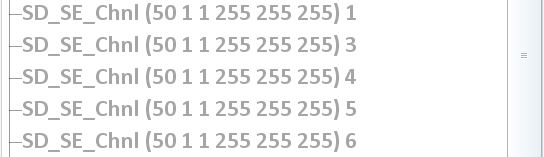
    I am using a crude way to get the same effect, i.e. instead of one call to the indicator, I am using 5 times (as shown below). This is increasing the thickness. But anyway, will wait for the updated release.

    Style-5-times.jpg Style-5-times.jpg
Viewing 8 posts - 1 through 8 (of 8 total)
  • You must be logged in to reply to this topic.

"Style" is not working in Standard deviation Channel


ProBuilder: Indicators & Custom Tools

New Reply
Author
Summary

This topic contains 7 replies,
has 4 voices, and was last updated by Partha Banerjee
6 years, 7 months ago.

Topic Details
Forum: ProBuilder: Indicators & Custom Tools
Language: English
Started: 07/07/2019
Status: Active
Attachments: 2 files
Logo Logo
Loading...