Hi all,
I have some problem coding the stochastic. I have set the Stochastic to (79,3,4) in the indicators section, but when it come to coding only shows two parameters: Stochastic [79,3]. I would like to create a condition when %K crosses over %D or viceversa, but I don’t see it.
I have reviewed the library in search of similar strategies with stochastic but nothing so far.
Any suggestions?
Thanks so much in advance.
Juan
I think i got it. I found an old result from Nicolas in the Forums.
K = stochastic[14,3]
D = average[4](K)

RETURN K, D
Thanks anyway,
Juan
Did you manage to write the correct screener code for the stochastic crossover?
If you did would you be able share it please?
Thank you
Did you manage to write the correct screener code for the stochastic crossover?
If you did would you be able share it please?
Thank you
Juan Salas‘s code is correct, to code a crossing just write:
CrossOver  = K crosses over D
CrossUnder = K crosses under D
If you search in the library for a Stochastic screener you’ll find some.
Did you manage to write the correct screener code for the stochastic crossover?
If you did would you be able share it please?
Thank you
Hi, disciplinet,
Roberto is right. I am sending you a piece of code similar to what Roberto sent:
// Indicators ///////////////////////
stoch76K= Stochastic[76,3]
long50=stoch76K crosses over 50 // Entrada en largo normal al cruzar al alza 50
long80=stoch76K crosses over 80 // Reentrada en largo en >80
short50=stoch76K crosses under 50 // Entrada en corto normal al cruzar a la baja 50
short20=stoch76K crosses under 20 // Reentrada en corto en <20

// Estocastico lento
D76 = average[4](stoch76K) // D
stoch76K= Stochastic[76,3] // K
crucelentoalza=stoch76K crosses over D76
crucelentobaja=stoch76K crosses under D76

// Estocastico rapido
D8 = average[3](stoch8K) // D
stoch8K= Stochastic[8,3] // K
crucerapidoalza=stoch8K crosses over D8
crucerapidobaja=stoch8K crosses under D8
I hope it can help you
I am have this code for stochastic in hourly TF. Pro Order should be placing order when, %K is above the %D (ie. %K>%D) and value of %D should be 32 and 75 before an order is placed. This is a bullish condition
But I have multiple orders being placed even when stochastic is bearish. All conditions should be true to open a buy position ie c2 and c3 and c4 should all be true..
Why is this dependency occurring with Pro Order Tests?
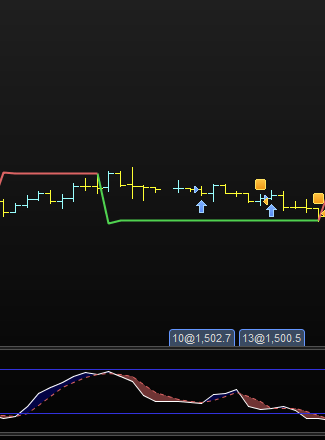
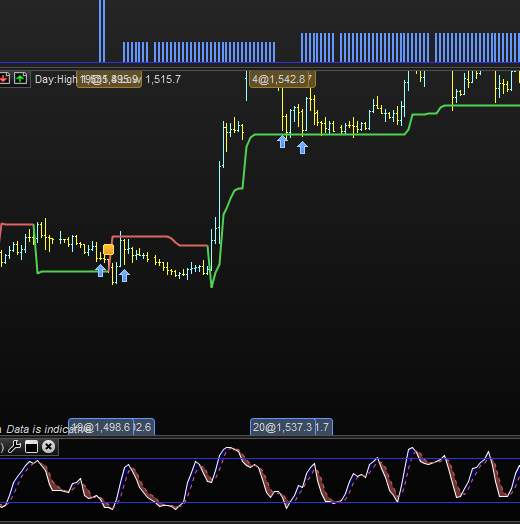
I have attached an image that clearly shows the stochastic does not meet the conditions.
timeframe(1 Hour, updateonclose)
indicator3 = Stochastic[5,3](close)
indicator4 = Average[3](indicator3)
c2 = (indicator3[3] > indicator4)
indicator5 = Average[3](Stochastic[5,3](close))
c3 = (indicator5 > 32)
indicator6 = Average[3](Stochastic[5,3](close))
c4 = (indicator5 < 75)
Why line 4 refers to the 3rd previous candle?
This could be the logical error.
Ok thanks for pointing that out – that was an error. I corrected it, it improved by removing some of these orders, but there are still some that should not be there.
If you see the screenshot below, 2 orders are placed in same area, the first one is placed when the stochastic is clearly bearish.
How can i fix this? I want it to place orders when stochastic is bullish only.
timeframe(1 Hour, updateonclose)
indicator3 = Stochastic[5,3](close)
indicator4 = Average[3](indicator3)
c2 = (indicator3 > indicator4)
indicator5 = Average[3](Stochastic[5,3](close))
c3 = (indicator5 > 25)
indicator6 = Average[3](Stochastic[5,3](close))
c4 = (indicator6 < 35)
Without the complete code it is impossible to tell, it is likely conditions are not linked with AND.
Or if you use a smaller default TF a trade could be entered while conditions have changed because variables are updated only when the 1-hour bar closes.
If you need further help you should post your code to enable readers to replicate your trades, also specifying instrument and default TF used.
Here is the code, its daily and hourly TF being used,
// Definition of code parameters
DEFPARAM CumulateOrders = False // Cumulating positions deactivated

// Conditions to enter long positions
timeframe(Daily)
indicator1 = Stochastic[5,3]
indicator2 = Average[3](indicator1)
indicator0 = Average[3](Stochastic[5,3])
c1 = (indicator1 > indicator2)
c0 = (indicator0 < 70)


timeframe(1 Hour, updateonclose)
indicator3 = Stochastic[5,3](close)
indicator4 = Average[3](indicator3)
c2 = (indicator3 > indicator4)
indicator5 = Average[3](Stochastic[5,3](close))
c3 = (indicator5 > 10)
indicator6 = Average[3](Stochastic[5,3](close))
c4 = (indicator6 < 40)
LL = lowest[6](low) - 2*pointsize
SL = close [0] - LL
//BARHIGH = High

REM Money Management
Capital = 5000
Risk = 0.01
//Stoploss = 5
//StopLoss = abs((BARHIGH - SL)/pointvalue) // Could be our variable X

REM Calculate contracts
equity = Capital + StrategyProfit
maxrisk = round(equity*Risk)
PositionSize = abs(((maxrisk/SL)/PointValue)*pipsize)


IF c0 AND c1 AND c2 AND c3 AND c4 THEN
Buy Positionsize CONTRACT AT MARKET
set stop Loss SL
Set target profit SL*6
ENDIF
What TF did you take that pic from?
When you look at the daily chart keep in mind that previous daily bars only show the pic at closing time, while you did not use updateonclose thus at runtime values can be differrnt from hour to hour.
I took that snap shot in Hourly TF. Daily TF seems to be working fine
Even if daily is not using update on close, hourly conditions should still be respected isn’t it?
What time and instrument were those wrong trades?
20 Aug to 31 Aug – Instrument is Spot Gold
For Spot GOLD I have no trades opened from Aug.20th through Aug 31st.