Stochastic and MACD Indicator Screener

Viewing 4 posts - 1 through 4 (of 4 total)
  • Author
    Posts
  • #205031 quote
    EmiglioLiberta
    Participant
    New

    Hello,

    I am trying to build a screen for certain stochastic signals and MACD. However i am struggling to access the fast and slow stochastic programmatically.

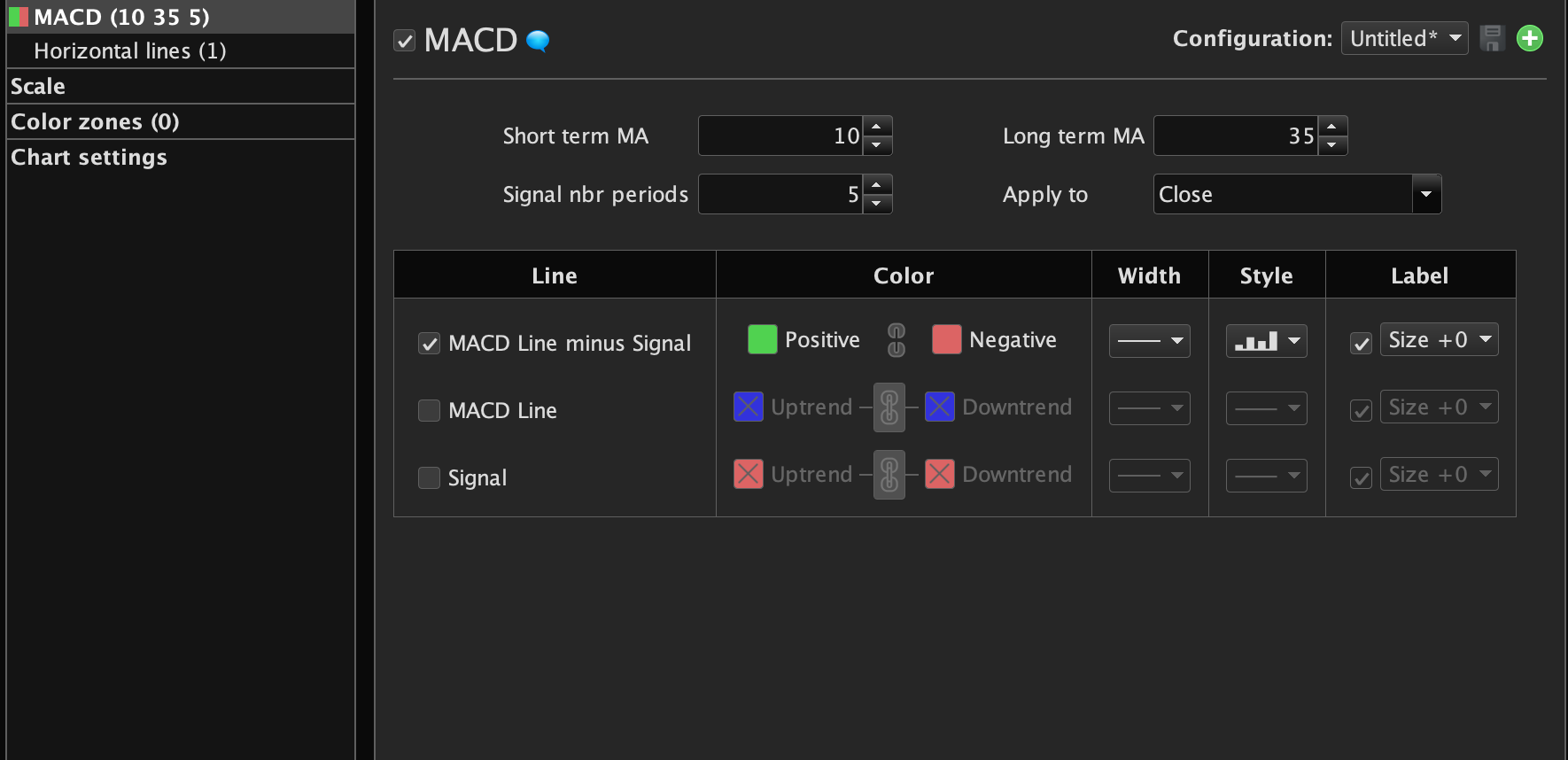
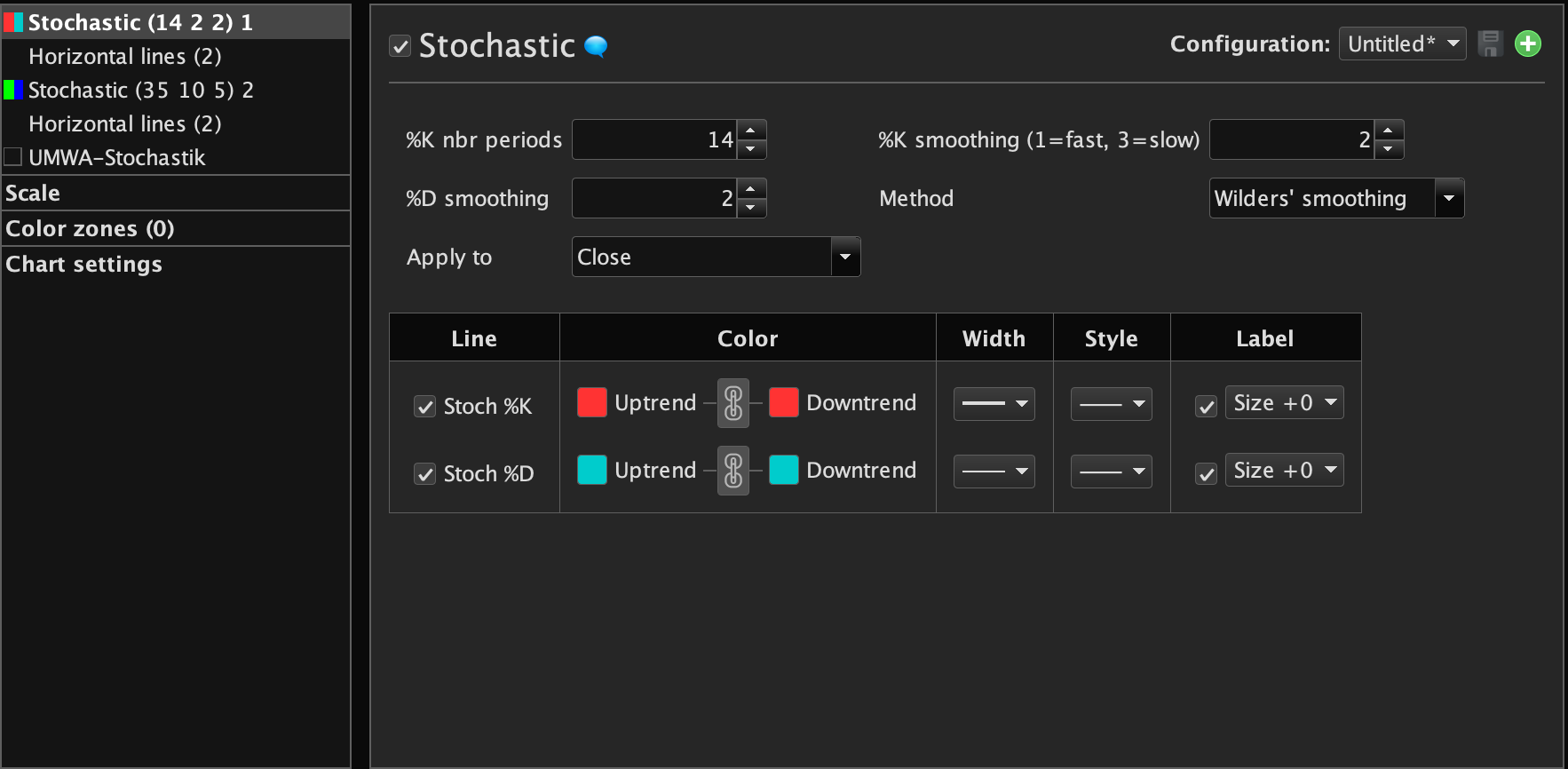
    Please check the screenshots of the MACD and stochastic, how can I get the 3 indicators into a variable?

    Currently I have

    tuerkis= WilderAverage[??](Stochastic[14,??](close))


    But this is only one of the two coming out of the stochastic indicator (when you plot it there are two lines). How can I access both (I need: Stochastic 14 periods, K smoothing 3, D smoothing 2, Wilders Average

    One more questions: Is it possible to programmatically draw an indicator in the right color, as bar diagramm, and group them together? (e.g. create a full settings page in one go)

    I want to have the main price window with a few MA, a secondary with stochastic, a third with MACD etc. Can I also define the colors of each? A simple

    return myindicator


    does not work. .


    Cheers

    Emiglio

    Screenshot-2022-11-29-at-20.04.29.png Screenshot-2022-11-29-at-20.04.29.png Screenshot-2022-11-29-at-20.04.06.png Screenshot-2022-11-29-at-20.04.06.png
    #205042 quote
    robertogozzi
    Moderator
    Master

    Your code:

    tuerkis= WilderAverage[??](Stochastic[14,??](close))

    computes the WilderAverage of the Stochastic indicator.
    What do you mean by “I need: Stochastic 14 periods, K smoothing 3, D smoothing 2, Wilders Average“?

    As to your last question, if you look at the many examples in the forum and in the online documentation for RETURN, COLOURED, STYLE etc… you will see how you can plot them in different colours and shapes.
    As to grouping them, you can combine many of them in one custom indicator, such as:

    StoK = Stochastic[10,3](close)
    StoD = Average[6](StoK)
    //
    MacdHistogram = MACD[12,26,9](close)
    MyColor       = 1    //bullish colour from the indicator settings
    IF MacdHistogram < 0 THEN
       MyColor    = -1   //bearish colour from the indicator settings
    ENDIF
    MacdSig       = MACDSignal[12,26,9](close)
    MyMacd        = MACDline[12,26,9](close)
    //
    return MacdHistogram coloured by MyColor Style(Histogram,1) AS "Macd Histogram",MacdSig coloured("Fuchsia") Style(Line,1) AS "Macd Signal",MyMacd coloured("Red") Style(DottedLine,1) AS "MACDline",StoK coloured("Green") Style(Line,1) AS "K",StoD coloured("Cyan") Style(Line,1) AS "D"

    as you will see after adding it below your chart, different indicators use different scales, so you may find that (in this case), to be able to spot the regular MACD lines, you will have to enlarge the scale quite a lot and STOCHASTIC lines will be huge!
    On the contrary, if you want to see the STOCHASTIC lines regularly, MACD lines will be very tiny!

    #205077 quote
    EmiglioLiberta
    Participant
    New

    Thank you very much for the help, now I am much wiser. Sorry, I did not find the help for style and histogram.

    If you take a look at my second screenshot, I want to programmatically replicate the indicator (e.g. stochastic, 14 periods, %D = 2, %K = 2 and Wilder Average selected.

    When I try this code:

    StoK = Stochastic[14,2](close)
    StoD = wilderAverage[2](StoK)
    
    return StoK coloured("Green") Style(Line,1) AS "K",StoD coloured("Cyan") Style(Line,1) AS "D"

    it gives slightly different results. Why is that? How do I get the right indicator?

    Is it possible to create multiple indicators (in multiple sections) in one go?

    #205325 quote
    robertogozzi
    Moderator
    Master

    Indeed you have to chamge the StoK line with this one:

    StoK = WilderAverage[2](Stochastic[14,1](close))
Viewing 4 posts - 1 through 4 (of 4 total)
  • You must be logged in to reply to this topic.

Stochastic and MACD Indicator Screener


ProScreener: Market Scanners & Detection

New Reply
Author
Summary

This topic contains 3 replies,
has 2 voices, and was last updated by robertogozzi
3 years, 3 months ago.

Topic Details
Forum: ProScreener: Market Scanners & Detection
Language: English
Started: 11/29/2022
Status: Active
Attachments: 2 files
Logo Logo
Loading...