Specific length on Drawhline

Viewing 6 posts - 1 through 6 (of 6 total)
  • Author
    Posts
  • #105336 quote
    PastaPesto
    Participant
    Veteran

    Hello,

    I am trying to make an indictaor with lines, but I dont want the lines to go on forever to the right of the screen. Is it possible to determine the length of “Drawhline”? For example 40bars. My screen gets all messy with all the lines and I am only interested in the recently drawn levels.

    Thank you!

    #105340 quote
    robertogozzi
    Moderator
    Master

    You can use DEFPARAM DISPLAYONLSTBARONLY=TRUE to only plot the last one (constantly displaying it again and again each new candle, until a new one replaces it). If you are interested in the last 3-4 lines you need to save them and shift them as soon as a new one occurs.

    You can use segments to draw lines having a start and an end, see https://www.prorealcode.com/prorealtime-indicators/pivot-support-resistance-zones/.

    #105346 quote
    Vonasi
    Moderator
    Master

    roberto means DRAWONLASTBARONLY and not DISPLAYONLSTBARONLY!

    DrawOnLastBarOnly

    robertogozzi and PastaPesto thanked this post
    #105575 quote
    PastaPesto
    Participant
    Veteran

    Hello,

    Thank you Roberto and Vonasi. I have managed to Get a indicator that looks ok now 🙂

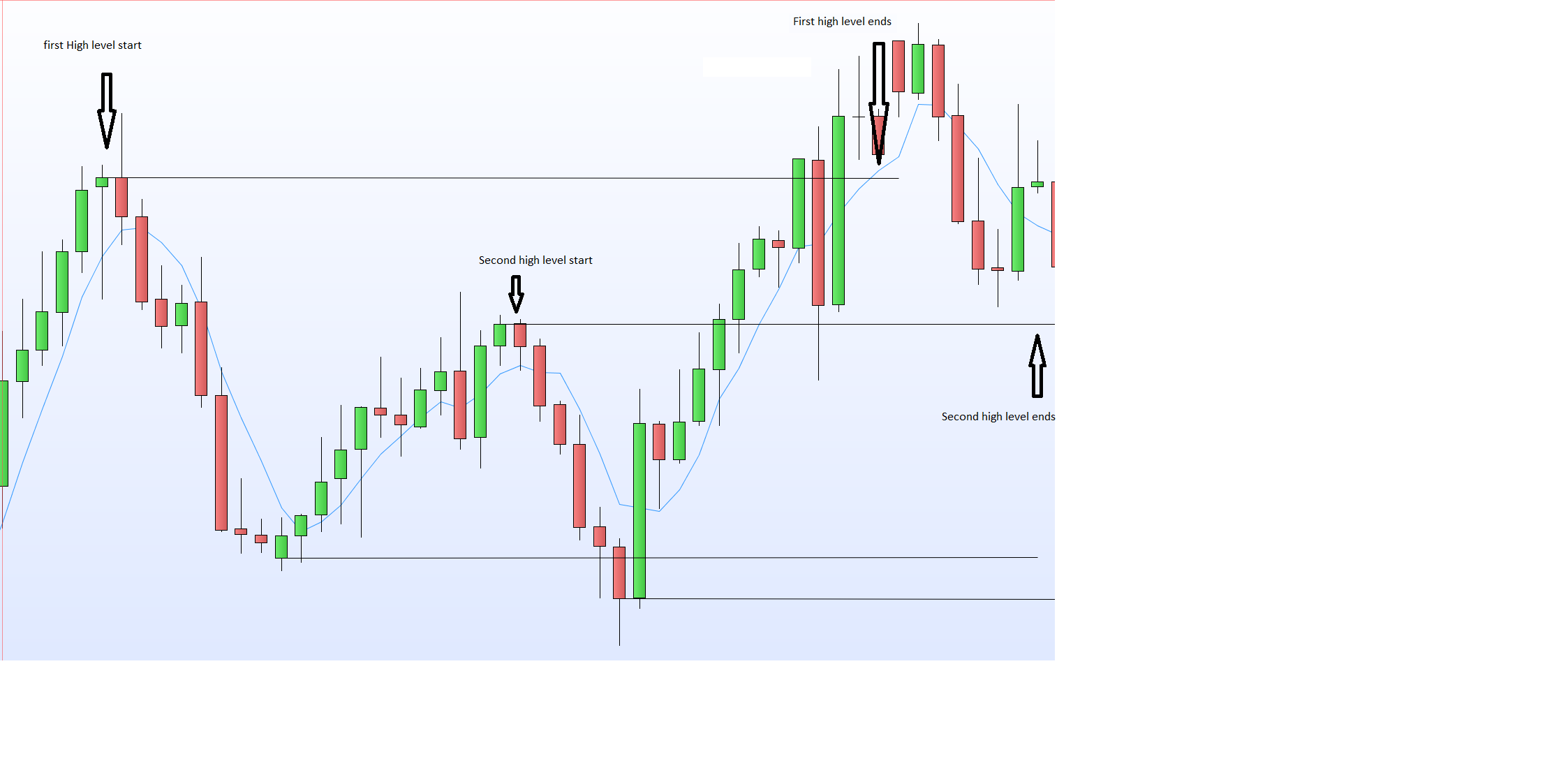
    However, I made this indicator to visually see if one of my trading idea was worth proceeding with. Now, I am starting to code a system and got stuck directly. My “levels” that are drawn in the indicator is easy to find but I want them to still be there in X bars regardless if a new level forms. That is my problem. The level changes as soon as a new level forms. I tried to have a counter and I tried barindex, but I just cant get it to work. My basic code for the level is copied here as well as a picture of the levels from the indicator.


    MA =  average[1](close)
    
    slack =0.1
    
    first1 =MA[10] < MA[5]// >Averagetruerange[10]*1
    second1 = MA[5] - MA >Averagetruerange[10]
    IF first1 and second1 then
    HI1=Highest[10](close)+Averagetruerange[10]*Slack
    endif
    Levels.png Levels.png
    #105579 quote
    robertogozzi
    Moderator
    Master

    We need thw full working code to be of some help.

    #105608 quote
    PastaPesto
    Participant
    Veteran

    Hi Roberto,

    Thank you for your reply. I understand, I will try to do something about that this week. The thing is, my code doesnt work :), but I will do as much as I can and then hopefully you can help me to get further. I will also attach my indicator file. As always, thank you for your prompt respond! I wouldnt have got a single system without your help.

    Nicolas thanked this post
Viewing 6 posts - 1 through 6 (of 6 total)

  • You must be logged in to reply to this topic.

Specific length on Drawhline


ProBuilder: Indicators & Custom Tools

New Reply
Author
author-avatar
PastaPesto @pastapesto Participant
Summary

This topic contains 5 replies,
has 3 voices, and was last updated by PastaPesto
6 years, 5 months ago.

Topic Details
Forum: ProBuilder: Indicators & Custom Tools
Language: English
Started: 08/22/2019
Status: Active
Attachments: 1 files
Logo Logo
Loading...