Hi,
I wolud like to kno how to sort the proscrener by order of appearance.
Thanks
If you don’t add any criterion, data should be returned as is.
Just write:
Screener[MyCond]
tHanks Roberto,
I do not have any condition and it does not appear vyappearance.
Any idea will be apreciated, It is very difficult to know wich one appeared last.
Thanks in advance
If you have set no conditions then you’ll get all (first 50 on demo accounts and 100 on real accounts).
I can’t be of more help without reading the code.
When the market/instruments you selected are scanned they are displayed as they are scanned, to sort then you’ll have to click on anyone of the tabs in the upper bare (Name, Max, Min,….). If you do not click any sort order they will be displayed in order of appearence.
RSI , RSIhigh , RSIlow, ignored = CALL "Marcara hi"
RSIl , ignored , ignored, ignored = CALL "Marcara Lo"
c1 = (RSI CROSSES OVER RSIhigh and RSIl > 0 )
c2 = (RSI CROSSES UNDER RSIlow and RSIl < 0 )
c3 = (RSI[1] CROSSES OVER RSIhigh[1] and RSIl > 0 )
c4 = (RSI[1] CROSSES UNDER RSIlow[1]and RSIl < 0 )
c5 = (RSI[2] CROSSES OVER RSIhigh[2] and RSI > RSIhigh and RSIl > 0 and RSIl[2] <= 0 )
c6 = (RSI[2] CROSSES UNDER RSIlow[2] and RSI < RSIhigh and RSIl < 0 and RSIl[2] >= 0 )
c7 = (RSI[3] CROSSES OVER RSIhigh[3] and RSI > RSIhigh and RSIl > 0 and RSIl[2] <= 0 )
c8 = (RSI[3] CROSSES UNDER RSIlow[3] and RSI < RSIhigh and RSIl < 0 and RSIl[2] >= 0 )
c9 = (RSI[4] CROSSES OVER RSIhigh[4] and RSI > RSIhigh and RSIl > 0 and RSIl[2] <= 0 )
c10 = (RSI[4] CROSSES UNDER RSIlow[4] and RSI < RSIhigh and RSIl < 0 and RSIl[2] >= 0 )
c11 = (RSI[5] CROSSES OVER RSIhigh[5] and RSI > RSIhigh and RSIl > 0 and RSIl[2] <= 0)
c12 = (RSI[5] CROSSES UNDER RSIlow[5] and RSI < RSIhigh and RSIl < 0 and RSIl[2] >= 0)
c13 = (RSI[6] CROSSES OVER RSIhigh[6] and RSI > RSIhigh and RSIl > 0 and RSIl[2] <= 0)
c14 = (RSI[6] CROSSES UNDER RSIlow[6] and RSI < RSIhigh and RSIl < 0 and RSIl[2] >= 0)
SCREENER [c1 or c2 or c3 or c4 or c5 or c6 or c7 or c8 or c9 or c10 or c11 or c12 or c13 or c14]
The code is very simple, It s a custom indicator as you can see. The results do not appear by appearance. I did not click any column to order. Any idea?
Thanks in advance
I cannot replicate your screener, but it is not necessary.
I tried this screener:
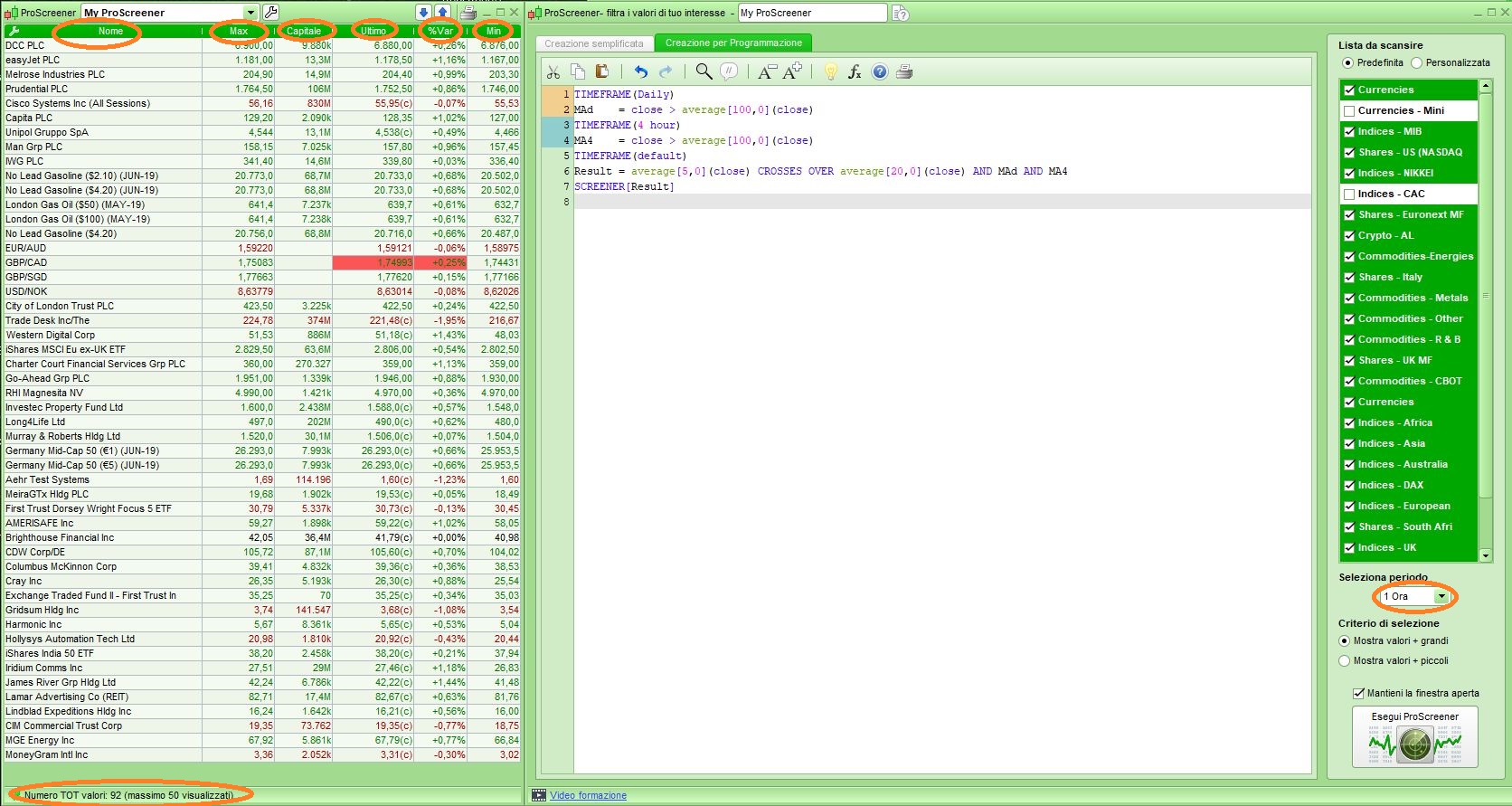
TIMEFRAME(Daily)
MAd = close > average[100,0](close)
TIMEFRAME(4 hour)
MA4 = close > average[100,0](close)
TIMEFRAME(default)
Result = average[5,0](close) CROSSES OVER average[20,0](close) AND MAd AND MA4
SCREENER[Result]
and it works as expected. From my attached pic you can see that 50 results, out of 83, have been displayed in order of appearence, as they are scanned. No sorting has been processed.
Hi,
You can not check an static result.
In my screener once a new result is found it can appear in any positon, It is not the last or the first, I am following this indicator and It always hapen, I hear the proscreener alert sound and then I see the highlited new item, and every time it appears whatever, you never know.
I think scanned items change every time a scanning occurs, so it’s impossible to hold the same position!
If 30 instruments are returned and the next scan they are 37 or 25, this will necessarily affect the previous positions.
Could you not include / sort by date / time so that the most recent addition to the screener hits could appear at the top of the column?
Thank you very much. So I guess the code is ¿?:
SCREENER [c1] order by time
I’ll try and follw it and I’ll let you know.
Hi,
I have trying sort by time and It seems that it works sometimes, I did not find out what is doing.
Many thanks