Shortcut for Chart Style ?

Viewing 3 posts - 1 through 3 (of 3 total)

  • Author
    Posts
  • #171058 quote
    Adriano250
    Participant
    New

    Hi guys

    Could someone help me with a workflow on how i can quickly change chart price style.

    Generally i use Candlestick but i would like to be able to quickly see the Heikin-Ashi chart. Is creating two templates the only way to do it ?

    #171064 quote
    GraHal
    Participant
    Master

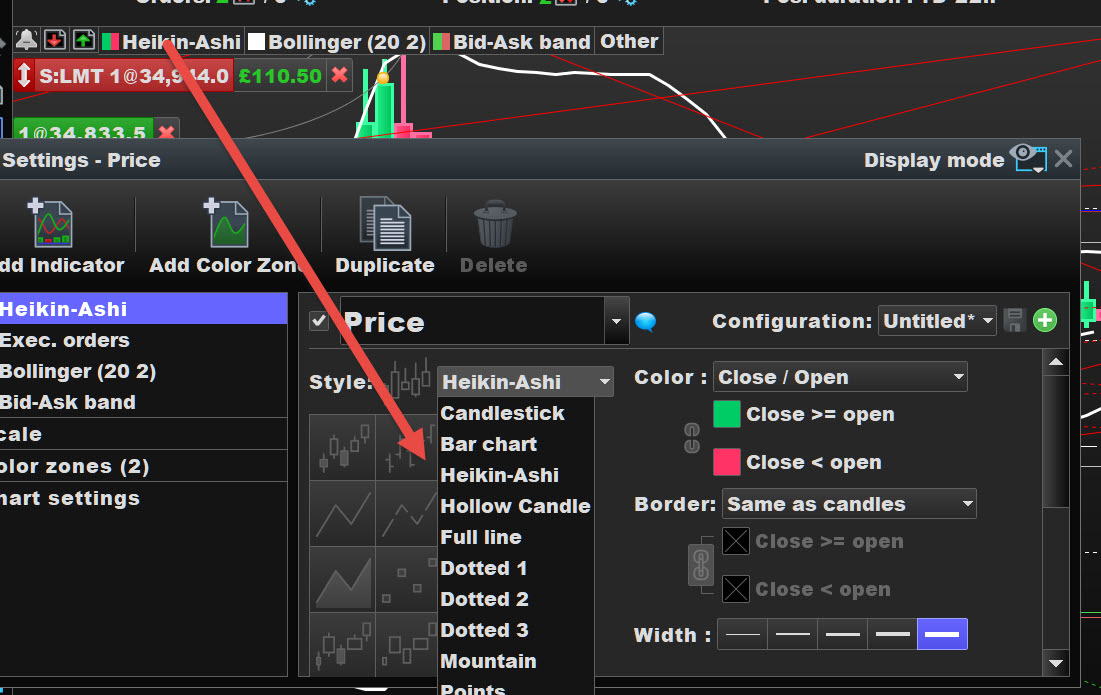
    If you have 3 seconds than it is easy to switch … right click > configure at start of red arrow and then click on the arrowhead to change bar type.

    If you need to see both at same time then duplicate the Chart, then unlink the duplicate from the Template Chart then select HA on one Chart and Candlestick on the other Chart.

    Adriano250 thanked this post
    HA.jpg HA.jpg
    #171102 quote
    Adriano250
    Participant
    New

    Thank you.

    I actually ended up putting one candlestick, one heikin-ashi price indicator on the chart, then hiding one showing the other and vice versa.

Viewing 3 posts - 1 through 3 (of 3 total)
  • You must be logged in to reply to this topic.

Shortcut for Chart Style ?


Platform Support: Charts, Data & Broker Setup

New Reply
Author
author-avatar
Adriano250 @adriano250 Participant
Summary

This topic contains 2 replies,
has 2 voices, and was last updated by Adriano250
4 years, 8 months ago.

Topic Details
Forum: Platform Support: Charts, Data & Broker Setup
Language: English
Started: 06/03/2021
Status: Active
Attachments: 1 files
Logo Logo
Loading...