setting stop and target at bar high and low

Viewing 7 posts - 1 through 7 (of 7 total)

  • Author
    Posts
  • #100010 quote
    Jaldidee
    Participant
    Average

    Hello everybody,

    I am fairly new at programming my own trading codes. I recently finished the advanced programming course and i am starting to program my first (simple) codes.

    I have run into a problem with setting my stop and target at de previous bar and low.

    What I want to achieve is that when a insidebar appears in a strong trend a order is put in.

    The entrypoint is the previous bar high(high[1] (this i already accomplished!)

    The stoploss is at the previous bar low (low[1]). (this also now works in the following code thanks to this forum)

    The target I want to set at two times the difference between the bar high and bar low so I get a R:R of 1:2.

    once mystop = 1
    //once mytarget = 1
    
    var1 = ExponentialAverage[20](close)>= ExponentialAverage[100](close)
    var2 = High[0] < High[1]
    var3 = Low[0] > Low[1]
    
    // Conditions to enter long positions
    
    IF var1 AND var2 AND var3 AND not daysForbiddenEntry THEN
    BUY 1 CONTRACT AT HIGH[1] STOP
    mystop = low[1]
    //mytarget = high[1] + (2*(high[1]-low[1]))
    ENDIF
    
    sell at mystopbull stop
    //sell at mytarget stop

    Hope someone can help me.


    Kind Regards,


    Jaldidee

    #100227 quote
    Vonasi
    Moderator
    Master

    Change the last line from STOP to LIMIT

     
    var1 = ExponentialAverage[20](close)>= ExponentialAverage[100](close)
    var2 = High[0] < High[1]
    var3 = Low[0] > Low[1]
     
    // Conditions to enter long positions
     
    IF not onmarket and var1 AND var2 AND var3 AND not daysForbiddenEntry THEN
    BUY 1 CONTRACT AT HIGH[1] STOP
    mystop = low[1]
    mytarget = high[1] + (2*(high[1]-low[1]))
    sell at mystopbull stop 
    sell at mytarget limit
    ENDIF
     
    if onmarket then
    sell at mystopbull stop
    sell at mytarget limit
    endif

    I’ve added a IF NOT ONMARKET condition as otherwise the stop and limit values could change after you have opened a position. This does however mean that you can not have cumulating positions.

    #100246 quote
    GraHal
    Participant
    Master

    Above code added to here

    Snippet Link Library

    #100251 quote
    Jaldidee
    Participant
    Average

    Hello Vonasi,

    Thanks for your reply. I tested your changes and it works perfectly now.

    Thanks alot.

    #100255 quote
    Barney
    Participant
    Senior

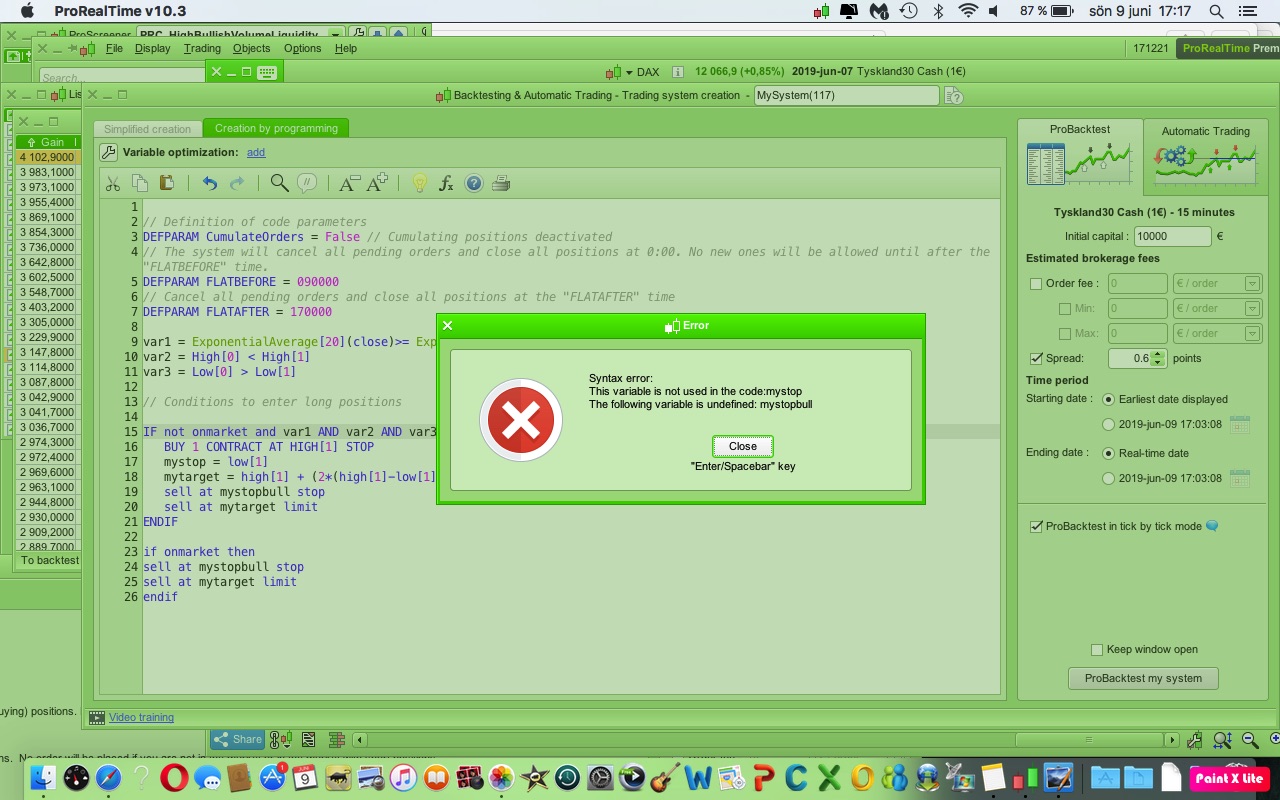
    Hmmm.


    When i tested the code it look like this?

    9jun.jpg 9jun.jpg
    #100266 quote
    GraHal
    Participant
    Master

    Yeah I noted that … it needs below as Line 9?

    Vonasi must not have had his coffees! 🙂

    Oh no it was 6:52 PM … he must have started on the beers early … well it is Sunday and he had been travelling for days! 🙂

    9    mystopbull = low[1]
    #100267 quote
    Jaldidee
    Participant
    Average

    Hello Guys,

    Grahal is right. The inconsistency was in difference between mystop and mystopbull (has to be the same offcourse!).

    Underneath I complemented the code now with also the conditions for short positions.

    var1 = ExponentialAverage[20](close)>= ExponentialAverage[100](close)
    var2 = High[0] < High[1]
    var3 = Low[0] > Low[1]
    var4 = ExponentialAverage[20](close)<= ExponentialAverage[100](close)
     
    // Conditions to enter long positions
     
    IF not onmarket and var1 AND var2 AND var3 AND not daysForbiddenEntry THEN
    BUY 1 CONTRACT AT HIGH[1] STOP
    mystoplong = low[1]
    mytargetlong = high[1] + (2*(high[1]-low[1]))
    ENDIF
     
    if onmarket then
    sell at mystoplong stop
    sell at mytargetlong limit
    endif
    
    //conditions to enter short positions
    IF not onmarket and var4 AND var2 AND var3 AND not daysForbiddenEntry THEN
    SELLSHORT 1 CONTRACT AT LOW[1] STOP
    mystopshort = high[1]
    mytargetshort = low[1]-(2*(high[1]-low[1]))
    ENDIF
     
    if onmarket then
    exitshort at mystopshort stop
    exitshort at mytargetshort limit
    endif
    GraHal and Nicolas thanked this post
Viewing 7 posts - 1 through 7 (of 7 total)

  • You must be logged in to reply to this topic.

setting stop and target at bar high and low


ProOrder: Automated Strategies & Backtesting

New Reply
Author
author-avatar
Jaldidee @jaldidee Participant
Summary

This topic contains 6 replies,
has 4 voices, and was last updated by Jaldidee

6 years, 8 months ago.

Topic Details
Forum: ProOrder: Automated Strategies & Backtesting
Language: English
Started: 06/05/2019
Status: Active
Attachments: 1 files
Logo Logo
Loading...