setting stop and target at bar high and low

Viewing 7 posts - 1 through 7 (of 7 total)

  • Author
    Posts
  • #100010 quote
    JaldideeJaldidee
    Participant
    Average

    Hello everybody,

    I am fairly new at programming my own trading codes. I recently finished the advanced programming course and i am starting to program my first (simple) codes.

    I have run into a problem with setting my stop and target at de previous bar and low.

    What I want to achieve is that when a insidebar appears in a strong trend a order is put in.

    The entrypoint is the previous bar high(high[1] (this i already accomplished!)

    The stoploss is at the previous bar low (low[1]). (this also now works in the following code thanks to this forum)

    The target I want to set at two times the difference between the bar high and bar low so I get a R:R of 1:2.

    once mystop = 1
    //once mytarget = 1
    
    var1 = ExponentialAverage[20](close)>= ExponentialAverage[100](close)
    var2 = High[0] < High[1]
    var3 = Low[0] > Low[1]
    
    // Conditions to enter long positions
    
    IF var1 AND var2 AND var3 AND not daysForbiddenEntry THEN
    BUY 1 CONTRACT AT HIGH[1] STOP
    mystop = low[1]
    //mytarget = high[1] + (2*(high[1]-low[1]))
    ENDIF
    
    sell at mystopbull stop
    //sell at mytarget stop

    Hope someone can help me.


    Kind Regards,


    Jaldidee

    #100227 quote
    VonasiVonasi
    Moderator
    Master

    Change the last line from STOP to LIMIT

     
    var1 = ExponentialAverage[20](close)>= ExponentialAverage[100](close)
    var2 = High[0] < High[1]
    var3 = Low[0] > Low[1]
     
    // Conditions to enter long positions
     
    IF not onmarket and var1 AND var2 AND var3 AND not daysForbiddenEntry THEN
    BUY 1 CONTRACT AT HIGH[1] STOP
    mystop = low[1]
    mytarget = high[1] + (2*(high[1]-low[1]))
    sell at mystopbull stop 
    sell at mytarget limit
    ENDIF
     
    if onmarket then
    sell at mystopbull stop
    sell at mytarget limit
    endif

    I’ve added a IF NOT ONMARKET condition as otherwise the stop and limit values could change after you have opened a position. This does however mean that you can not have cumulating positions.

    #100246 quote
    GraHalGraHal
    Participant
    Master

    Above code added to here Snippet Link Library

    #100251 quote
    JaldideeJaldidee
    Participant
    Average

    Hello Vonasi,

    Thanks for your reply. I tested your changes and it works perfectly now.

    Thanks alot.

    #100255 quote
    BarneyBarney
    Participant
    Senior

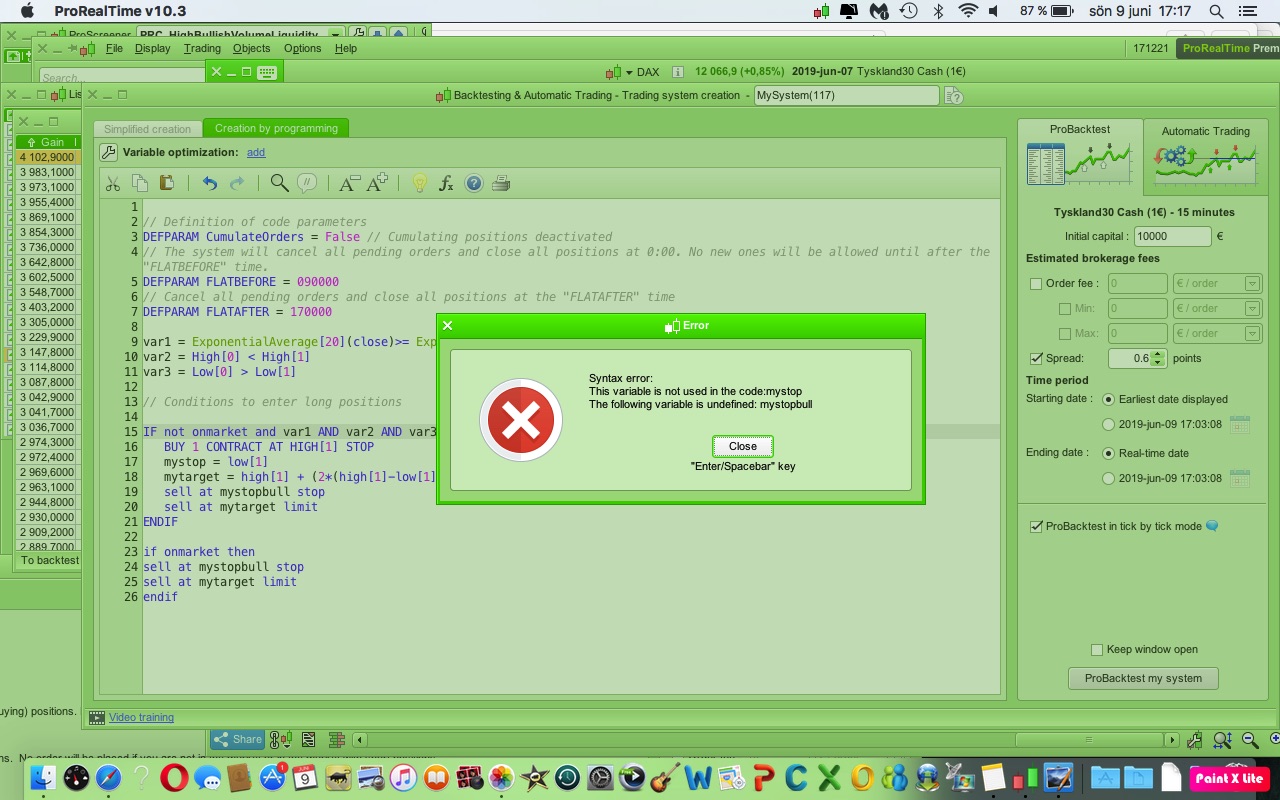
    Hmmm.


    When i tested the code it look like this?

    9jun.jpg 9jun.jpg
    #100266 quote
    GraHalGraHal
    Participant
    Master

    Yeah I noted that … it needs below as Line 9?

    Vonasi must not have had his coffees! 🙂

    Oh no it was 6:52 PM … he must have started on the beers early … well it is Sunday and he had been travelling for days! 🙂

    9    mystopbull = low[1]
    #100267 quote
    JaldideeJaldidee
    Participant
    Average

    Hello Guys,

    Grahal is right. The inconsistency was in difference between mystop and mystopbull (has to be the same offcourse!).

    Underneath I complemented the code now with also the conditions for short positions.

    var1 = ExponentialAverage[20](close)>= ExponentialAverage[100](close)
    var2 = High[0] < High[1]
    var3 = Low[0] > Low[1]
    var4 = ExponentialAverage[20](close)<= ExponentialAverage[100](close)
     
    // Conditions to enter long positions
     
    IF not onmarket and var1 AND var2 AND var3 AND not daysForbiddenEntry THEN
    BUY 1 CONTRACT AT HIGH[1] STOP
    mystoplong = low[1]
    mytargetlong = high[1] + (2*(high[1]-low[1]))
    ENDIF
     
    if onmarket then
    sell at mystoplong stop
    sell at mytargetlong limit
    endif
    
    //conditions to enter short positions
    IF not onmarket and var4 AND var2 AND var3 AND not daysForbiddenEntry THEN
    SELLSHORT 1 CONTRACT AT LOW[1] STOP
    mystopshort = high[1]
    mytargetshort = low[1]-(2*(high[1]-low[1]))
    ENDIF
     
    if onmarket then
    exitshort at mystopshort stop
    exitshort at mytargetshort limit
    endif
    GraHal and Nicolas thanked this post
Viewing 7 posts - 1 through 7 (of 7 total)

  • You must be logged in to reply to this topic.

ProRealAI ProRealAI New

Stuck on this ProBuilder code?

Describe what this topic is trying to build, in plain English, and ProRealAI writes the ProRealTime™ indicator, screener or system for you.

Available in 7 languages
Try ProRealAI

setting stop and target at bar high and low


ProOrder: Automated Strategies & Backtesting

New Reply
Author
author-avatar
Jaldidee @jaldidee Participant
Summary

This topic contains 6 replies,
has 4 voices, and was last updated by JaldideeJaldidee

7 years, 3 months ago.

Topic Details
Forum: ProOrder: Automated Strategies & Backtesting
Language: English
Started: 06/05/2019
Status: Active
Attachments: 1 files
ProRealCode ProRealCode
Loading...