Sessione asiatica

Viewing 10 posts - 1 through 10 (of 10 total)

  • Author
    Posts
  • #233908 quote
    figu92
    Participant
    New

    Ciao a tutti,

    mi piacerebbe avere visibile sui grafici da h1 in giù, un rettangolo che mi indichi massimo e minimo fatto tra la 1 di notte e le 8 del mattino.

    E’ possibile?


    Grazie a tutti

    #233924 quote
    JS
    Participant
    Senior

    Ciao @figu92

    Prova questo…

    StartTime=010000
    EndTime=080000
     
    if IntraDayBarIndex=0 then
    hh=0
    ll=0
    Draw=0
    endif
     
    if OpenTime=StartTime then
    StartBar=BarIndex
    endif
     
    if OpenTime=EndTime then
    EndBar=BarIndex
    endif
     
    if Time>=StartTime and Time<=EndTime then
    if High>hh then
    hh=High
    endif
    if Low<ll or ll=0 then
    ll=Low
    endif
    endif
    
    n=Round(SQRT(GetTimeFrame))/4 //Only for style
    
    if Time>endtime and Draw=0 then
    drawrectangle(StartBar,hh,EndBar,ll)Coloured("Red")
    DrawText("High=#HH#",(StartBar+EndBar)/2,HH+n,SansSerif,Bold,16)Coloured("Green")
    DrawText("Low=#LL#",(StartBar+EndBar)/2,LL-n,SansSerif,Bold,16)Coloured("Red")
    Draw=1
    endif
     
    RETURN
    #233930 quote
    figu92
    Participant
    New
    Ottimo, grazie. Sarebbe perfetto se il rettangolo fosse riempito di colore giallo molto chiaro (quasi trasparente) e il font massimo minimo fosse più piccolo oppure toglierlo proprio.   Grazie ancora 🙏
    #233932 quote
    JS
    Participant
    Senior

    Ciao @figu92

    Ecco la versione modificata…

    È possibile regolare la dimensione del testo aumentando o diminuendo il numero 16:

    DrawText(“High=#HH#”,(StartBar+EndBar)/2,HH+n,SansSerif,Bold,16)Coloured(“Green”)

    È possibile disabilitare del tutto i testi mettendo un “//” davanti ad essi:

    //DrawText(“High=#HH#”,(StartBar+EndBar)/2,HH+n,SansSerif,Bold,16)Coloured(“Green”)

     
    StartTime=010000
    EndTime=080000
     
    if IntraDayBarIndex=0 then
    hh=0
    ll=0
    Draw=0
    endif
     
    if OpenTime=StartTime then
    StartBar=BarIndex
    endif
     
    if OpenTime=EndTime then
    EndBar=BarIndex
    endif
     
    if Time>=StartTime and Time<=EndTime then
    if High>hh then
    hh=High
    endif
    if Low<ll or ll=0 then
    ll=Low
    endif
    endif
    
    n=Round(SQRT(GetTimeFrame))/4 //Only for style
    
    if Time>endtime and Draw=0 then
    drawrectangle(StartBar,hh,EndBar,ll) FillColor(255,255,0,20)
    DrawText("High=#HH#",(StartBar+EndBar)/2,HH+n,SansSerif,Bold,12)Coloured("Green")
    DrawText("Low=#LL#",(StartBar+EndBar)/2,LL-n,SansSerif,Bold,12)Coloured("Red")
    Draw=1
    endif
     
    RETURN
    
    #233935 quote
    JS
    Participant
    Senior
    Se si desidera impostare ulteriormente la trasparenza, è possibile modificare l’ultima cifra di FillColor(255,255,0,20)…
    #233941 quote
    figu92
    Participant
    New
    Così è perfetto. Grazie infinite 🙏🙂
    #233943 quote
    figu92
    Participant
    New
    Ultima richiesta: è possibile visualizzare questo indicatore solo nei timeframe da m1 a h1? Evitando così la confusione su timeframe alti. Grazie ancora
    #233946 quote
    JS
    Participant
    Senior

    I tempi nell’indicatore sono in ore (010000 e 080000), quindi l’intervallo di tempo utilizzato deve essere di almeno 1 ora e tutti gli intervalli di tempo inferiori a 1 ora… (ad esempio: 1 secondo, 1 minuto, 5 minuti, …)

    #234019 quote
    figu92
    Participant
    New
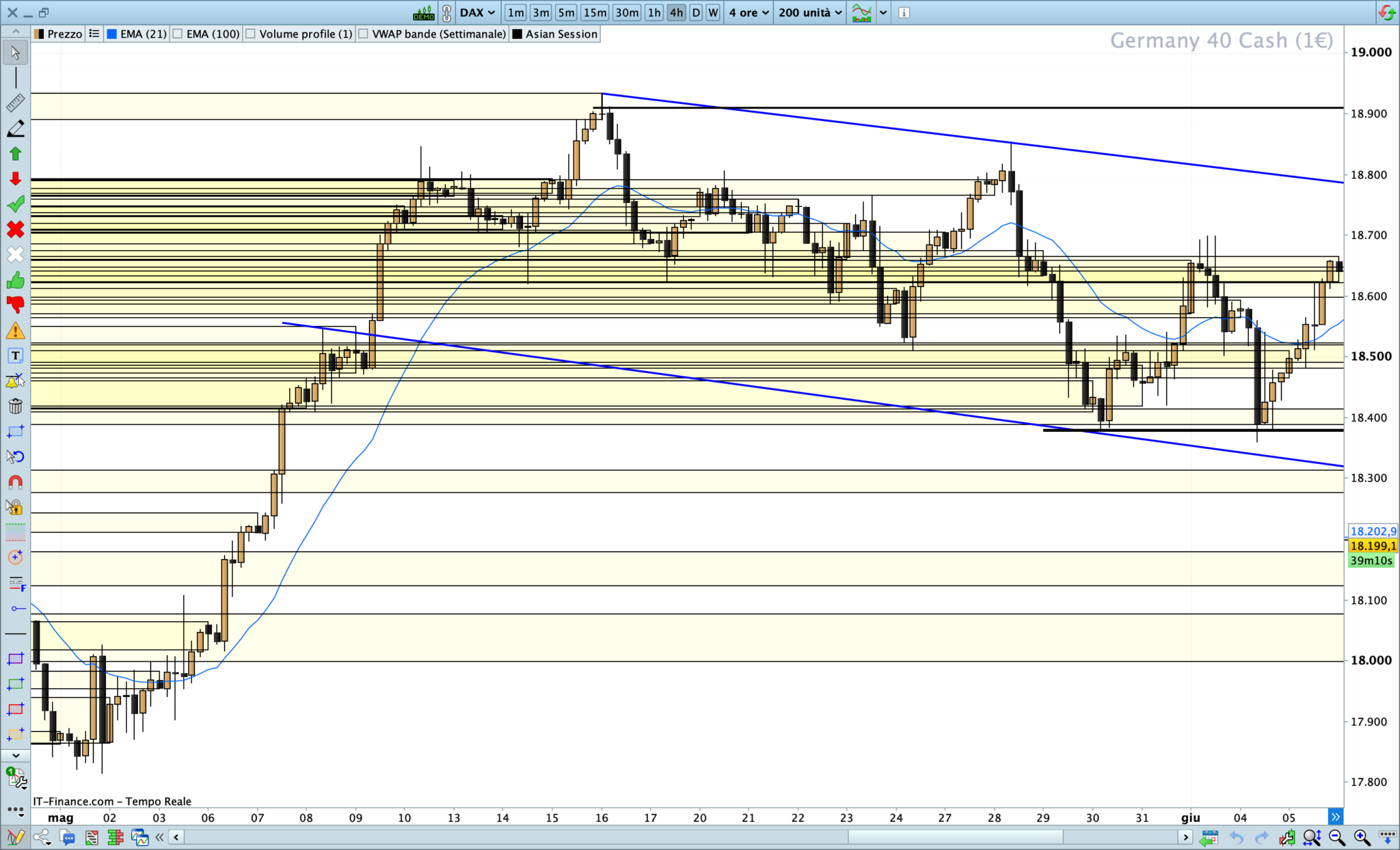
    Intanto ti ringrazio per la spiegazione e il codice che mi aiuta tantissimo. Riguardo quello che ti volevo dire, se con l’indicatore attivato vado su timeframe come h4 (quindi maggiore di h1) il grafico diventa confusionario (ti mando l’immagine qui in allegato). Quindi quello che ti chiedo è: è possibile visualizzare la sessione asiatica solo su timeframe uguali o minori a h1?   Grazie ancora
    #234028 quote
    JS
    Participant
    Senior

    Esatto, puoi utilizzare l’indicatore solo con un intervallo di tempo di 1 ora e tutti gli intervalli di tempo inferiori a 1 ora…

Viewing 10 posts - 1 through 10 (of 10 total)
  • You must be logged in to reply to this topic.

Sessione asiatica


ProBuilder: Indicatori & Strumenti Personalizzati

New Reply
Author
author-avatar
figu92 @figu92 Participant
Summary

This topic contains 9 replies,
has 2 voices, and was last updated by JS

1 year, 7 months ago.

Topic Details
Forum: ProBuilder: Indicatori & Strumenti Personalizzati
Language: Italian
Started: 06/16/2024
Status: Active
Attachments: 3 files
Logo Logo
Loading...