Hello,
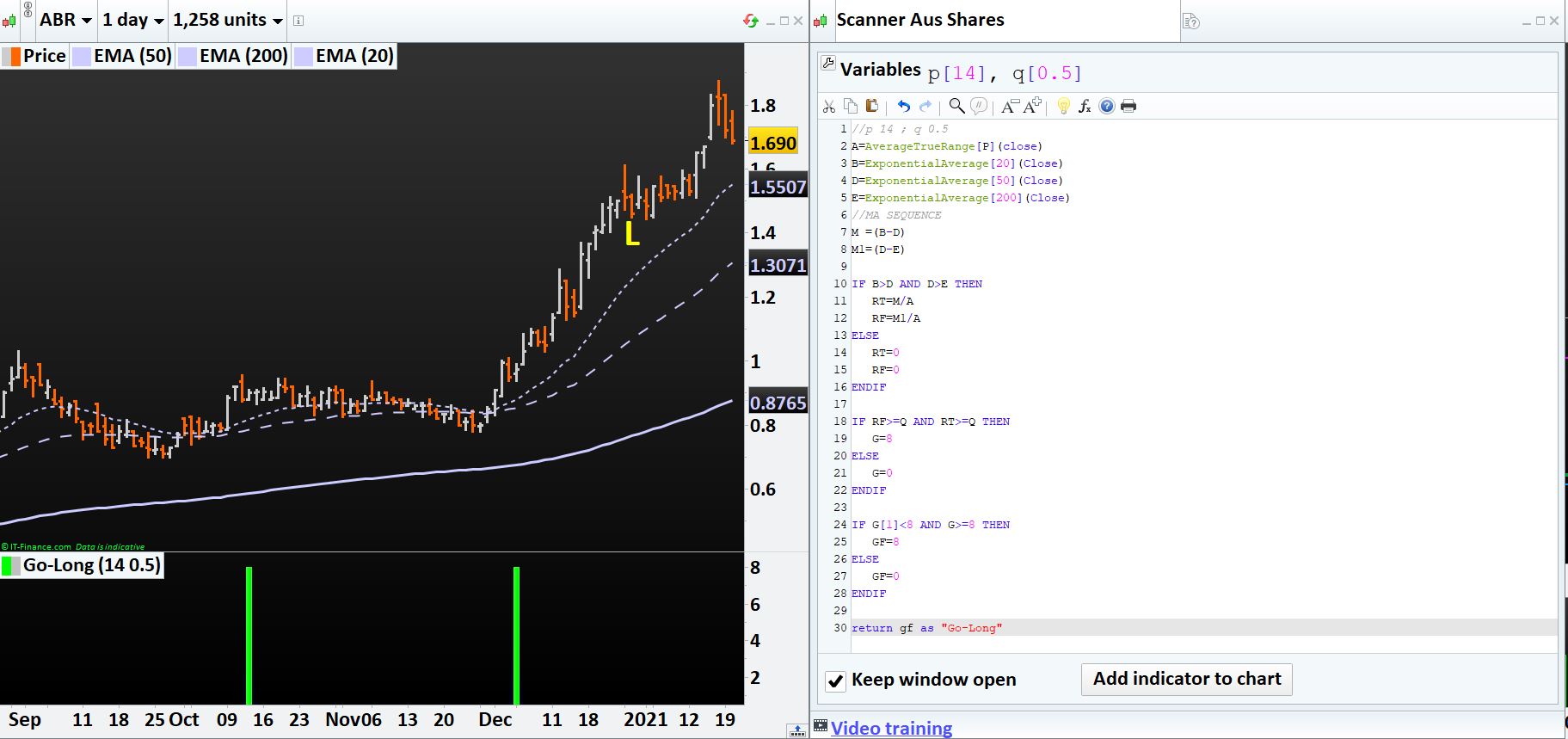
This is a useful scanner of stocks ready to rise. It is working in indicator mode but not in Scanning. Any idea why?
Regards,
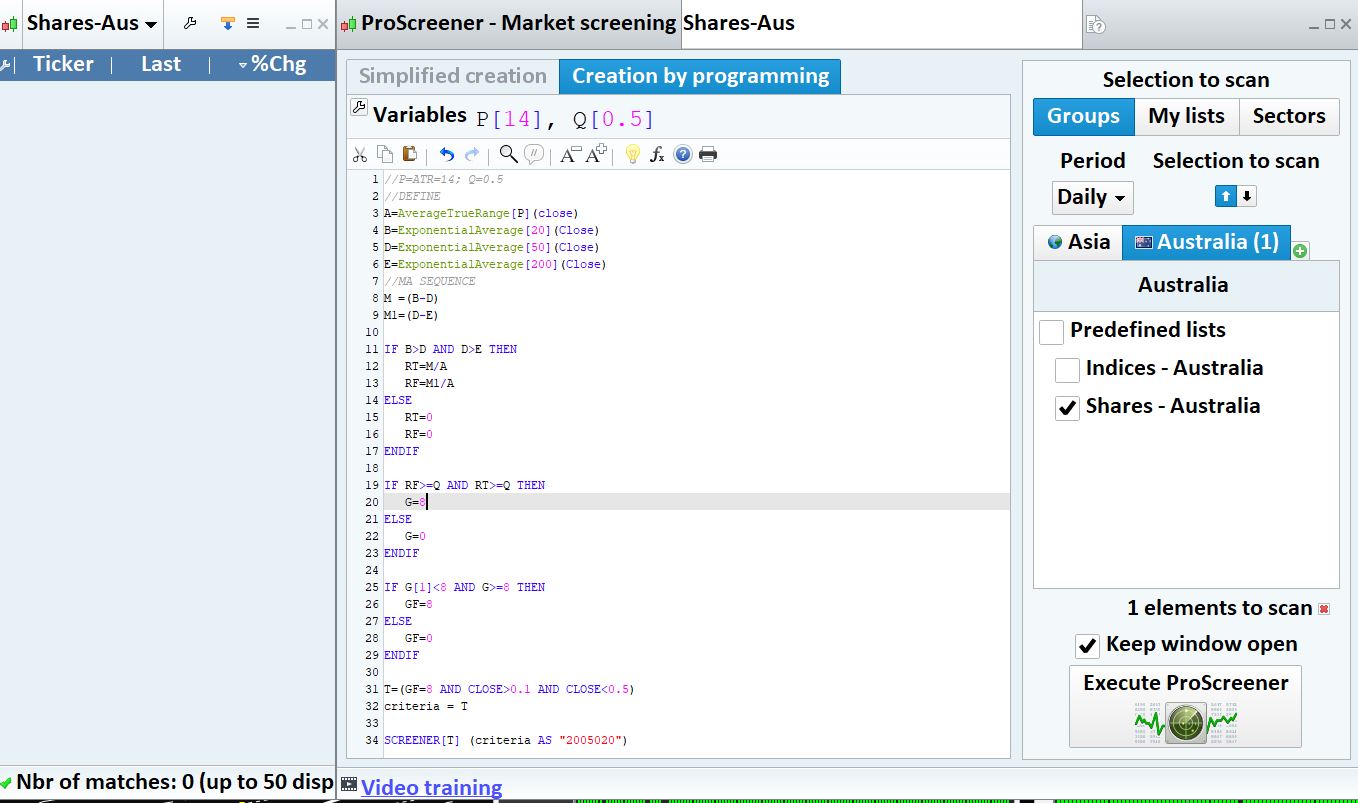
//P=ATR=14; Q=0.5
//DEFINE
A=AverageTrueRange[P](close)
B=ExponentialAverage[20](Close)
D=ExponentialAverage[50](Close)
E=ExponentialAverage[200](Close)
//MA SEQUENCE
M =(B-D)
M1=(D-E)

IF B>D AND D>E THEN
RT=M/A
RF=M1/A
ELSE
RT=0
RF=0
ENDIF

IF RF>=Q AND RT>=Q THEN
G=8
ELSE
G=0
ENDIF

IF G[1]<8 AND G>=8 THEN
GF=8
ELSE
GF=0
ENDIF

T=(GF=8 AND CLOSE>0.1 AND CLOSE<0.5)
criteria = T

SCREENER[T] (criteria AS "2005020")
ProScreener has a 254-lookback bar limit.
It may be that exponential averages need more than their periods to work.
Try using 150 or 100 periods. You can also try to use those periods, but replace exponentialaverage with average, at least for the 200-period one.
Thank you Robert. Even after changing it to 100 it is not working.
If I change the code as enclosed (by removing ”
IF G[1]<8 AND G>=8 THEN
GF=8
ELSE
GF=0
ENDIF
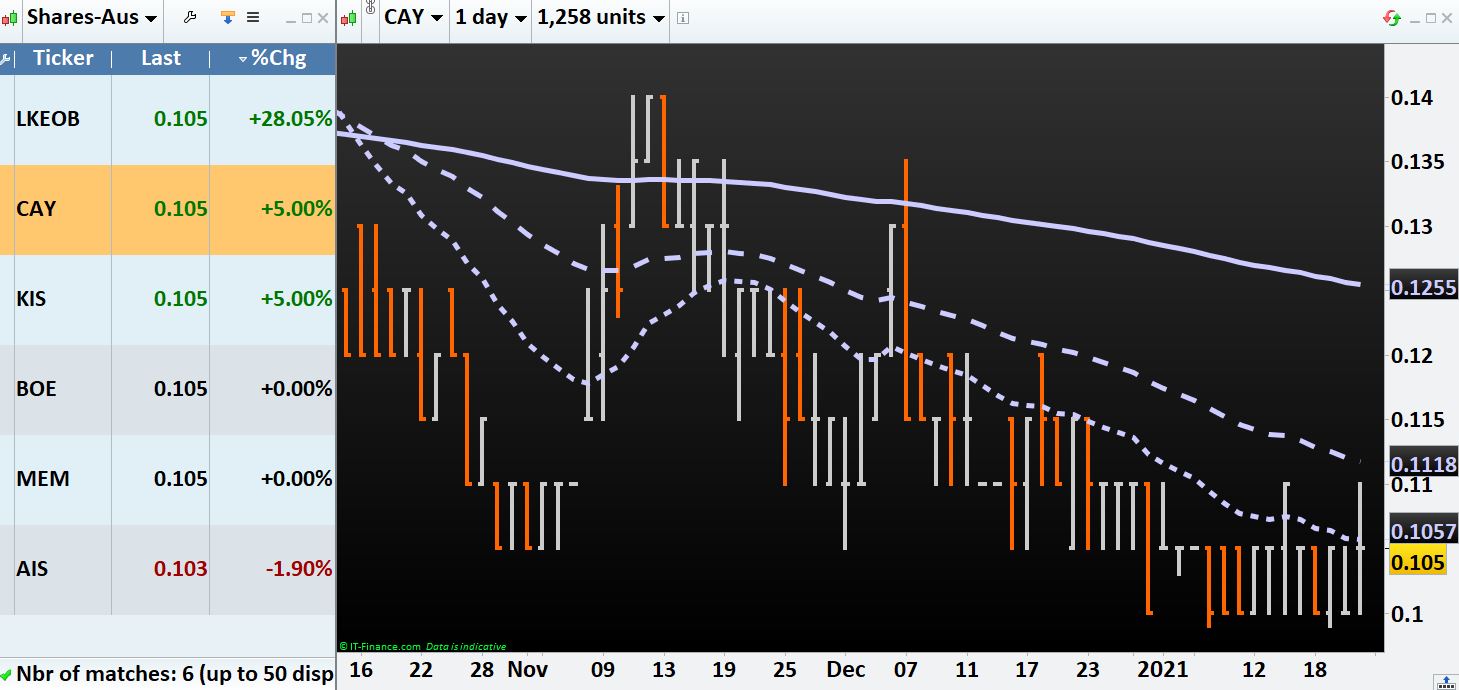
it is showing some reslt although erroneus since it is picking up the stocks (like “CAY” in which EMAs are below and not above 200 EMA
//P=ATR=14; Q=0.5
//DEFINE
A=AverageTrueRange[P](close)
B=ExponentialAverage[20](Close)
D=ExponentialAverage[50](Close)
E=ExponentialAverage[200](Close)
//MA SEQUENCE
M =(B-D)
M1=(D-E)

IF B>D AND D>E THEN
RT=M/A
RF=M1/A
ELSE
RT=0
RF=0
ENDIF

IF RF>=Q AND RT>=Q THEN
G=8
ELSE
G=0
ENDIF
rem
//IF G[1]<8 AND G>=8 THEN
//GF=8
//ELSE
//GF=0
//ENDIF

T=(G=8 AND CLOSE>0.1 AND CLOSE<0.11)
criteria = T

SCREENER[T] (criteria AS "2005020")
) which is not meeting the criteria (IF B>D AND D>E THEN). Any help would be much appreciated.
MODERATORS EDIT: Your post was edited. Always use the ‘Insert PRT Code’ button when posting code.
No, there are many shares within that range. Same result if I increase the limit. Issue is it is screening the wrong ones as well which is not satisfying the criteria.
Is there a fix to this bug please?
In your first post the indicator showed correct results, bu NOT for the current bar, which is what a screener looks for.
Try replacing the last line with:
SCREENER[summation[30](T)](criteria AS "2005020")
to make the screener return TRUE when T is true in any of the last 30 bars.
Thank you Robert for your prompt response. I incorporate your suggesstion however the problem is still there as the screener is showing names of stocks even for which the basic criteria are not satisfied (i.e. IF B>D AND D>E).
It is showing results where even B<D and D<E. This is the problem dear.
Any input will be highly appreciated.
Regards,
It seems to be working correctly.
Try using this strategy to test T:
//P=ATR=14; Q=0.5
//DEFINE
p=14
q=1.5
A=AverageTrueRange[P](close)
B=ExponentialAverage[20](Close)
D=ExponentialAverage[50](Close)
E=ExponentialAverage[200](Close)
//MA SEQUENCE
M =(B-D)
M1=(D-E)

IF B>D AND D>E THEN
RT=M/A
RF=M1/A
ELSE
RT=0
RF=0
ENDIF

IF RF>=Q AND RT>=Q THEN
G=8
ELSE
G=0
ENDIF

IF G[1]<8 AND G>=8 THEN
GF=8
ELSE
GF=0
ENDIF

T=(GF=8 AND CLOSE>0.1 AND CLOSE<0.5)
criteria = T
buy at -close limit
graph T
The logic of the code is not easy to follow at first sight and I didn’t have much time to check any single variable.
If you post the logic of your screener I might be of further help trying to code it differently.
Many thanks Robert. The logic is quite simple as below. I am trying to get the list of stocks that are just lining up for a possible UP move when 3 EMAs are separated by a fixed ratio after crossing each other.
- Identify sequence of exponential moving averages EMA) 20, 50 and 200 for long opportunities only (20 ema (B)> 50 ema (D)> 200 ema (E)).
- Get AverageTrueRange (A) (14 period)
- Divide EMA differences by ATR to get the 2 ratios [RT= (B-D)/A and RF= (D-E)/A].
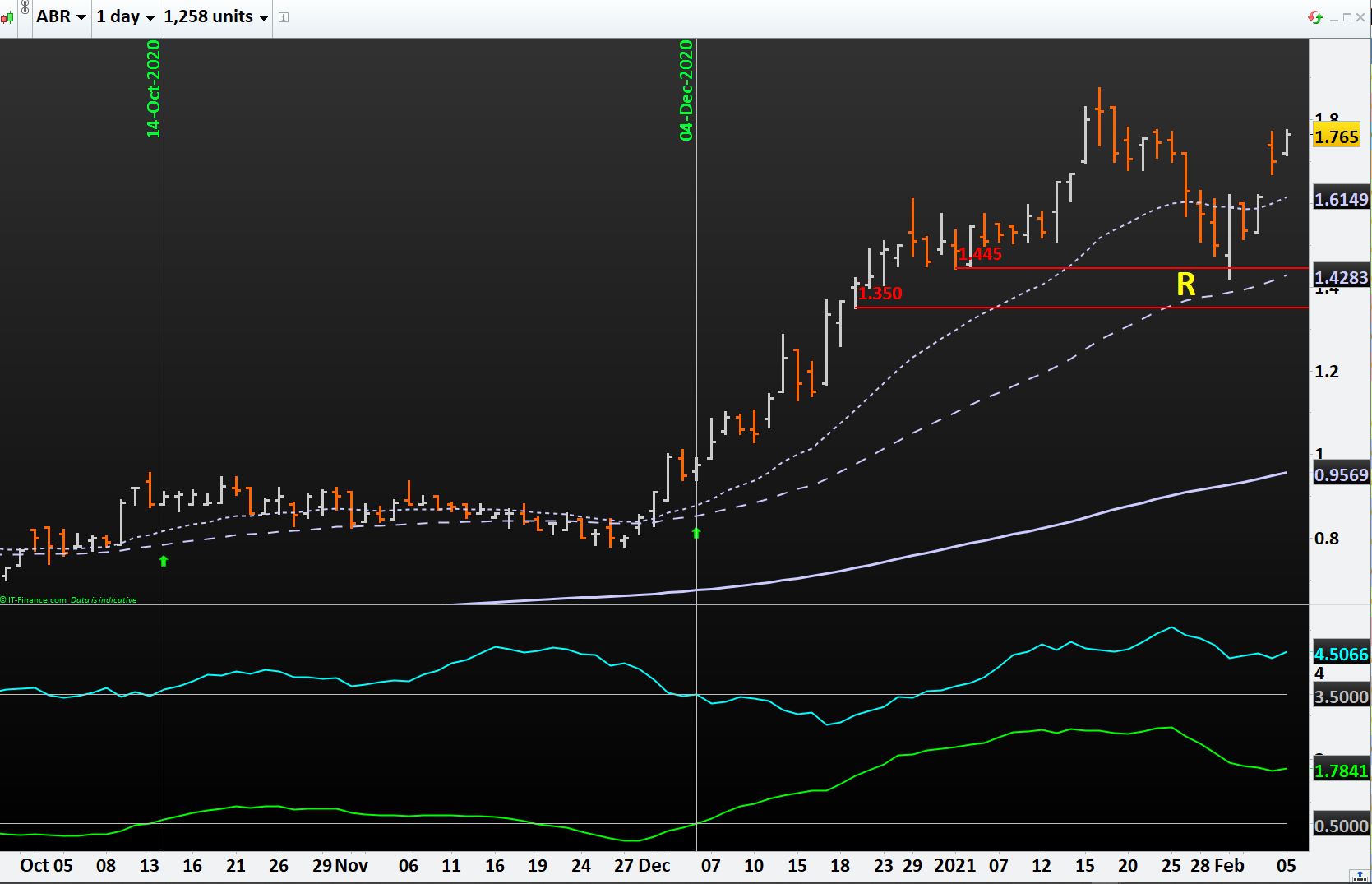
- If these 2 ratios (RT & RF) are >= particular value (say 0.5) for the first time, then screen that stock as shown in the attachment: e,g, ABR.ASX reached these ratios (RT>0.5 and RF>3.5) for the first time on 14.10.2020 and again on 04.12.2020 before moving substantially up.
Trust this helps, else please let me know if you need any other input.
You can try with the below screener code, this is how I interpret your last description:
RTtrigger=0.5
RFtrigger=1

A=AverageTrueRange[14](close)
B=ExponentialAverage[20](Close)
D=ExponentialAverage[50](Close)
E=ExponentialAverage[200](Close)

RT= (B-D)/A
RF= (D-E)/A

test = RT>RTtrigger and RF>RFtrigger
toscan = (test and not test[1])

screener[toscan]
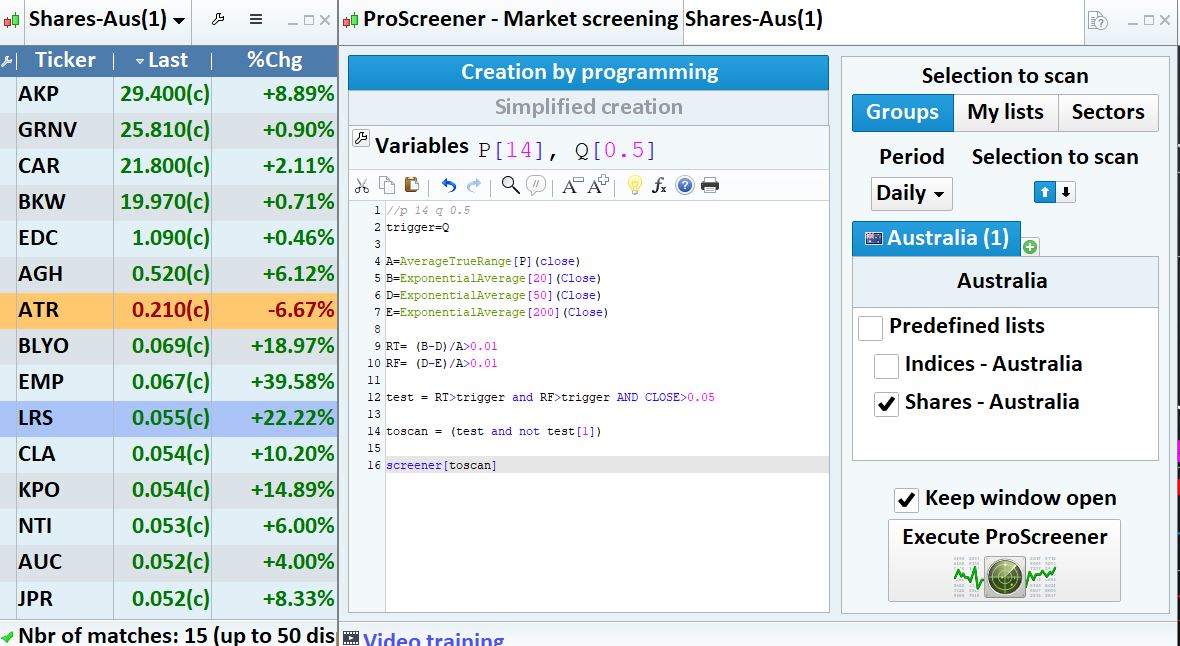
Many thanks Nicolas. You are a genius. I have slightly modified the code as required (enclosed). It is working correctly for shares whose price is more than $1.00 (because RT and RF in these cases are >0.00) , but it is working incorrectly for share value less than $1.00 ((because RT and RF in these cases are = 0.00).
I have modified the code to avoid RT and RF =0 as enclosed but still it is picking them up (e.g. JPR, ATR, BLYO in Shares-Australia). Any idea how to fix it would be much appreciated.
Regards,
//p 14 q 0.5
trigger=Q

A=AverageTrueRange[P](close)
B=ExponentialAverage[20](Close)
D=ExponentialAverage[50](Close)
E=ExponentialAverage[200](Close)

RT= (B-D)/A>0.01
RF= (D-E)/A>0.01

test = RT>trigger and RF>trigger AND CLOSE>0.05

toscan = (test and not test[1])

screener[toscan]