A request that was addressed to ProRealTime:
Hello,
I would like to create a screener that accomplishes the following.
Screener Long:
1. The current closing price is above the 50 day simple moving average.
2. The 50 day simple moving average is higher than 5 days ago.
3. The 20 day simple moving average is above the 50 day simple moving average.
4. The Stochastic [8,3] has to be less than 40. If it then rises by 5 points that’s when I want to get a screener result.
It could be that the Stochastic goes down to 30 (or any number below 40) and then could take only 1 day to increase by 5 points to 35, but it could also take 2 days or 3 days, or theoretically any number of days if the market goes sideways.
Also it could happen that the Stochastic goes down to for example 30, increase by 2 points to 32, then goes down for a few more days to 10 and then takes X number of days to increase by 5 points.*
 // Long-Screener:
 c1 = (close > Average[50](close))
 c2 = (Average[50](close) > Average[50](close)[5])
 c3 = (Average[20](close) > Average[50](close))
 c4 = Stochastic[8,3](close) < 40
 SCREENER[c1 AND c2 AND c3 AND c4] ((close/DClose(1)-1)*100 AS "%Chg yest.")
Suggestion for an anwser:
 //Long-Screener
  avg50=Average[50](close)
  avg20=Average[20](close)
  mystochastic=Stochastic[8,3](close)

  if mystochastic crosses under 40 then
  minvalue=mystochastic
  elsif mystochastic < 40  then
  minvalue=min(minvalue,mystochastic)
  endif

  c1 = (close > avg50)
  c2 = (avg50 > avg50[5])
  c3 = (avg20 > avg50)
  c4 = mystochastic < 40 and mystochastic > minvalue+5

  SCREENER[c1 AND c2 AND c3 AND c4] ((close/DClose(1)-1)*100 AS "%Chg yest.")
Hi Henry,
Thank you for the code.
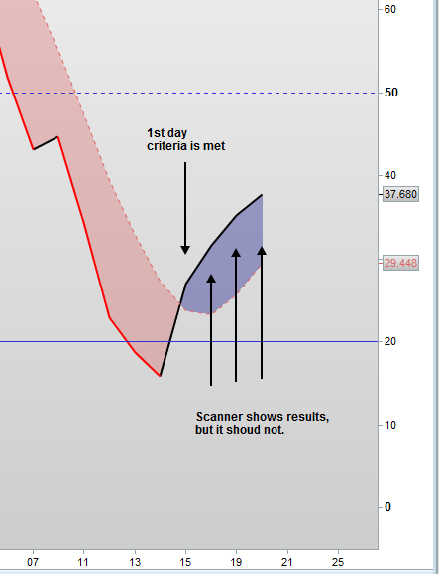
Is it possible to add a condition that only gives you a scanner result on the first time when the Stochastic has gone up by 5 points. This could be after one day or two days or theoretically any number of days it takes to go up by at least 5 points.
Currently the scanner gives a result not only on the first time it has gone up by 5 points but also on the subsequent days, for example when the Stochastic has gone up by 10 points off the low on the second day it also shows up in the results.
Thanks a lot.
Kind regards,
Sascha
Hello geodelsa, a simple solution (maybe?) would be to add a treshold on the c4 condition :
c4 = mystochastic < 40 and mystochastic > minvalue+5 and mystochastic < minvalue+10
As far as I understand your request.
Hi Nicolas,
Thank you for your message.
Unfortunately it’s not a predefined threshold but it’s the time that is the determining factor.
It could take X number of days for the Stochastic to go up by at least 5 points. I only want to have a scanner result on that day when the Stochastic went up by at least 5 points.
I attach a screenshot to clarify it.
On the first day the Stochastic went up from 15.81 to 26.99. This is more than 5 points and it shows up in the scanner results.
After that day I don’t want it to show up again the search results. However over the following 3 days it keeps showing the same stock (HPE).
Hopefully this helps.
Thanks.
Sascha
Hello Sascha,
I changed a bit the conditions of the screener, it filters a lot and I think it may solve your problem:
//Long-Screener
avg50=Average[50](close)
avg20=Average[20](close)
mystochastic=Stochastic[8,3](close)

if mystochastic crosses under 40 then
  minvalue=mystochastic
elsif mystochastic < 40  then
  minvalue=min(minvalue,mystochastic)
endif

c1 = (close > avg50)
c2 = (avg50 > avg50[5])
c3 = (avg20 > avg50)
c4 = mystochastic < 40
c5 = mystochastic > minvalue+5
c6 = mystochastic[1] > minvalue+5

SCREENER[c1 AND c2 AND c3 AND c4 AND c5 AND NOT c6] ((close/DClose(1)-1)*100 AS "%Chg yest.")
Tell me if it’s ok now! Have a good day 🙂
Hi Nicolas,
Thank you for your update of the code. I ran a few checks and it seems it solves the issue.
However there is one case that I didn’t consider initially which is the following.
It can be that the Stochastic drops below 40 let’s say to 38 and then increases by 5 points to 43. This would be acceptable as a result .
So technically if it drops to 39.99 and then goes up over the following days to 44.99 that would be ok.
Would you be able to integrate that in the code?
I think the way it’s currently coded asks for the Stochastic to be below 40 after it has gone up by 5 points.
Thank you so much for your help.
Kind regards,
Sascha
In any cases, the actual screener will give you results that have the c4 condition to be true (stochastic below 40). So if you only want to test if the previous stochastic was below this level and not necessarily on the actual day, change the line 15 to:
c4 = mystochastic[1] < 40
I did not tested it, but I think it would be ok.
Hi Nicolas,
I added another question yesterday but it seems it has disappeared. I just wanted to make sure it was uploaded properly at first. Therefore, did you delete my question or didn’t it show up for you?
Thanks.
Kind regards,
Sascha
I made another topic from it, since it is not related to this screener specifically: http://www.prorealcode.com/topic/trend-analysis-screener-help-for-code/