Screener 8h and 12H timeframe?

Viewing 5 posts - 1 through 5 (of 5 total)
  • Author
    Posts
  • #100248 quote
    LO
    Participant
    Junior

    Hi,

    I have searched on both the forum, the videos and youtube but I am unable to find what I’m looking for. Hope you could guide me.

    I want to screen for a condition on the 8H and 12H timeframe, is there a good way to combine two or more bars for a higher timeframe?

    Perhaps combine two and three 4H bars for 8H and 12H.

    #100249 quote
    robertogozzi
    Moderator
    Master

    You can use the TIMEFRAME keyword several times with different TF’s, so you can evaluate conditions on all of them at the same time.

    #100250 quote
    robertogozzi
    Moderator
    Master
    #100970 quote
    LO
    Participant
    Junior

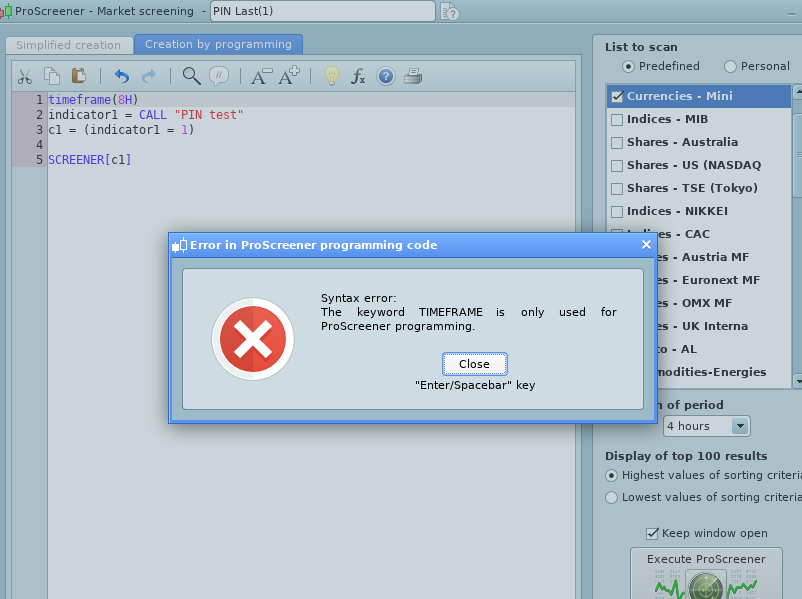
    Thanks for the help, but I didn’t get it to work.

    It seems like I can only use the standard timeframes like daily, weekly, 4H and so on. But how do I create 8H and 12H?

    I have created a indicator that I would like to call on 8H and 12H close bars individually, not test both 8H and 12H at the same time. I want two different screeners.

    I attached the error message.

    Screenshot-from-2019-06-18-21-19-28.png Screenshot-from-2019-06-18-21-19-28.png
    #100975 quote
    robertogozzi
    Moderator
    Master

    ProScreener only allows standard TF’s. If a TF is not available in its menu, then it is not available in coding, too.

    ProOrder, instead, has not this kind of limitations.

    Nicolas thanked this post
Viewing 5 posts - 1 through 5 (of 5 total)
  • You must be logged in to reply to this topic.

Screener 8h and 12H timeframe?


ProScreener: Market Scanners & Detection

New Reply
Author
author-avatar
LO @lars-olof_moberg Participant
Summary

This topic contains 4 replies,
has 2 voices, and was last updated by robertogozzi
6 years, 9 months ago.

Topic Details
Forum: ProScreener: Market Scanners & Detection
Language: English
Started: 06/09/2019
Status: Active
Attachments: 1 files
Logo Logo
Loading...