round number

Viewing 11 posts - 1 through 11 (of 11 total)

  • Author
    Posts
  • #132962 quote
    rama
    Participant
    Senior

    I there any code available to find the round number example for dax 11100 11200 etc

    similarly for dow 24400 , 24500


    code should give nearest round number the idea is to place 2 pips above round number 24400 buy and place stop loss 23990 etc

    #132968 quote
    Vonasi
    Moderator
    Master

    rama – You’ve been around long enough to know that your question is not a platform question but a strategy question. I’ve moved your topic to the correct forum. Please be more careful with future posts.

    #132969 quote
    Vonasi
    Moderator
    Master

    It took all of three seconds using the search box and typing in ’round numbers’ to find this:

    Sweet Spots – round numbers

    You should try the search box some time as it is quite useful! 🙂

    #133131 quote
    rama
    Participant
    Senior

    Before I asked the question i searched and tried, can I ask you try to see the level for 24600 at 100 intervals in the thread you suggested

    #133136 quote
    Vonasi
    Moderator
    Master

    I’m not sure exactly what you are asking for. With MainLevels = 100 and SubLevels = 100 it draws lines at 100 intervals. I did spot a couple of little errors in the code. The FOR NEXT loop should start from 1 and not from zero and the addition or subtraction of 0.51 should be 0.5.

    Here is a version of that code that simply returns the nearest round number above price and below price.

    MainLevels = 100
    
    DecAr = MainLevels*pointsize
    
    myVarUp = close
    myVarDn = close
    
    if DecAr = 0 then
    InvDec = 1
    else
    InvDec = 1/DecAr
    endif
    
    Floor = round(InvDec*myVarDn-0.5)/InvDec
    Ceil = round(InvDec*myVarUp+0.5)/InvDec
    
    return floor, ceil
    
    #133143 quote
    robertogozzi
    Moderator
    Master

    To always round a number (using ROUND) to the lowest positive integer -0.5 needs to be subtracted, while always rounding to the highest positive integer +0.4 needs to be added.

    #133147 quote
    Vonasi
    Moderator
    Master

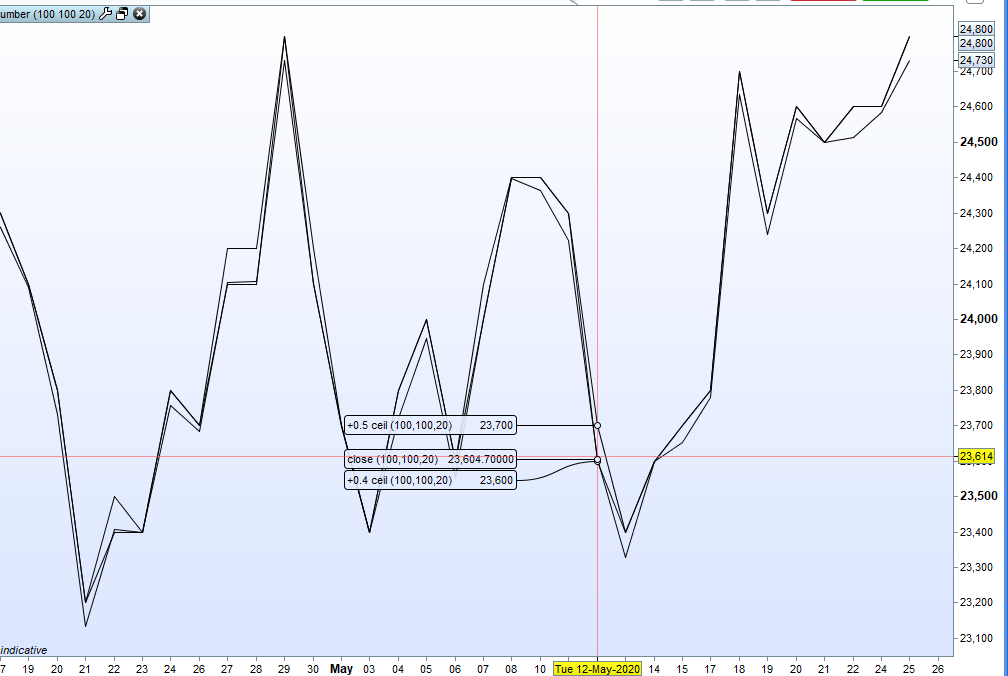
    I’m not sure that is correct Roberto. I tested it with this little code:

    MainLevels = 100
    
    DecAr = MainLevels*pointsize
    
    myVarUp = close
    
    if DecAr = 0 then
    InvDec = 1
    else
    InvDec = 1/DecAr
    endif
    
    Ceil = round(InvDec*myVarUp+0.4)/InvDec
    myround = round(InvDec*myVarUp+0.5)/InvDec
    
    return ceil as "+0.4 ceil", myround as "+0.5 ceil", close as "close"

    When using +0.4 sometimes it rounds it down rather than up.

    Screenshot_1-4.png Screenshot_1-4.png
    #133159 quote
    robertogozzi
    Moderator
    Master

    because it rounds the first decimal position, to round the second one it should be 0.04 (or 0.05), 0.004 (or 0.005) for the third decimal position, etc…

    #133195 quote
    Vonasi
    Moderator
    Master

    Yes but in this indicator we always want to be a number above so if the current price is 1.0 then rounding with +0.4 will return 1.0 whereas we need it to be 2.0  To get 2.0 we have to add on 0.5

    In a normal rounding situation you are correct as 1.0 should return 1 when rounded but not if we want to always find the next whole number above the current value.

    #133198 quote
    robertogozzi
    Moderator
    Master

    Got it.

    #133204 quote
    Paul
    Participant
    Master
Viewing 11 posts - 1 through 11 (of 11 total)

  • You must be logged in to reply to this topic.

round number


ProOrder: Automated Strategies & Backtesting

New Reply
Author
author-avatar
rama @rama Participant
Summary

This topic contains 10 replies,
has 4 voices, and was last updated by Paul

5 years, 9 months ago.

Topic Details
Forum: ProOrder: Automated Strategies & Backtesting
Language: English
Started: 05/23/2020
Status: Active
Attachments: 1 files
Logo Logo
Loading...