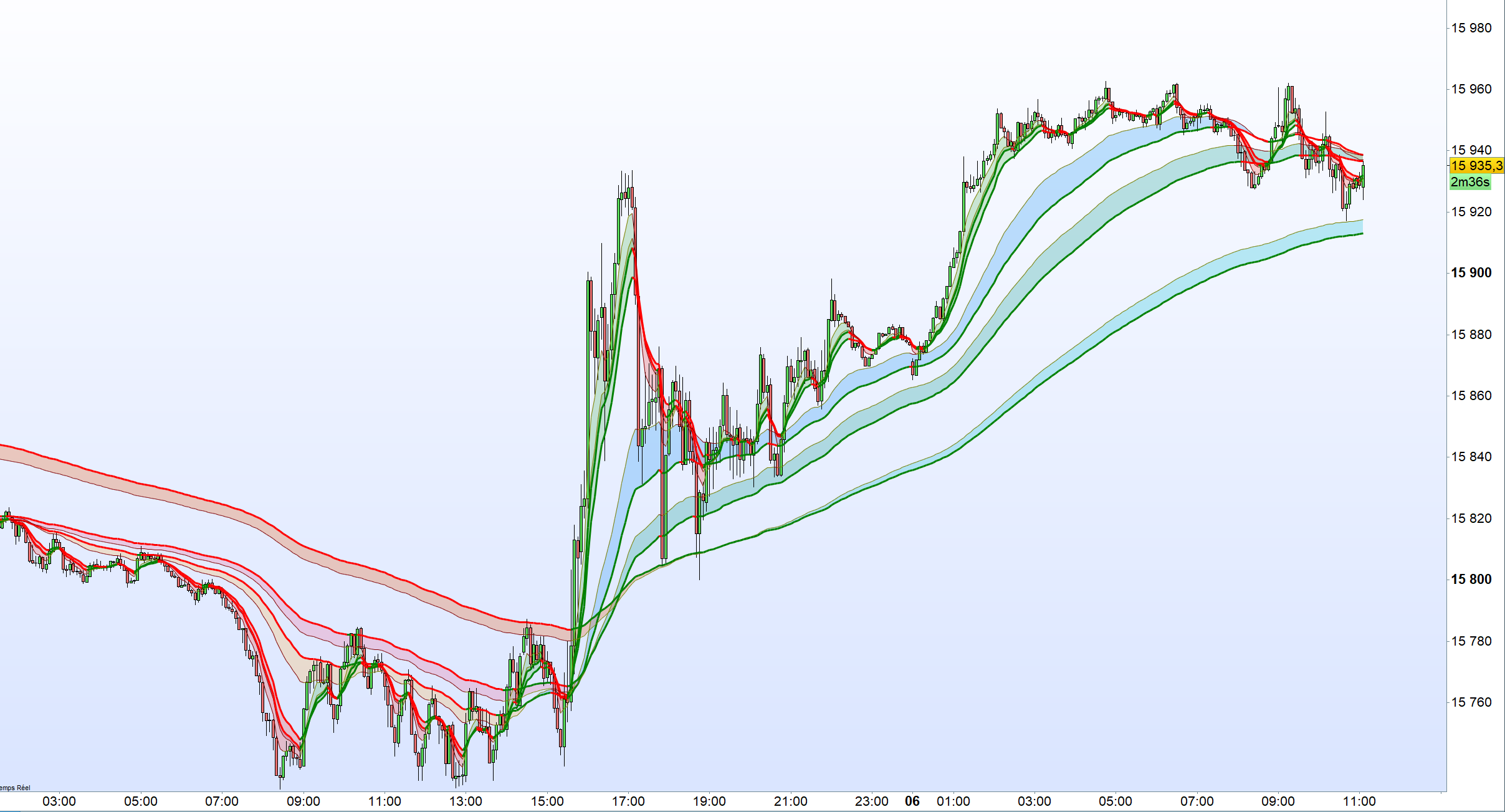
Ripster EMA Clouds

Viewing 7 posts - 1 through 7 (of 7 total)
  • Author
    Posts
  • #224738 quote
    jprt
    Participant
    New

    Bonjour,

    est-il possible de convertir ce script pour le rendre compatible avec PRT 11 ?

    Merci

    Source : https://www.tradingview.com/script/7LPOiiMN-Ripster-EMA-Clouds/

    // This source code is subject to the terms of the Mozilla Public License 2.0 at https://mozilla.org/MPL/2.0/
    // © ripster47
    
    //@version=4
    study("Ripster EMA Clouds","Ripster EMA Clouds", overlay=true)
    matype = input(title="MA Type", type=input.string, defval="EMA", options=["EMA", "SMA"])
    
    ma_len1 = input(title="Short EMA1 Length", type=input.integer, defval=8)
    ma_len2 = input(title="Long EMA1 Length", type=input.integer, defval=9)
    ma_len3 = input(title="Short EMA2 Length", type=input.integer, defval=5)
    ma_len4 = input(title="Long EMA2 Length", type=input.integer, defval=12)
    ma_len5 = input(title="Short EMA3 Length", type=input.integer, defval=34)
    ma_len6 = input(title="Long EMA3 Length", type=input.integer, defval=50)
    ma_len7 = input(title="Short EMA4 Length", type=input.integer, defval=72)
    ma_len8 = input(title="Long EMA4 Length", type=input.integer, defval=89)
    ma_len9 = input(title="Short EMA5 Length", type=input.integer, defval=180)
    ma_len10 = input(title="Long EMA5 Length", type=input.integer, defval=200)
    
    src = input(title="Source", type=input.source, defval=hl2)
    ma_offset = input(title="Offset", type=input.integer, defval=0)
    //res = input(title="Resolution", type=resolution, defval="240")
    
    f_ma(malen) =>
        float result = 0
        if (matype == "EMA")
            result := ema(src, malen)
        if (matype == "SMA")
            result := sma(src, malen)
        result
        
    htf_ma1 = f_ma(ma_len1)
    htf_ma2 = f_ma(ma_len2)
    htf_ma3 = f_ma(ma_len3)
    htf_ma4 = f_ma(ma_len4)
    htf_ma5 = f_ma(ma_len5)
    htf_ma6 = f_ma(ma_len6)
    htf_ma7 = f_ma(ma_len7)
    htf_ma8 = f_ma(ma_len8)
    htf_ma9 = f_ma(ma_len9)
    htf_ma10 = f_ma(ma_len10)
    
    //plot(out1, color=green, offset=ma_offset)
    //plot(out2, color=red, offset=ma_offset)
    
    //lengthshort = input(8, minval = 1, title = "Short EMA Length")
    //lengthlong = input(200, minval = 2, title = "Long EMA Length")
    //emacloudleading = input(50, minval = 0, title = "Leading Period For EMA Cloud")
    //src = input(hl2, title = "Source")
    showlong = input(false, title="Show Long Alerts")
    showshort = input(false, title="Show Short Alerts")
    showLine = input(false, title="Display EMA Line")
    ema1 = input(true, title="Show EMA Cloud-1")
    ema2 = input(true, title="Show EMA Cloud-2")
    ema3 = input(true, title="Show EMA Cloud-3")
    ema4 = input(false, title="Show EMA Cloud-4")
    ema5 = input(false, title="Show EMA Cloud-5")
    
    emacloudleading = input(0, minval=0, title="Leading Period For EMA Cloud")
    mashort1 = htf_ma1
    malong1 = htf_ma2
    mashort2 = htf_ma3
    malong2 = htf_ma4
    mashort3 = htf_ma5
    malong3 = htf_ma6
    mashort4 = htf_ma7
    malong4 = htf_ma8
    mashort5 = htf_ma9
    malong5 = htf_ma10
    
    cloudcolour1 = mashort1 >= malong1 ? #036103 : #880e4f
    cloudcolour2 = mashort2 >= malong2 ? #4caf50 : #f44336
    cloudcolour3 = mashort3 >= malong3 ? #2196f3 : #ffb74d
    cloudcolour4 = mashort4 >= malong4 ? #009688 : #f06292
    cloudcolour5 = mashort5 >= malong5 ? #05bed5 : #e65100
    //03abc1
    
    mashortcolor1 = mashort1 >= mashort1[1] ? color.olive : color.maroon
    mashortcolor2 = mashort2 >= mashort2[1] ? color.olive : color.maroon
    mashortcolor3 = mashort3 >= mashort3[1] ? color.olive : color.maroon
    mashortcolor4 = mashort4 >= mashort4[1] ? color.olive : color.maroon
    mashortcolor5 = mashort5 >= mashort5[1] ? color.olive : color.maroon
    
    
    mashortline1 = plot(ema1 ? mashort1 : na, color=showLine ? mashortcolor1 : na, linewidth=1, offset=emacloudleading, title="Short Leading EMA1")
    mashortline2 = plot(ema2 ? mashort2 : na, color=showLine ? mashortcolor2 : na, linewidth=1, offset=emacloudleading, title="Short Leading EMA2")
    mashortline3 = plot(ema3 ?mashort3 : na, color=showLine ? mashortcolor3 : na, linewidth=1, offset=emacloudleading, title="Short Leading EMA3")
    mashortline4 = plot(ema4 ? mashort4 :na , color=showLine ? mashortcolor4 : na, linewidth=1, offset=emacloudleading, title="Short Leading EMA4")
    mashortline5 = plot(ema5 ? mashort5 : na, color=showLine ? mashortcolor5 : na, linewidth=1, offset=emacloudleading, title="Short Leading EMA5")
    
    malongcolor1 = malong1 >= malong1[1] ? color.green : color.red
    malongcolor2 = malong2 >= malong2[1] ? color.green : color.red
    malongcolor3 = malong3 >= malong3[1] ? color.green : color.red
    malongcolor4 = malong4 >= malong4[1] ? color.green : color.red
    malongcolor5 = malong5 >= malong5[1] ? color.green : color.red
    
    malongline1 = plot(ema1 ? malong1 : na, color=showLine ? malongcolor1 : na, linewidth=3, offset=emacloudleading, title="Long Leading EMA1")
    malongline2 = plot(ema2 ? malong2 : na, color=showLine ? malongcolor2 : na, linewidth=3, offset=emacloudleading, title="Long Leading EMA2")
    malongline3 = plot(ema3 ? malong3 : na, color=showLine ? malongcolor3 : na, linewidth=3, offset=emacloudleading, title="Long Leading EMA3")
    malongline4 = plot(ema4 ? malong4 : na, color=showLine ? malongcolor4 : na, linewidth=3, offset=emacloudleading, title="Long Leading EMA4")
    malongline5 = plot(ema5 ? malong5 : na, color=showLine ? malongcolor5 : na, linewidth=3, offset=emacloudleading, title="Long Leading EMA5")
    
    
    // Updated fill function calls using color.new() for transparency
    fill(mashortline1, malongline1, color=color.new(cloudcolour1, 45), title="MA Cloud1")
    fill(mashortline2, malongline2, color=color.new(cloudcolour2, 65), title="MA Cloud2")
    fill(mashortline3, malongline3, color=color.new(cloudcolour3, 70), title="MA Cloud3")
    fill(mashortline4, malongline4, color=color.new(cloudcolour4, 65), title="MA Cloud4")
    fill(mashortline5, malongline5, color=color.new(cloudcolour5, 65), title="MA Cloud5")

    #224790 quote
    JC_Bywan
    Moderator
    Master

    Bonjour,

    Voici pour afficher les 5 nuages de 10 moyennes 2 à 2, avec paramètre matype =1 pour les rendre exponentielles, ou =0 pour les rendre simples

    Pour éventuellement ne pas garder les lignes en noir, elles peuvent être colorées ou rendues invisibles dans la fenêtre de propriétés, ou bien dans la ligne return en se servant du mot-clé coloured.

    Si tu choisis de rajouter coloured, tu peux aussi y inclure un paramètre de transparence optionnel qui permettrait de sélectionner ou pas l’affichage des lignes.

    COLOURED

    Matype=1 // =0 pour ma simple ou =1 pour ma exponentielle// ou mettre en param externe booléen 0 ou 1
    
    ma1=average[8,Matype](close)
    ma2=average[9,Matype](close)
    ma3=average[5,Matype](close)
    ma4=average[12,Matype](close)
    ma5=average[34,Matype](close)
    ma6=average[50,Matype](close)
    ma7=average[72,Matype](close)
    ma8=average[89,Matype](close)
    ma9=average[180,Matype](close)
    ma10=average[200,Matype](close)
    
    red1=150
    g1=0
    b1=0
    if ma1>ma2 then
    red1=0
    g=150
    endif
    colorbetween(ma1,ma2,red1,g1,b1,50)
    //
    red2=250
    g2=0
    b2=0
    if ma3>ma4 then
    red2=0
    g2=250
    endif
    colorbetween(ma3,ma4,red2,g2,b2,50)
    //
    red3=100
    g3=149
    b3=237
    if ma5>ma6 then
    red3=255
    g3=215
    b3=0
    endif
    colorbetween(ma5,ma6,red3,g3,b3,50)
    //
    red4=100
    g4=149
    b4=237
    if ma7>ma8 then
    red4=255
    g4=215
    b4=0
    endif
    colorbetween(ma7,ma8,red4,g4,b4,50)
    //
    red5=100
    g5=149
    b5=237
    if ma9>ma10 then
    red5=255
    g5=215
    b5=0
    endif
    colorbetween(ma9,ma10,red5,g5,b5,50)
    //
    
    return ma1 as "Short EMA cloud1", ma2 as "Long EMA cloud1", ma3 as "Short EMA cloud2", ma4 as "Long EMA cloud2", ma5 as "Short EMA cloud3", ma6 as "Long EMA cloud3", ma7 as "Short EMA cloud4", ma8 as "Long EMA cloud4", ma9 as "Short EMA cloud5", ma10 as "Long EMA cloud5"
    #224805 quote
    LucasBest
    Participant
    Average

    Je l’avais déjà converti il y a quelques semaines/mois… Je post aussi l’itf au cas où

    // Ripster EMA Clouds
    
    once OLIVER = 128
    once OLIVEG = 128
    once OLIVEB = 0
    
    once MAROONR = 128
    once MAROONG = 0
    once MAROONB = 0
    
    once GREENR = 0
    once GREENG = 128
    once GREENB = 0
    
    once REDR = 255
    once REDG = 0
    once REDB = 0
    
    // Input Parameters
    
    MAShort1Length = 8
    MAlong1Length = 9
    MAShort2Length = 5
    MAlong2Length = 12
    MAShort3Length = 34
    MAlong3Length = 50
    MAShort4Length = 72
    MAlong4Length = 89
    MAShort5Length = 180
    MAlong5Length = 200
    
    EmaCloudLeading = 0
    
    Src = customclose
    
    MAOffset = 0
    
    // Calculate moving averages
    MASHORT1 = Average[MAShort1Length, MAType](Src)
    MASHORT2 = Average[MAShort2Length, MAType](Src)
    MASHORT3 = Average[MAShort3Length, MAType](Src)
    MASHORT4 = Average[MAShort4Length, MAType](Src)
    MASHORT5 = Average[MAShort5Length, MAType](Src)
    
    MALONG1 = Average[MAlong1Length, MAType](Src)
    MALONG2 = Average[MAlong2Length, MAType](Src)
    MALONG3 = Average[MAlong3Length, MAType](Src)
    MALONG4 = Average[MAlong4Length, MAType](Src)
    MALONG5 = Average[MAlong5Length, MAType](Src)
    
    // Cloud Colors (broken down into individual RGB components)
    IF MASHORT1 >= MALONG1 THEN
    CloudColour1R = 3
    CloudColour1G = 97
    CloudColour1B = 3
    ELSE
    CloudColour1R = 136
    CloudColour1G = 14
    CloudColour1B = 79
    ENDIF
    
    IF MASHORT2 >= MALONG2 THEN
    CloudColour2R = 76
    CloudColour2G = 175
    CloudColour2B = 80
    ELSE
    CloudColour2R = 244
    CloudColour2G = 67
    CloudColour2B = 54
    ENDIF
    
    IF MASHORT3 >= MALONG3 THEN
    CloudColour3R = 33
    CloudColour3G = 150
    CloudColour3B = 243
    ELSE
    CloudColour3R = 255
    CloudColour3G = 183
    CloudColour3B = 77
    ENDIF
    
    IF MASHORT4 >= MALONG4 THEN
    CloudColour4R = 0
    CloudColour4G = 150
    CloudColour4B = 136
    ELSE
    CloudColour4R = 240
    CloudColour4G = 98
    CloudColour4B = 146
    ENDIF
    
    IF MASHORT5 >= MALONG5 THEN
    CloudColour5R = 5
    CloudColour5G = 190
    CloudColour5B = 213
    ELSE
    CloudColour5R = 230
    CloudColour5G = 81
    CloudColour5B = 0
    ENDIF
    
    IF MASHORT1 >= MASHORT1[1] THEN
    MASHORTCOLOR1R = OLIVER  // Olive Red value
    MASHORTCOLOR1G = OLIVEG  // Olive Green value
    MASHORTCOLOR1B = OLIVEB  // Olive Blue value
    ELSE
    MASHORTCOLOR1R = MAROONR // Maroon Red value
    MASHORTCOLOR1G = MAROONG // Maroon Green value
    MASHORTCOLOR1B = MAROONB // Maroon Blue value
    ENDIF
    
    IF MASHORT2 >= MASHORT2[1] THEN
    MASHORTCOLOR2R = OLIVER  // Olive Red value
    MASHORTCOLOR2G = OLIVEG  // Olive Green value
    MASHORTCOLOR2B = OLIVEB  // Olive Blue value
    ELSE
    MASHORTCOLOR2R = MAROONR // Maroon Red value
    MASHORTCOLOR2G = MAROONG // Maroon Green value
    MASHORTCOLOR2B = MAROONB// Maroon Blue value
    ENDIF
    
    IF MASHORT3 >= MASHORT3[1] THEN
    MASHORTCOLOR3R = OLIVER  // Olive Red value
    MASHORTCOLOR3G = OLIVEG  // Olive Green value
    MASHORTCOLOR3B = OLIVEB  // Olive Blue value
    ELSE
    MASHORTCOLOR3R = MAROONR // Maroon Red value
    MASHORTCOLOR3G = MAROONG // Maroon Green value
    MASHORTCOLOR3B = MAROONB// Maroon Blue value
    ENDIF
    
    IF MASHORT4 >= MASHORT4[1] THEN
    MASHORTCOLOR4R = OLIVER  // Olive Red value
    MASHORTCOLOR4G = OLIVEG  // Olive Green value
    MASHORTCOLOR4B = OLIVEB  // Olive Blue value
    ELSE
    MASHORTCOLOR4R = MAROONR // Maroon Red value
    MASHORTCOLOR4G = MAROONG // Maroon Green value
    MASHORTCOLOR4B = MAROONB// Maroon Blue value
    ENDIF
    
    IF MASHORT5 >= MASHORT5[1] THEN
    MASHORTCOLOR5R = OLIVER  // Olive Red value
    MASHORTCOLOR5G = OLIVEG  // Olive Green value
    MASHORTCOLOR5B = OLIVEB  // Olive Blue value
    ELSE
    MASHORTCOLOR5R = MAROONR // Maroon Red value
    MASHORTCOLOR5G = MAROONG // Maroon Green value
    MASHORTCOLOR5B = MAROONB// Maroon Blue value
    ENDIF
    
    IF MALONG1 >= MALONG1[1] THEN
    MALONGCOLOR1R = GREENR
    MALONGCOLOR1G = GREENG
    MALONGCOLOR1B = GREENB
    ELSE
    MALONGCOLOR1R = REDR
    MALONGCOLOR1G = REDG
    MALONGCOLOR1B = REDB
    ENDIF
    
    IF MALONG2 >= MALONG2[1] THEN
    MALONGCOLOR2R = GREENR
    MALONGCOLOR2G = GREENG
    MALONGCOLOR2B = GREENB
    ELSE
    MALONGCOLOR2R = REDR
    MALONGCOLOR2G = REDG
    MALONGCOLOR2B = REDB
    ENDIF
    
    IF MALONG3 >= MALONG3[1] THEN
    MALONGCOLOR3R = GREENR
    MALONGCOLOR3G = GREENG
    MALONGCOLOR3B = GREENB
    ELSE
    MALONGCOLOR3R = REDR
    MALONGCOLOR3G = REDG
    MALONGCOLOR3B = REDB
    ENDIF
    
    IF MALONG4 >= MALONG4[1] THEN
    MALONGCOLOR4R = GREENR
    MALONGCOLOR4G = GREENG
    MALONGCOLOR4B = GREENB
    ELSE
    MALONGCOLOR4R = REDR
    MALONGCOLOR4G = REDG
    MALONGCOLOR4B = REDB
    ENDIF
    
    IF MALONG5 >= MALONG5[1] THEN
    MALONGCOLOR5R = GREENR
    MALONGCOLOR5G = GREENG
    MALONGCOLOR5B = GREENB
    ELSE
    MALONGCOLOR5R = REDR
    MALONGCOLOR5G = REDG
    MALONGCOLOR5B = REDB
    ENDIF
    
    // Plotting mashortline1
    IF ema1 AND ShowLine THEN
    DRAWSEGMENT(barindex-1, mashort1[1], barindex, mashort1) STYLE(LINE, 1) COLOURED(MASHORTCOLOR1R, MASHORTCOLOR1G, MASHORTCOLOR1B, 255)
    DRAWSEGMENT(barindex-1, MALONG1[1], barindex, MALONG1) STYLE(LINE, 3) COLOURED(MALONGCOLOR1R, MALONGCOLOR1G, MALONGCOLOR1B, 255)
    ENDIF
    
    // Plotting mashortline2
    IF ema2 AND ShowLine THEN
    DRAWSEGMENT(barindex-1, mashort2[1], barindex, mashort2) STYLE(LINE, 1) COLOURED(MASHORTCOLOR2R, MASHORTCOLOR2G, MASHORTCOLOR2B, 255)
    DRAWSEGMENT(barindex-1, MALONG2[1], barindex, MALONG2) STYLE(LINE, 3) COLOURED(MALONGCOLOR2R, MALONGCOLOR2G, MALONGCOLOR2B, 255)
    ENDIF
    
    // Plotting mashortline3
    IF ema3 AND ShowLine THEN
    DRAWSEGMENT(barindex-1, mashort3[1], barindex, mashort3) STYLE(LINE, 1) COLOURED(MASHORTCOLOR3R, MASHORTCOLOR3G, MASHORTCOLOR3B, 255)
    DRAWSEGMENT(barindex-1, MALONG3[1], barindex, MALONG3) STYLE(LINE, 3) COLOURED(MALONGCOLOR3R, MALONGCOLOR3G, MALONGCOLOR3B, 255)
    ENDIF
    
    // Plotting mashortline4
    IF ema4 AND ShowLine THEN
    DRAWSEGMENT(barindex-1, mashort4[1], barindex, mashort4) STYLE(LINE, 1) COLOURED(MASHORTCOLOR4R, MASHORTCOLOR4G, MASHORTCOLOR4B, 255)
    DRAWSEGMENT(barindex-1, MALONG4[1], barindex, MALONG4) STYLE(LINE, 3) COLOURED(MALONGCOLOR4R, MALONGCOLOR4G, MALONGCOLOR4B, 255)
    ENDIF
    
    // Plotting mashortline5
    IF ema5 AND ShowLine THEN
    DRAWSEGMENT(barindex-1, mashort5[1], barindex, mashort5) STYLE(LINE, 1) COLOURED(MASHORTCOLOR5R, MASHORTCOLOR5G, MASHORTCOLOR5B, 255)
    DRAWSEGMENT(barindex-1, MALONG5[1], barindex, MALONG5) STYLE(LINE, 3) COLOURED(MALONGCOLOR5R, MALONGCOLOR5G, MALONGCOLOR5B, 255)
    ENDIF
    
    IF EMA1 THEN
    Colorbetween(mashort1,MALONG1,CloudColour1R,CloudColour1G,CloudColour1B,45)
    ENDIF
    IF EMA2 THEN
    Colorbetween(mashort2,MALONG2,CloudColour2R,CloudColour2G,CloudColour2B,65)
    ENDIF
    IF EMA3 THEN
    Colorbetween(mashort3,MALONG3,CloudColour3R,CloudColour3G,CloudColour3B,70)
    ENDIF
    IF EMA4 THEN
    Colorbetween(mashort4,MALONG4,CloudColour4R,CloudColour4G,CloudColour4B,65)
    ENDIF
    IF EMA5 THEN
    Colorbetween(mashort5,MALONG5,CloudColour5R,CloudColour5G,CloudColour5B,65)
    ENDIF
    
    Return
    Ripster-EMA-Clouds.itf
    #224918 quote
    jprt
    Participant
    New

    Bonjour,

    merci pour vos retours.

    C’est bizarre LucasBest ton code n’affiche pas tout en meme temps. Si je décoche des EMA dans les propriétés, là des nuages s’affichent mais je peux pas tout afficher en meme temps.

    Pour le 1er code je ne vois quasiment aucun nuage. Par defaut j’ai plein de lignes uniquement.

    #224920 quote
    LucasBest
    Participant
    Average

    Il faut qu’il y ait suffisamment de bougies affichées pour que les calcules puissent se faire…

    #224922 quote
    LucasBest
    Participant
    Average

    Voilà ce que ça donne chez moi (prt v11)

    Capture-decran-2023-12-06-110731.png Capture-decran-2023-12-06-110731.png
    #224938 quote
    jprt
    Participant
    New

    j’ai importé ton ITF

    j’ajoute l’indicateur sur les prix, graphique jour.

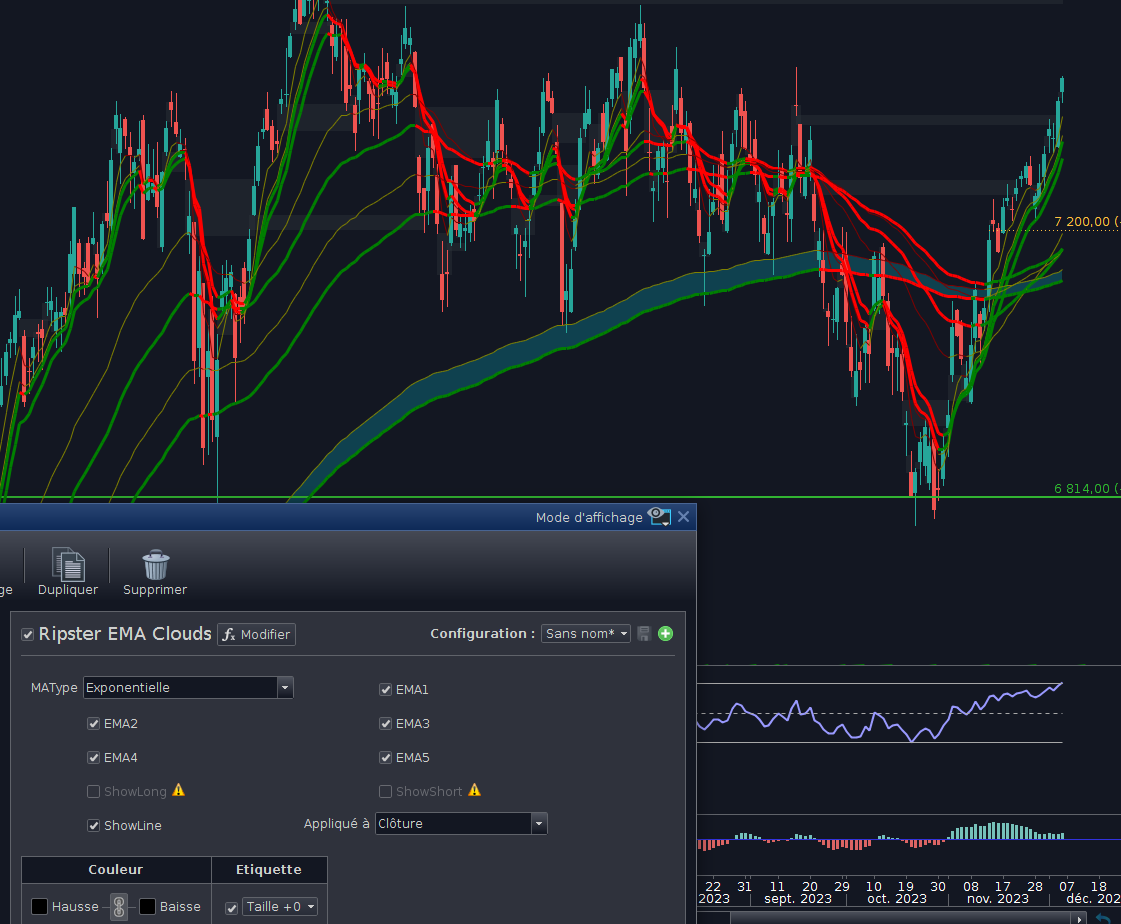
    je v ai dans les paramètres et décoche tout. Je coche juste EMA2 par exemple. Elle apparait bien. Si je coche aussi EMA3 par exemple et bien le nuage EMA2 disparait et EMA3 s’affiche.

    Je peux avoir qu’un nuage a la fois on dirait

    ripster.png ripster.png
Viewing 7 posts - 1 through 7 (of 7 total)
  • You must be logged in to reply to this topic.

Ripster EMA Clouds


ProBuilder : Indicateurs & Outils Personnalisés

New Reply
Author
author-avatar
jprt @jprt Participant
Summary

This topic contains 6 replies,
has 3 voices, and was last updated by jprt
2 years, 3 months ago.

Topic Details
Forum: ProBuilder : Indicateurs & Outils Personnalisés
Language: French
Started: 12/02/2023
Status: Active
Attachments: 3 files
Logo Logo
Loading...