Rewrite SwingTeller code from binck ProTrader to Prorealtime code

Viewing 15 posts - 1 through 15 (of 67 total)
  • Author
    Posts
  • #29755 quote
    joerie1
    Participant
    New

    Dear Prorealtime members,

    Is there someone who can change this code of a different banksystem (protrader binq) to a prorealtime code.

    {- Filename: dynamische RSI -}
    
    var 
      RSIPeriode: integer;  // parameterwaarde 
      StdDevUp, StdDevDown: real; 
      BolBandPeriode: integer;
      i: integer; 
      RSIValues, TARValues, UpperBand, LowerBand: TSeries;
      UpperCrossings, LowerCrossings: TLineCrossings;
    begin 
      // Indicator parameter definities 
      RSIPeriode := CreateParameterInteger('RSI periode', 1, 999, 7, true); 
      BolBandPeriode := CreateParameterInteger('Boll. MA periode', 1, 999, 50, true); 
      StdDevUp := CreateParameterReal('StdDevUp', 1, 9, 2, true); 
      StdDevDown := CreateParameterReal('StdDevDown', 1, 9, 2, true); 
    
      // Indicator definitie 
      with Indicator do 
      begin 
        RequiredBars := 5*RSIPeriode + BolBandPeriode;
      end; 
      
      // Indicatorberekening 
      RSIValues := RSI(Close, RSIPeriode); 
      UpperBand := BollingerBand(RSIValues, BolBandPeriode, maSimple, StdDevUp); 
      LowerBand := BollingerBand(RSIValues, BolBandPeriode, maSimple, -StdDevDown); 
      TARValues := CreateSeries(BarCount);
    
      // signalen berekenen 
      UpperCrossings := Crossings(RSIValues, UpperBand);
      LowerCrossings := Crossings(RSIValues, LowerBand); 
    
      for i:=1 to BarCount-1 do
      begin 
    {
    RSI crosses over OB lijn = OB entry (signal)
    RSI > OB lijn = OB (condition)
    RSI crosses under OB = OB Exit (signal)
    RSI between OB en OS = Neutral (condition)
    
    RSI crosses under OS lijn = OS entry (signal)
    RSI < OS lijn = OS (condition)
    RSI crosses over OS = OS Exit (signal)
    RSI between OB en OS = Neutral (condition)
    }
        TARValues[i] := TARValues[i-1];
        if UpperCrossings[i] = lc1Over2 then
        begin
          EnterShort(i);
          TARValues[i] := 1;
        end else
        if UpperCrossings[i] = lc2Over1 then
        begin
          ExitShort(i);
          TARValues[i] := 0;
        end else
        if LowerCrossings[i] = lc2Over1 then
        begin
          EnterLong(i);
          TARValues[i] := -1;
        end else
        if LowerCrossings[i] = lc1Over2 then
        begin
          ExitLong(i);
          TARValues[i] := 0;
        end;
      end;
    
      with CreateLine(RSIValues) do
      begin
        Color := clLime;
        Name := 'RSI';
      end;
      with CreateLine(UpperBand) do
      begin
        Color := clSilver;
        Name := 'OB';
      end;
      with CreateLine(LowerBand) do
      begin
        Color := clSilver;
        Name := 'OS';
      end;
      with CreateLine(TARValues) do
      begin
        Color := clWhite;
        Name := 'TAR';
        LineContent := lcTAR;
        Visible := false;
      end;
    end.

    I hope someone can help me with this

    #30005 quote
    Nicolas
    Keymaster
    Master

    Seems to be an automated trading system based on RSI with Bollinger Bands, isn’t it?

    This code seems to draw white lines too when signals occurs. So do you want to code it as a ProOrder automatic trading system or an indicator to draw lines when you get signals?

    Is this strategy profitable? Do you use it yourself? Thanks.

    #30027 quote
    joerie1
    Participant
    New

    Hi,

    Thank you for your response!

    I use it as an indicator combined with some other indicators, but this one is probably the most important and is most of the time accurate.

    I just want the rsi with bollinger I dont mind about the signals.

    Are you able to rewrite it for prorealtime?

    Joerie

    #30072 quote
    Nicolas
    Keymaster
    Master

    Ok, so here are a couple of indicators that may do this job already:

    https://www.prorealcode.com/prorealtime-indicators/traders-dynamic-index-tdi/

    https://www.prorealcode.com/prorealtime-indicators/rsi-self-adjusting-bands/

    Tell me if that suits your query or not, many thanks.

    #30082 quote
    joerie1
    Participant
    New

    Thats Perfect, Thank you very much!

    One more thing,

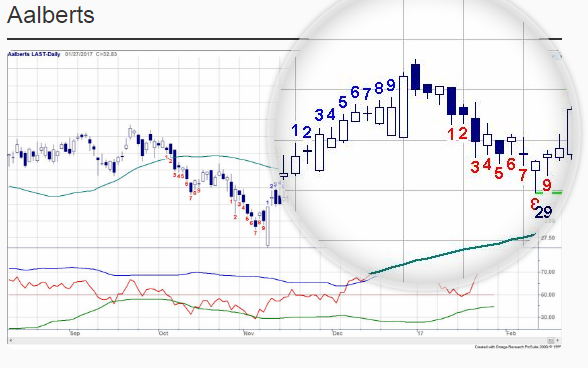
    Can you also help me with this indicator (Swingcounter)

    It is a swingcounter that counts a row of green or red candles. I attached a picture to this document. I want it to be exactly like the picture so the numbers need to appear in the graphic chart and not below the chart as an indicator.

    {- Filename: Swingteller Perfect -}
    
    procedure TextAboveBar(Bar:integer; Text: string; 
                           fFontSize:integer; AColor:TColor);
    begin
      with CreateText(BarPosition[Bar], High[Bar] * 1.003, Text) do
      begin
        VertPosition := vpTop;
        HorzPosition := hpCenter;
        Color        := AColor;
        Font.Size    := fFontSize;
      end;
    end;
    
    //=== Procedure ================================================================
    
    procedure TextBelowBar(Bar: integer; Text: string; 
                           fFontSize:integer; AColor:TColor);
    begin
      with CreateText(BarPosition[Bar], Low[Bar] * 0.997, Text) do
      begin
        VertPosition := vpBottom;
        HorzPosition := hpCenter;
        Color        := AColor;
        Font.Size    := fFontSize;
      end;
    end;
    
    // === BEGIN ===================================================================
    
    var
      i,j,iFirst,Lb,UpCount,DownCount,FtSize  : integer;
      UpCol,DwCol,BUpCol,BDwCol             : TColor;
      HideCol,HideCnt                       : boolean;
      r: real;
    
    BEGIN
    
      // --- Indicator eigenschappen -----------------------------------------------
    
      with Indicator do 
      begin 
        RequiredBars := 10; 
        NewBand      := false; 
        HiddenParams := true;
      end; 
    
      // --- Parameters ------------------------------------------------------------
       
      Lb     := CreateParameterInteger('Lookback', 1, 10, 4, true); 
      HideCnt:= CreateParameterBoolean('Hide Count?',false,true);
      UpCol  := CreateParameterColor('Count Up', clGreen);
      DwCol  := CreateParameterColor('Count Down', clRed);
      FtSize := CreateParameterInteger('FontSize', 10, 25, 8, false);
      HideCol:= CreateParameterBoolean('Hide BarColors?',true,false);
      BUpCol := CreateParameterColor('BarColor Up', clGreen);
      BDwCol := CreateParameterColor('BarColor Down', clRed);  
    
      // --- Indicatorberekening & Weergave ----------------------------------------
    
      iFirst := FirstValidIndex(Close); 
      i := iFirst+Lb;
      while i<BarCount do
      begin
        if (UpCount > 0) and (Close[i] > Close[i-Lb]) then
        begin 
          if not HideCol then SetParentBarColor(i, BUpCol);
          DownCount := 0;
          UpCount := UpCount+1;
          if (UpCount = 9) or (i=BarCount-1) then
          begin
            if not HideCnt then
              for j:=0 to UpCount-1 do TextAboveBar(i-j, IntToStr(UpCount-j), FtSize, UpCol);
            UpCount := 0;
            i := i+1;
          end;
        end else
        if (DownCount > 0) and (Close[i] < Close[i-Lb]) then
        begin 
          if not HideCol then SetParentBarColor(i, BDwCol);
          UpCount := 0;
          DownCount := DownCount+1;
          if (DownCount = 9) or (i=BarCount-1)  then
          begin
            if not HideCnt then
              for j:=0 to DownCount-1 do TextBelowBar(i-j, IntToStr(DownCount-j), FtSize, DwCol);
            DownCount := 0;
            i := i+1;
          end;
        end else
        if DownCount = 0 then
        begin
          r := Min(Min(Close[i-1], Close[i-2]), Close[i-3]);
          if Close[i] < r then
          begin
            DownCount := 1;
            UpCount := 0;
    //        if not HideCnt then TextBelowBar(i, IntToStr(DownCount), FtSize, DwCol);
            if not HideCol then SetParentBarColor(i, BDwCol);
          end;
        end else
        if UpCount = 0 then
        begin
          r := Max(Max(Close[i-1], Close[i-2]), Close[i-3]);
          if Close[i] > r then
          begin
            UpCount := 1;
            DownCount := 0;
    //        if not HideCnt then TextAboveBar(i, IntToStr(UpCount), FtSize, UpCol);
            if not HideCol then SetParentBarColor(i, BUpCol);
          end;
        end;
        i := i+1;
      end;
    
    //=== END ======================================================================
    
    END.

    #30090 quote
    Nicolas
    Keymaster
    Master

    I remember having already coded something like this before, this is the code:

    //case Bullish
    If close > close[4] THEN
    highcount=highcount+1
    ELSE
    highcount=0
    Endif
    
    //case Bearish
    If close < close[4] THEN
    lowcount=lowcount+1
    ELSE
    lowcount=0
    ENDIF
    
    //signals spotted
    If highcount = 9 Then
    bearish = 9
    Elsif lowcount = 9 Then
    bullish = 9
    elsif highcount = 1 then
    bearish = 1
    elsif lowcount = 1 then
    bullish = 1
    Else
    bearish = 0
    bullish = 0
    Endif
    
    RETURN bullish coloured(0,200,0) as "bullish signal _ count", bearish coloured(200,0,0) as "bearish signal _ count"
    

    But .. it was before the 10.3 release and the ability the draw text on chart, so only the 1st count reset and the 9th count appear. Could you please confirm that the signals given for the 9th count is good? If it’s ok, I’ll try to add text on price chart instead.

    #30099 quote
    joerie1
    Participant
    New

    Heyy,

    Thanks alot. This one doesn’t look good to me.

    Swing +1 starts when a candle closes higher then the 3 candles before.  And the swing -1 starts when the candle closes lower then 3 candles before. When a Fully swing has appeared (Swing 1 -> 9) it stops counting because the 10th candle is called the resting candle. If the 11th candle also closes higher then the 3 candles before the swing starts again at swing 1 (in green colour and red for -1). Also if a swing doesnt succeed in reaching number 9 all the numbers dissapear from the chart. So only the full swings till 9 are and the current swing at the moment is displayed in the graphic. But if the current swing doesnt succeed then it will also dissapear.

    Hope you can understand this a little bit haha

    #30109 quote
    JohnVS
    Participant
    Junior

    That greatly explained Joerie, lot better then i did 🙂

    I did ask the maker of the swingcounter and it was confirmed it should look back 4 days in stead of 3

    But first of all hope Nicolas can put something together 🙂

    rgds

    John

    #30799 quote
    Nicolas
    Keymaster
    Master

    Another try with this code, hope it’s better. But, the swing counts are not displayed while the actual swing is forming, it will be only displayed if the count is 9 (because we can’t erase what’s already written on chart). If this code is correct, I will change it to make it possible.

    Lb=4
    
    //begin swing Up
    if UpCount=0 then 
    r = Max(Max(Close[1], Close[2]), Close[3])
    if close>r then 
    UpCount=1
    DownCount=0
    endif
    endif
    
    //continue swing Up
    if UpCount>0 and Close>Close[Lb] then 
    DownCount=0
    UpCount=UpCount+1
    //draw count
    if(UpCount=9) then
    a=9
    for i = 1 to 9 
    drawtext("#a#",barindex[i],low[i]-averagetruerange[10],Dialog,Standard,12) coloured(0,200,0) 
    a=a-1
    next
    //reset count
    UpCount=0
    endif
    endif
    
    //begin swing Down
    if DownCount=0 then
    r = Min(Min(Close[1], Close[2]), Close[3])
    if close<r then
    DownCount=1
    UpCount=0
    endif
    endif
    
    //continue swing Down
    if DownCount>0 and Close<Close[Lb] then
    UpCount=0
    DownCount=DownCount+1
    //draw count
    if(DownCount=9) then
    a=9
    for i = 1 to 9
    drawtext("#a#",barindex[i],high[i]+averagetruerange[10],Dialog,Standard,12) coloured(200,0,0)
    a=a-1
    next
    //reset count
    DownCount=0
    endif
    endif
    
    return
    #30808 quote
    JohnVS
    Participant
    Junior

    Hi Nicolas,

    We are getting close 🙂

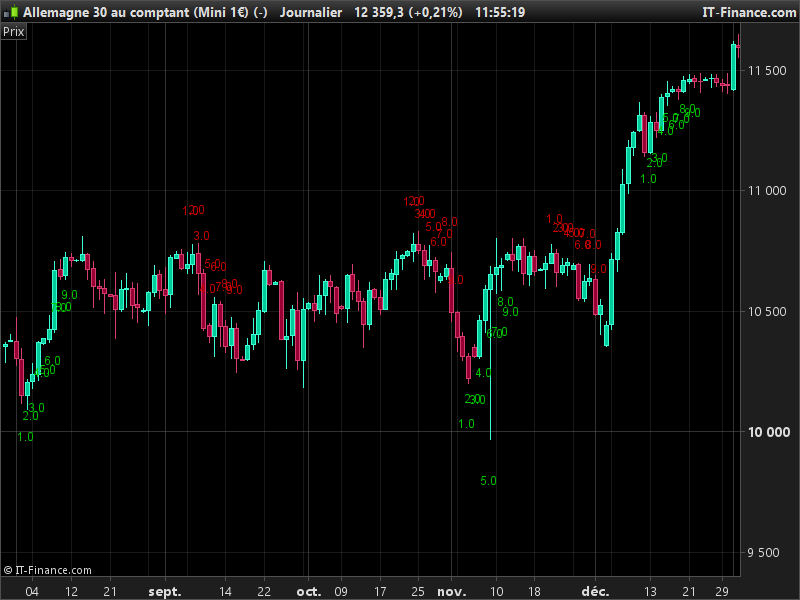
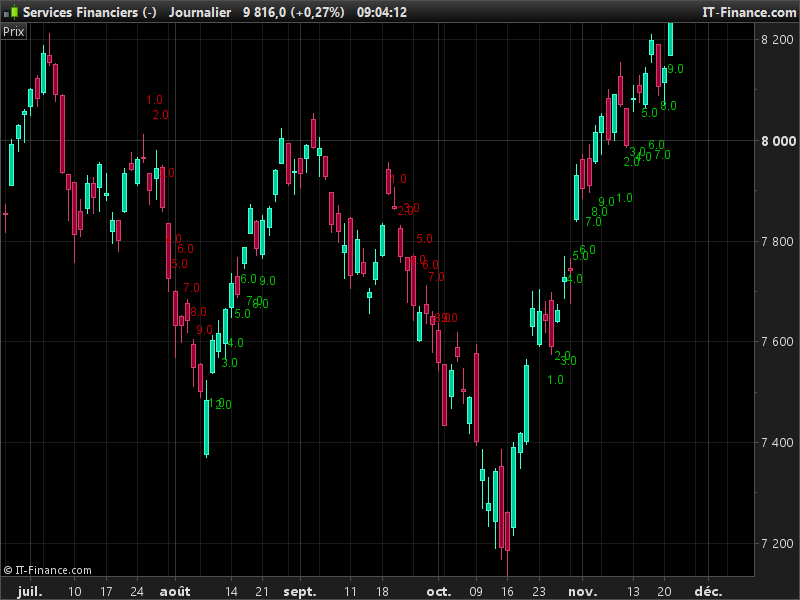
    First i see there is a digit shown 1.0 etc .. its should only be just 1

    Also i see the count is not staring at the right moment i will send a printscreen where the counter goes wrong

    And yes it should be perfect if the count was shown during the swing and not only when it completes to 9

    rgds

    John

    #30839 quote
    JohnVS
    Participant
    Junior

    Hi Nicolas,

    Hope the problems are gone now.

    Please let me know

    Did you see the post and attached file?

    rgds

    John

    #30846 quote
    Nicolas
    Keymaster
    Master

    Yes thank you. You can write comments and upload picture here instead! Your malware problem seems gone now, good news!
    I managed the “resting bar”, but I’d like to change the way numbers are displayed to delete the digit and still with variable, instead of writing drawtext 9 times.. I’ll get back with some news later.

    #30865 quote
    JohnVS
    Participant
    Junior

    Glad to hear that.

    Ive attached a printscreen.

    counter works but but at some points it isnt quite doing what it should

    In this case it jumps from 9.0 to 2.0 on the next bar

    It would also already be a great improvement to show the first bar with the 1 so at least one can see where the swing starts

    Im sure you work something out 🙂


    rgds

    John

    #30899 quote
    JohnVS
    Participant
    Junior

    Hi Nicolas ,

    Been looking through a few charts and i find the start of the counter is wrong in many cases

    If a upswing starts the current close must be higher then the close of 4 bars earlier

    For the downswing to start the close of the current day must be lower then 4 days ago

    It must keep counting as long as that is the case. I think you have that working but the starting point often is wrong.


    rgds

    John

    #30958 quote
    Nicolas
    Keymaster
    Master

    I think this new WIP version should be ok. Because code is read from top to bottom, sometimes counting were wrong, so I stacked the code in another way (my bad sorry).

    About the Close superior or inferior to the one 4 bars earlier, it is not how it is coded in the original code posted by joerie1, it is looking for the current Close to be superior to highest one of the last 3 bars (up swing) and vice versa for the down swing, but I modified as per your suggestion..

Viewing 15 posts - 1 through 15 (of 67 total)
  • You must be logged in to reply to this topic.

Rewrite SwingTeller code from binck ProTrader to Prorealtime code


ProOrder: Automated Strategies & Backtesting

New Reply
Author
author-avatar
joerie1 @joerie1 Participant
Summary

This topic contains 66 replies,
has 6 voices, and was last updated by AVT
8 years, 7 months ago.

Topic Details
Forum: ProOrder: Automated Strategies & Backtesting
Language: English
Started: 03/24/2017
Status: Active
Attachments: 23 files
Logo Logo
Loading...