Returning information from a Screener

Viewing 3 posts - 1 through 3 (of 3 total)

  • Author
    Posts
  • #95517 quote
    bobt
    Participant
    Average

    Hi all,

    It seems the PRT screener can only ever return one variable for any instrument matching screening criteria.

    Are there plans to allow more than one to be returned ?

    If not, how many options are there for “overloading” the one value returned ?

    e.g an instrument matching a 15 minute “hit” on the screener with for example an RSI of 82 could be returned as 15,082 with some simple maths.

    Even direction can be added by using positive and negative numbers ( +15,082 and -15,082), however at that point are there more options ( use of colour / font / colour of the entry in the list ? )

    Is it possible to return text strings in any way ? ( ASCII encoding ? )

    Any ideas appreciated……..

    #95521 quote
    Nicolas
    Keymaster
    Master

    Only one criteria is possible for the list of results in ProScreener. I know that it should be extended in a next version, but I don’t know when.

    String variables are not possible and you can’t change the color of the criteria column.

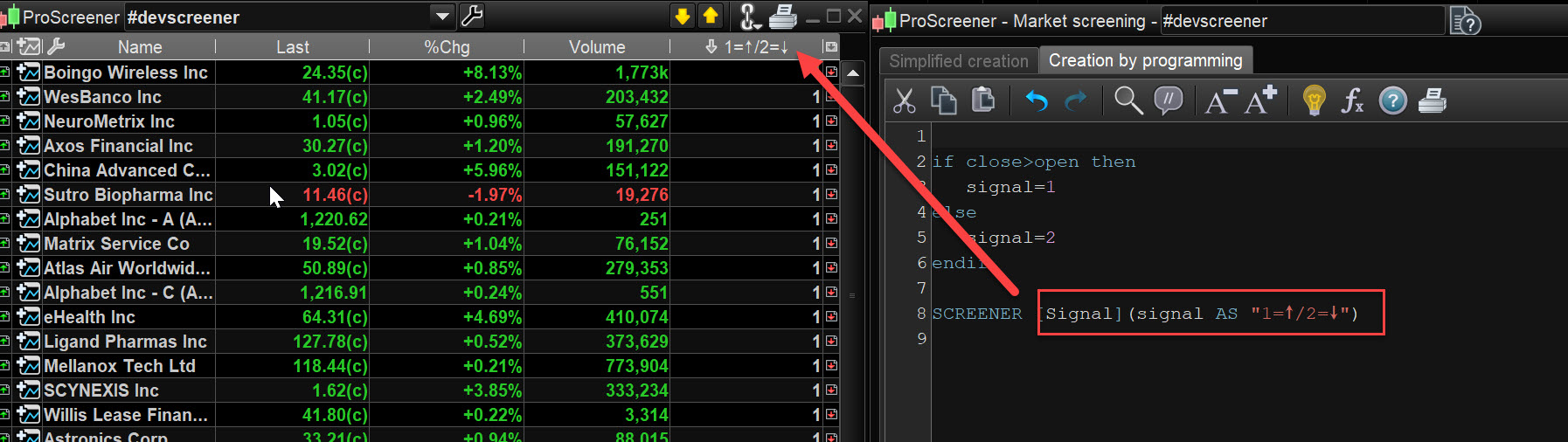
    Another solution is to add ASCII symbol in the criteria description like I did in the attached screenshot.

    bobt thanked this post
    screener-criteria-column-with-symbols.jpg screener-criteria-column-with-symbols.jpg
    #95524 quote
    robertogozzi
    Moderator
    Master

    You can use a simple math. in your cas your RSI periods will need the rightmost 3 digits (0 -999), so you will have to multiply 15 by 1000 to make it use the two leftmost digits:

    TIMEFRAME(15 minute)
    MyRsi = Rsi[14](close)
    ReturnValue = 15000 + MyRsi
    SCREENER[MyRsi > 50](ReturnValue AS "My Criterion")

    But this won’t help much if you use several TF’s. In this case I suggest that you use a pattern where the single digits refers to a single TF and, for each one of them, you could use 1 for positive data or 2 for negative data. Say you want to use 3 TF’s (4-hour, 1-hour and 15-minute TF’s), with 1=Macd > 0 and 2=Macd < 0, you could write:

    TIMEFRAME(4 hour)
    MyMacd4 = Macd[12,26,9]
    
    TIMEFRAME(1 hour)
    MyMacd1 = Macd[12,26,9]
    
    TIMEFRAME(15 minute)
    MyMacd15 = Macd[12,26,9]
    
    TIMEFRAME(default)
    
    IF MyMacd4 > 0 THEN
       Result4 = 100
    ELSE
       Result4 = 200
    ENDIF
    
    IF MyMacd1 > 0 THEN
       Result1 = 10
    ELSE
       Result1 = 20
    ENDIF
    
    IF MyMacd15 > 0 THEN
       Result15 = 1
    ELSE
       Result15 = 2
    ENDIF
    
    Result = Result4 + Result1 + Result15
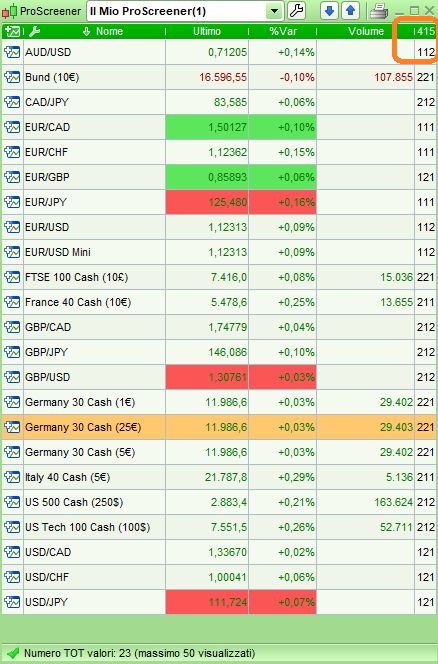
    SCREENER[Result](Result AS "415")

    the last line shows 415, where “4” refers to the 4-hour TF, “1” to the 1-hour TF and “5” to the 15-minute TF.

    As from attached pic, the first item in the list shows that AudUsd’s MACD is above 0 on the 4-h and 1-h TF’s, but below 0 on the 15-minute TF.

    bobt thanked this post
    x-3.jpg x-3.jpg
Viewing 3 posts - 1 through 3 (of 3 total)

  • You must be logged in to reply to this topic.

Returning information from a Screener


ProScreener: Market Scanners & Detection

New Reply
Author
author-avatar
bobt @bobt Participant
Summary

This topic contains 2 replies,
has 3 voices, and was last updated by robertogozzi
6 years, 11 months ago.

Topic Details
Forum: ProScreener: Market Scanners & Detection
Language: English
Started: 04/05/2019
Status: Active
Attachments: 2 files
Logo Logo
Loading...