Hi,
Could anyone convert this indicator into different candle colours instead?
PRC_FlatTrend.
Flat Trend
Thank you.
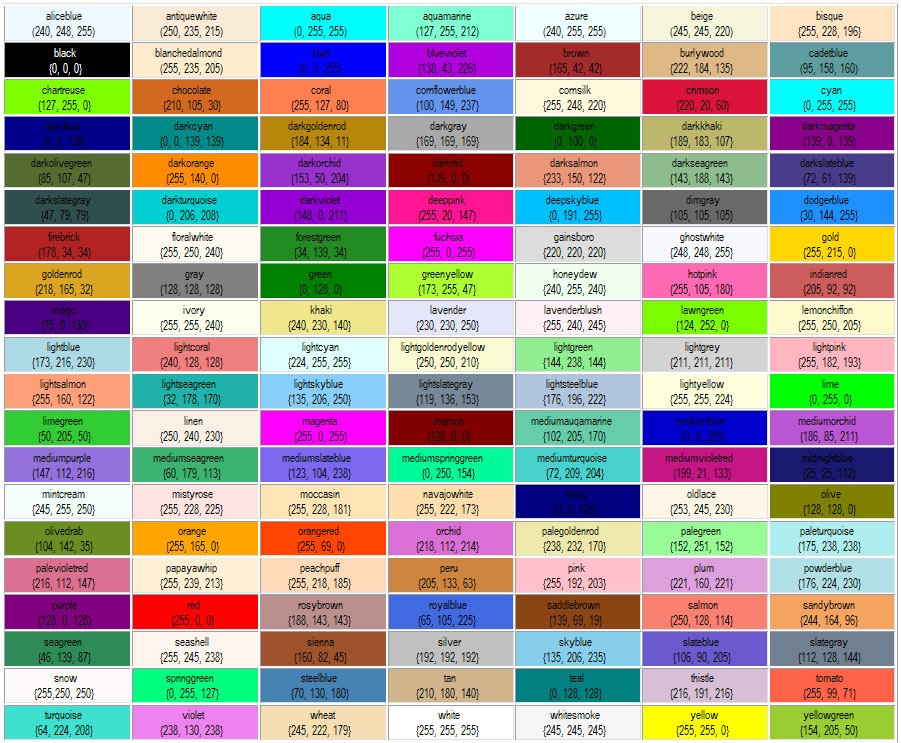
You can replace the colours in the last line (the RETURN line) with the numbers of your choice (Red,Green,Blue) from the table https://www.prorealcode.com/wp-content/uploads/2015/09/P1jHlnG.jpg, or you can use names shown in the same table like
coloured("LawnGreen")
or you can simply rewrite the RETURN line like this one:
return ExtMapBuffer1, ExtMapBuffer2, ExtMapBuffer3, ExtMapBuffer4
so that you can choose colours ans styles from the setting panel of the indicator.
thank you.
What I meant to ask is that the indicator appears in the chart and paints the colour of the body of the japanese candle. 🙂
JSParticipant
Senior
Hi
@jonpt88
Here is the indicator…
//PRC_FlatTrend | indicator
//26.03.2018
//Nicolas @ www.prorealcode.com
//Sharing ProRealTime knowledge
PADX=DIplus[14](close)
NADX=DIminus[14](close)
PSAR = SAR[0.02,0.02,0.2]
ExtMapBuffer1=0
ExtMapBuffer2=0
ExtMapBuffer3=0
ExtMapBuffer4=0
if (Psar < Close AND PADX > NADX) then
ExtMapBuffer2=1
R=50
G=205
B=50
DrawCandle(Open,High,Low,Close) Coloured(R,G,B)
endif
if (Psar < Close AND NADX > PADX) then
ExtMapBuffer4=1
R=144
G=238
B=144
DrawCandle(Open,High,Low,Close) Coloured(R,G,B)
endif
if (Psar > Close AND NADX > PADX) then
ExtMapBuffer1=1
R=255
G=0
B=0
DrawCandle(Open,High,Low,Close) Coloured(R,G,B)
endif
if (Psar > Close AND PADX > NADX) then
ExtMapBuffer3=1
R=250
G=128
B=114
DrawCandle(Open,High,Low,Close) Coloured(R,G,B)
endif
return
wowowowow – thanks JS – you are alwysss so helpful! amazing!