ProScreener returning incorrect data

Viewing 4 posts - 1 through 4 (of 4 total)
  • Author
    Posts
  • #38242 quote
    prcolf
    Participant
    New

    Hi

    I’ve been having a lot of trouble setting up a scan in ProScreener. This is partly due to the scanner not being able to scan a weekly bar on the weekend. However I have also tried to scan on a Monday and a Tuesday and its still not correct so I must have something wrong.

    To simplify things I have taken just one condition from my scan and its still returning stocks that at outside of the criteria. Could someone please tell me what might be wrong with this simple scan.

    This is my formula

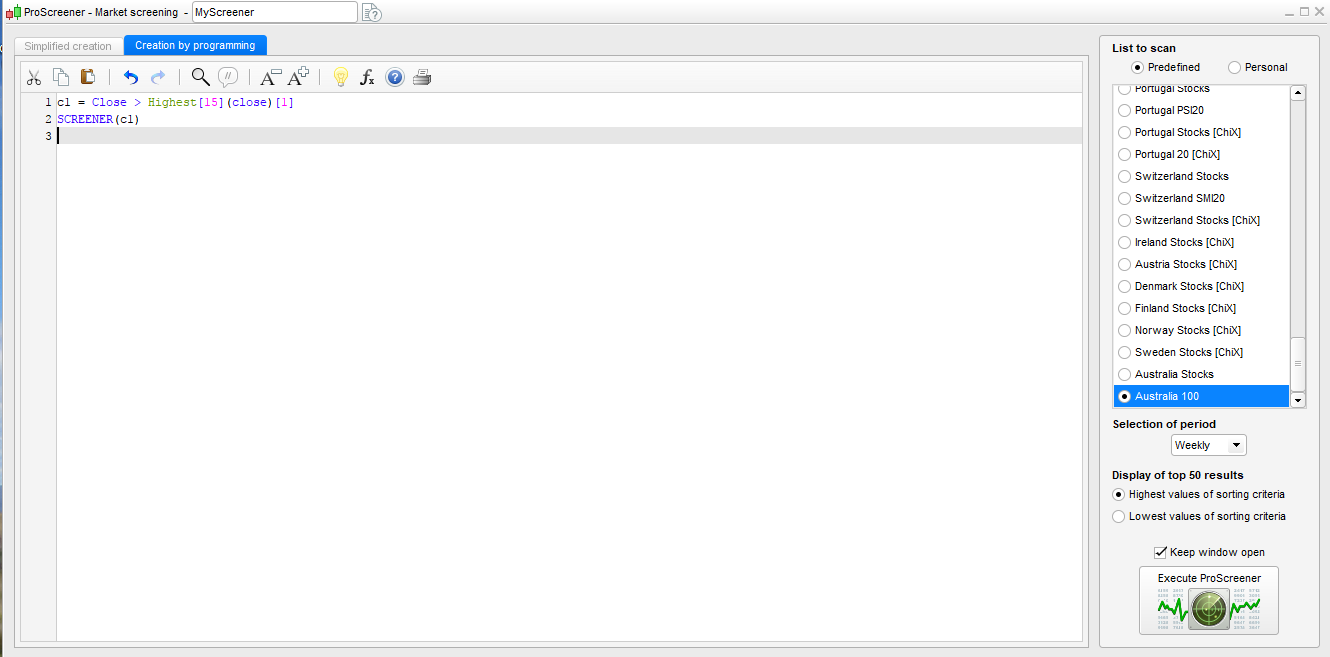
    c1 = Close > Highest[15](close)[1]
    SCREENER(c1)

    I’ve uploaded the following images.

    1. The ProScreener window. I have weekly selected and the ASX100

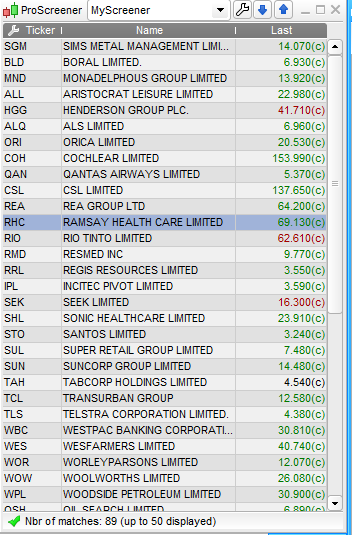
    2. The results that the scan returned

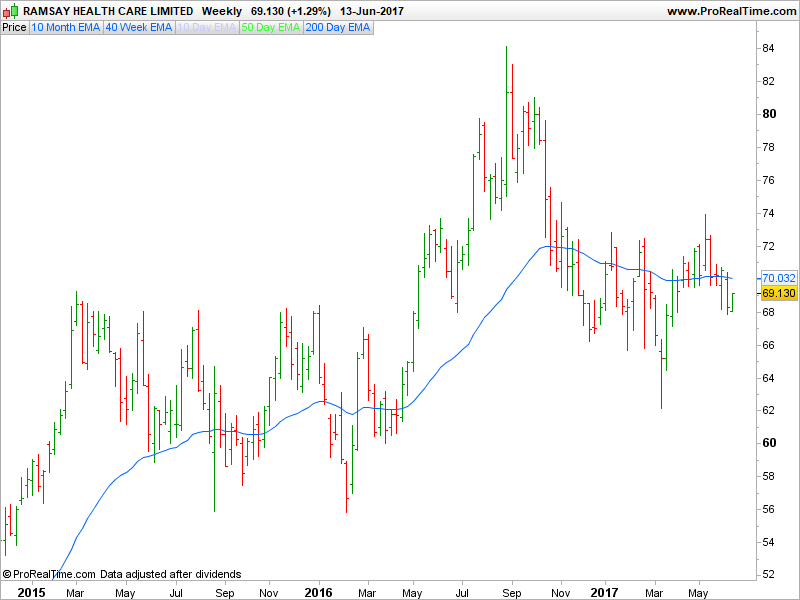
    3.  Stock RHC clearly is not a weekly 15 bar highest close so why is it there?   RIO, RMD, RRL etc are also not correct

    Do I have to somehow filter the results so that it only returns candidates that are true?

    I also tried adding  TIMEFRAME(Weekly) but it made no difference.


    Thanks

    Alan

    ProScreener-Window.png ProScreener-Window.png Results.png Results.png RHC.png RHC.png
    #38260 quote
    Nicolas
    Keymaster
    Master

    Condition to be tested with SCREENER instruction must be under brackets, not parenthesis:

    c1 = Close > Highest[15](close)[1]
    SCREENER [c1]
    prcolf thanked this post
    #38273 quote
    prcolf
    Participant
    New

    Great stuff.  Its almost ok now. I must have a problem with one or two of my formulas. How do I make something plot on a chart so that I can check?

    c1 = Close > Highest[15](close)[1]
    
    if C1 then
    
    DRAWARROWUP(barindex,low) COLOURED(0,155,10)
    
    endif
    
    SCREENER [c1]
    #38281 quote
    Nicolas
    Keymaster
    Master

    If you want to make an indicator, don’t use ProScreener instruction 🙂

    c1 = Close > Highest[15](close)[1]
    
    if C1 then
    
    DRAWARROWUP(barindex,low) COLOURED(0,155,10)
    
    endif
    
    RETURN
    prcolf thanked this post
Viewing 4 posts - 1 through 4 (of 4 total)
  • You must be logged in to reply to this topic.

ProScreener returning incorrect data


ProScreener: Market Scanners & Detection

New Reply
Author
author-avatar
prcolf @ozzietrader Participant
Summary

This topic contains 3 replies,
has 2 voices, and was last updated by Nicolas

8 years, 9 months ago.

Topic Details
Forum: ProScreener: Market Scanners & Detection
Language: English
Started: 06/14/2017
Status: Active
Attachments: 3 files
Logo Logo
Loading...