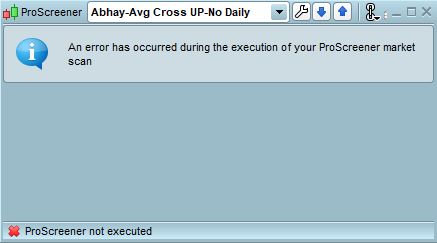
ProScreener not executed

Viewing 5 posts - 1 through 5 (of 5 total)
  • Author
    Posts
  • #85649 quote
    abhay
    Participant
    Junior

    Just from today after I launch ProRealTime Platform, all my proscreener windows are displaying the error

    “ProScreener not executed”

    All these have been working for all of last week, so all the code is correct and tested and I have used them for many days already, so why is it not working today?

    proscreener-error.jpg proscreener-error.jpg
    #85687 quote
    Patrick121916
    Participant
    New

    I’m having a similar problem. My ProScreener wont load, it just keeps displaying the spinning loading icon. It was working fine before they did the maintenance a couple of days ago.

    #85688 quote
    Robb
    Participant
    Average

    Yes, I confirm it does not work after saturday maintenance.

    #85695 quote
    Vonasi
    Moderator
    Master

    I would suggest sending a technical report to PRT via your platforms to make sure that they are aware of this issue as they do not monitor this forum section.

    #85709 quote
    Patrick121916
    Participant
    New

    All working fine now.

Viewing 5 posts - 1 through 5 (of 5 total)
  • You must be logged in to reply to this topic.

ProScreener not executed


ProScreener: Market Scanners & Detection

New Reply
Author
author-avatar
abhay @abhay Participant
Summary

This topic contains 4 replies,
has 4 voices, and was last updated by Patrick121916

7 years, 3 months ago.

Topic Details
Forum: ProScreener: Market Scanners & Detection
Language: English
Started: 11/24/2018
Status: Active
Attachments: 1 files
Logo Logo
Loading...