Hello,
Is there a way to make the proscreener display a full number instead of number with a “k” or “M”?
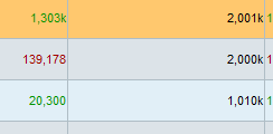
As in the attachment below I get “2,001k” but I really want it to be 2,001,073 [ as the lower digits convey certain information]
So is there a way to change the way proscreener prints out its data ?
Alternatively, is there a way to output more than one column of data ?
For example, an instrument that met the scan criteria,have a column representing average low and another column representing average high – both calculated inside the scan script.
Thanks
Hello,
How can I use BBCodes in Proscanner ? I didn’t see any documentation about this subject.
Thanks,
Lior
As in the attachment below I get “2,001k” but I really want it to be 2,001,073 [ as the lower digits convey certain information] So is there a way to change the way proscreener prints out its data ?
No, but you can divide the number by 1000, 10.000 etc.. to get a non truncated value instead.
Alternatively, is there a way to output more than one column of data ?
ProScreener only allow 1 sorting criteria = 1 column.