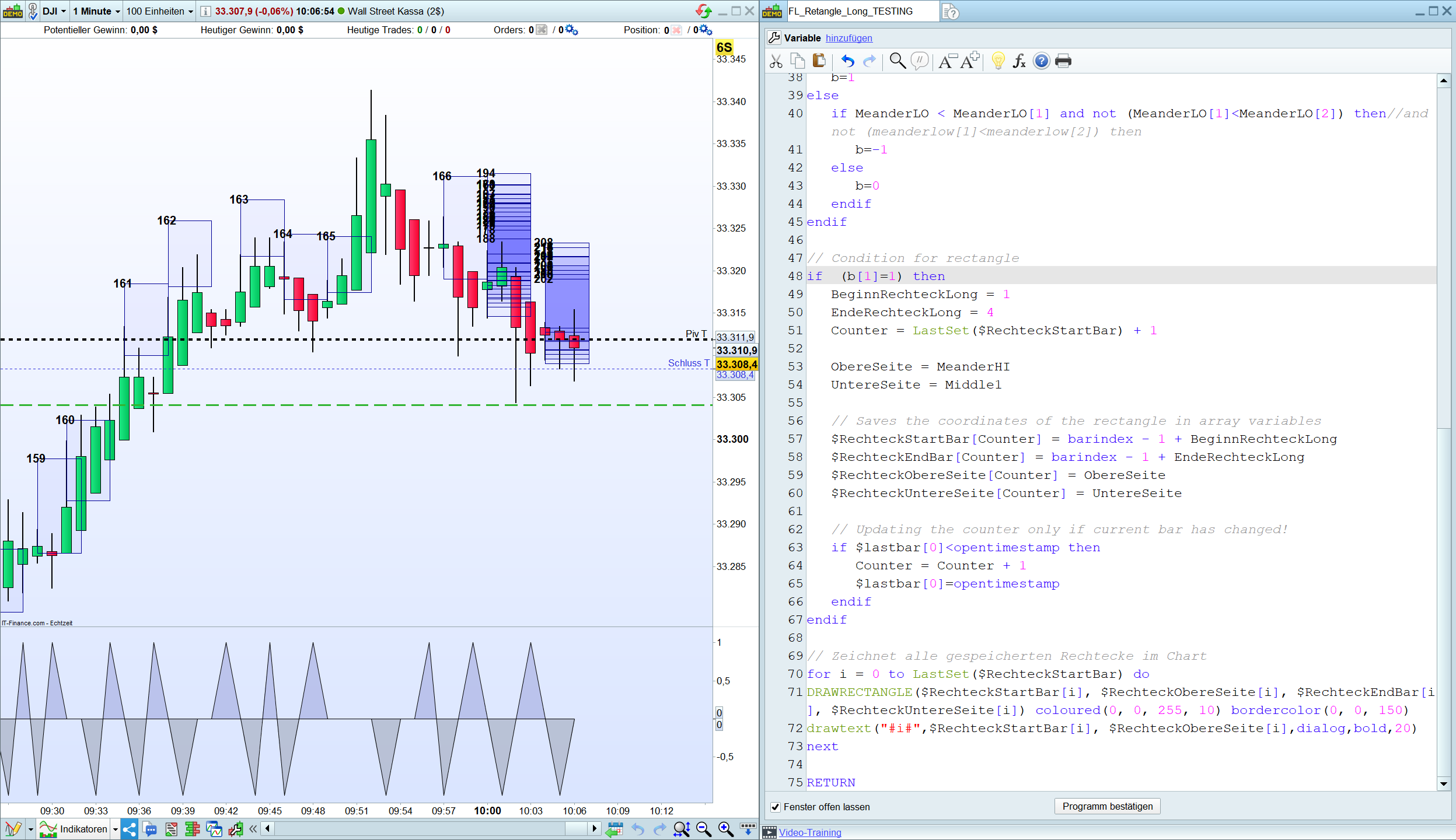
Prevent the rectangle from being drawn continually, only at each new bar.

Viewing 3 posts - 16 through 18 (of 18 total)
  • Author
    Posts
  • #214781 quote
    NicolasNicolas
    Keymaster
    Legend

    Yes, so that’s what I talked about. In history your calculation is made only once because the bars are already closed. While on the current bar, until its closure, your calculation is made on each tick and on each new tick you are increasing the column number (counter in your code?) and there creating X rectangles for the same bar and they are all painted until the bar is closed.

    I have trouble making the rectangles to be detected and plotted with your version, what is instrument and timeframe please?

    In order for your counter to increase only a new bar, change this function like this: (checking if timestamp of the bar is newer):

    // Condition for rectangle
    if  (b[1]=1) then
    BeginnRechteckLong = 1
    EndeRechteckLong = 4
    Counter = LastSet($RechteckStartBar) + 1
    
    ObereSeite = MeanderHI
    UntereSeite = Middle1
    
    // Saves the coordinates of the rectangle in array variables
    $RechteckStartBar[Counter] = barindex - 1 + BeginnRechteckLong
    $RechteckEndBar[Counter] = barindex - 1 + EndeRechteckLong
    $RechteckObereSeite[Counter] = ObereSeite
    $RechteckUntereSeite[Counter] = UntereSeite
    
    // Updating the counter only if current bar has changed! 
    if $lastbar[0]<opentimestamp then 
    Counter = Counter + 1
    $lastbar[0]=opentimestamp
    endif 
    endif
    #214782 quote
    FabianFabian
    Participant
    Master

    Thanks for your answer.

    I’m using the 1 Minute Timeframe for Testing.

    FL_Retangle_Testing.png FL_Retangle_Testing.png FL_Retangle_Long_TESTING.itf
    #215201 quote
    FabianFabian
    Participant
    Master

    By the way, I solved it last week.

    • The counter and drawonlastbaronly must be removed.

    As well as:

    UpperSide = MeanderHI[1]
    
    LowerSide = Middle1[1]
    Nicolas thanked this post
Viewing 3 posts - 16 through 18 (of 18 total)
  • You must be logged in to reply to this topic.
ProRealAI ProRealAI New

Stuck on this ProBuilder code?

Describe what this topic is trying to build, in plain English, and ProRealAI writes the ProRealTime™ indicator, screener or system for you.

Available in 7 languages
Try ProRealAI

Prevent the rectangle from being drawn continually, only at each new bar.

ProBuilder: Indicators & Custom Tools

New Reply
Author
author-avatar
Fabian @heikinashi Participant
Summary

This topic contains 17 replies,
has 3 voices, and was last updated by FabianFabian
3 years, 3 months ago.

Topic Details
Forum: ProBuilder: Indicators & Custom Tools
Language: English
Started: 05/08/2023
Status: Active
Attachments: 9 files
ProRealCode ProRealCode
Loading...