Possible to access “3 Day” timeframe

Viewing 4 posts - 1 through 4 (of 4 total)
  • Author
    Posts
  • #187642 quote
    krogen
    Participant
    New

    Hi,

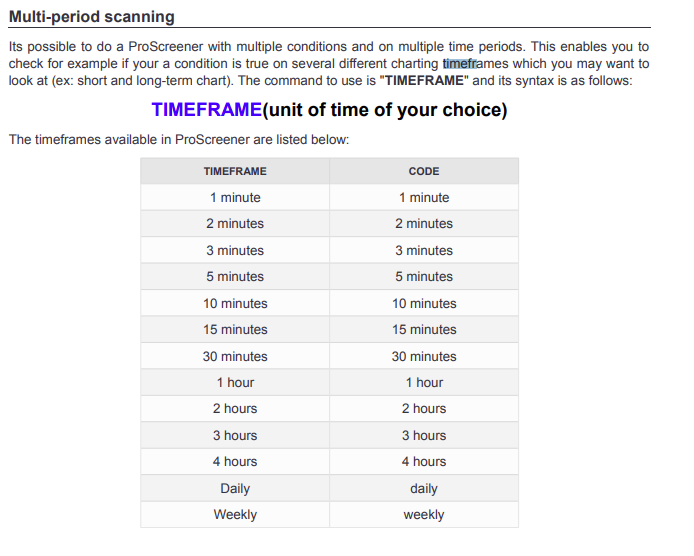
    Is it possible to access a custom timeframe such as “3 Day” from script for an indicator? I am guessing not as the help only specifies the below but wanted to ask as there may be a workaround.

    Thanks

    2022-02-06_17h57_40.png 2022-02-06_17h57_40.png
    #187647 quote
    GraHal
    Participant
    Master

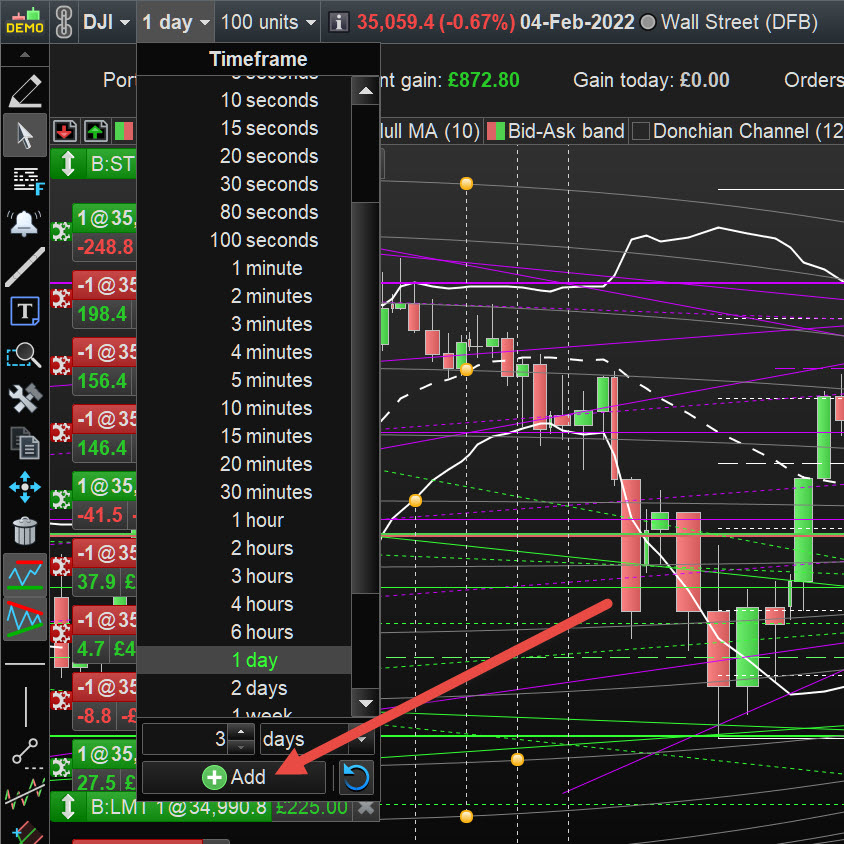
    You can run your charts on a 3 Day Timeframe, just add 3 days as a Timeframe … see attached at red arrowhead.

    Try it and see if the 3 Day TF then beceomes available in your Screener. doubt it but you never know until you try? 🙂

    Nicolas thanked this post
    3-days.jpg 3-days.jpg
    #187811 quote
    robertogozzi
    Moderator
    Master

    You can use any TF among those listed in ProScreener’s dropdown list. I can’t see any support for the number of days, just DAILY.

    #189298 quote
    krogen
    Participant
    New

    Thanks all.

    Indeed, unfortunately only those timeframes supported as indicated by the documentation (see first post screenshot).

    Feature request: support any timeframes defined by the user in ProRealtime 🙂

    thanks

    k

Viewing 4 posts - 1 through 4 (of 4 total)

  • You must be logged in to reply to this topic.

Possible to access “3 Day” timeframe


ProScreener: Market Scanners & Detection

New Reply
Author
author-avatar
krogen @krogen Participant
Summary

This topic contains 3 replies,
has 3 voices, and was last updated by krogen

4 years ago.

Topic Details
Forum: ProScreener: Market Scanners & Detection
Language: English
Started: 02/06/2022
Status: Active
Attachments: 2 files
Logo Logo
Loading...