


Poner el numero de Pips en el grafico del precio

Viewing 3 posts - 1 through 3 (of 3 total)
  • Author
    Posts
  • #248220 quote
    RAM24
    Participant
    New

    Hola a todos,

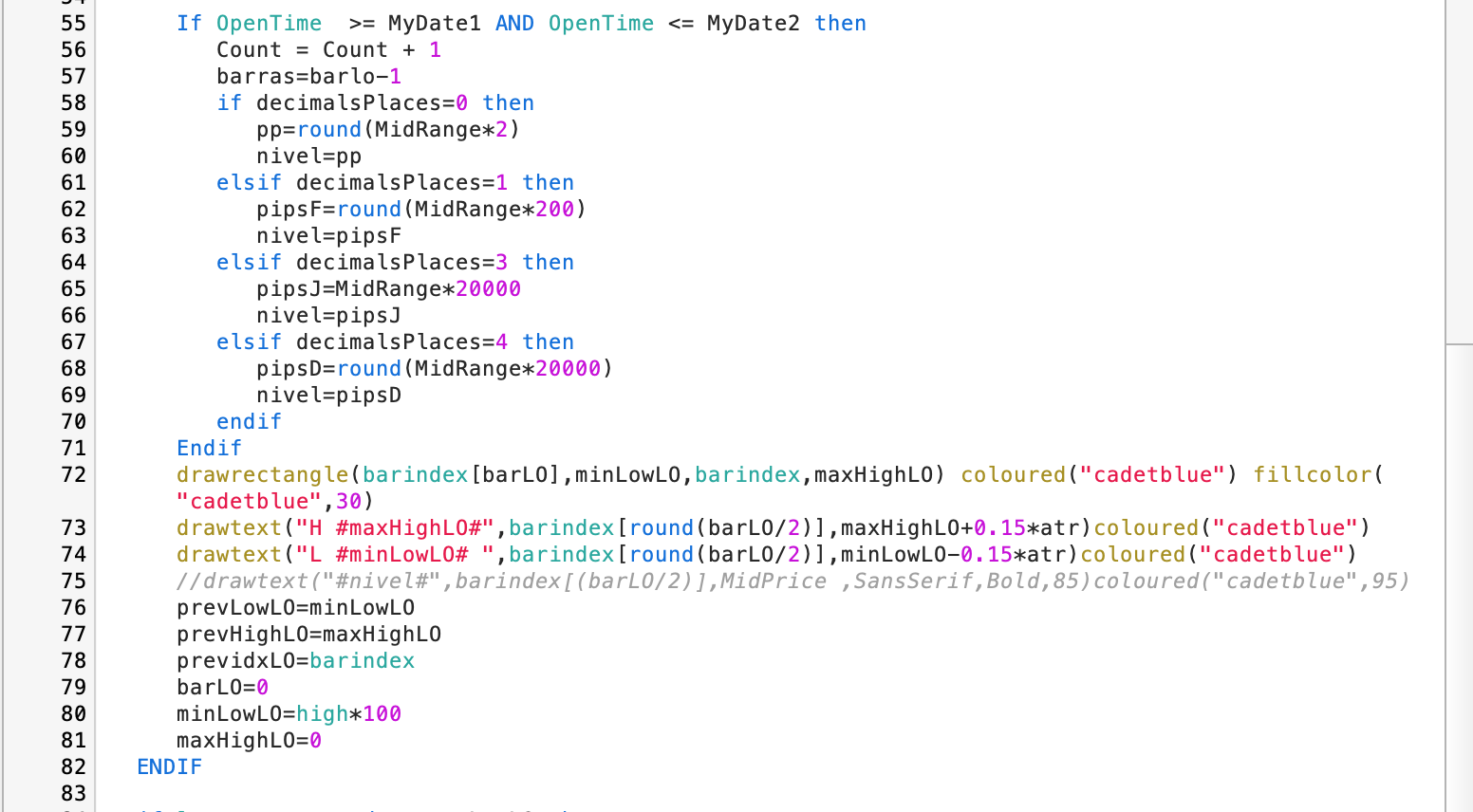
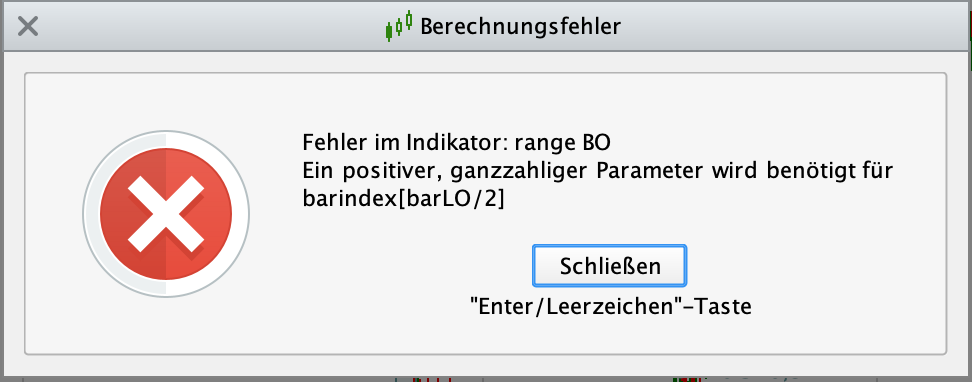
    Estoy tratando de completar el indicador de RBO de tal forma que una vez calculada la distancia en pips del rango se pueda ver en el grafico del precio, he programado esta funcion que es la linea 75  pero me da error si cambio de Time Frame. Me podrian ayudar con la correcion del error obtenido.

    gracias de antemano

    openLO=143000
    closeLO=160000
    limitday=220000
    endentry=closeLO + 050000
    endtime=closeLO
    atr=AverageTrueRange[14](close)
    ShowMidLine=1

    if ticksize=1 or ticksize=0.01 then
    decimalsPlaces=0
    elsif ticksize=0.001 then
    decimalsPlaces=1
    elsif ticksize=0.0001 then
    decimalsPlaces=3
    elsif ticksize=0.00001 then
    decimalsPlaces=4
    endif

    if gettimeframe<=3600 then
    once maxHighLO=high
    once minLowLO=low
    if opentime>=openLO and opentime<=closeLO THEN
    maxi=highest[max(1,barras+1)](high)
    mini=LOWEST[max(1,barras+1)](low)
    ENDIF

    if opentime>=openLO and opentime<=closeLO then
    barLO=barLO+1
    if high>=maxHighLO then
    maxHighLO=high
    else
    maxHighLO=maxHighLO
    endif
    if low<=minLowLO then
    minLowLO=low
    else
    minLowLO=minLowLO
    endif
    endif
    if opentime=closeLO then
    IF ShowMidLine THEN
    MidRange0 = (maxHighLO – minLowLO) / 2
    MidPrice = minLowLO + MidRange0
    drawsegment(barindex[barLO],MidPrice,barindex,MidPrice)coloured(“blue”) style(dottedline,2)coloured(“cadetblue”,45)
    ENDIF
    endif

    if opentime=closeLO then
    Once MyDate1 = openLO
    Once MyDate2 = endtime
    Once Count = 0
    MidRange=(maxHighLO – minLowLO) / 2
    MidPrice = minLowLO + MidRange

    If OpenTime >= MyDate1 AND OpenTime <= MyDate2 then
    Count = Count + 1
    barras=barlo-1
    if decimalsPlaces=0 then
    pp=round(MidRange*2)
    nivel=pp
    elsif decimalsPlaces=1 then
    pipsF=round(MidRange*200)
    nivel=pipsF
    elsif decimalsPlaces=3 then
    pipsJ=MidRange*20000
    nivel=pipsJ
    elsif decimalsPlaces=4 then
    pipsD=round(MidRange*20000)
    nivel=pipsD
    endif
    Endif
    drawrectangle(barindex[barLO],minLowLO,barindex,maxHighLO) coloured(“cadetblue”) fillcolor(“cadetblue”,30)
    drawtext(“H #maxHighLO#”,barindex[round(barLO/2)],maxHighLO+0.15*atr)coloured(“cadetblue”)
    drawtext(“L #minLowLO# “,barindex[round(barLO/2)],minLowLO-0.15*atr)coloured(“cadetblue”)
    //drawtext(“#nivel#”,barindex[(barLO/2)],MidPrice ,SansSerif,Bold,85)coloured(“cadetblue”,95)
    prevLowLO=minLowLO
    prevHighLO=maxHighLO
    previdxLO=barindex
    barLO=0
    minLowLO=high*100
    maxHighLO=0
    ENDIF

    if low crosses under prevLowLO then
    drawsegment(previdxLO,prevLowLO,barindex,prevLowLO)coloured(“cadetblue”)
    prevLowLO=0
    elsif opentime=limitday and prevLowLO<>0 then
    drawsegment(previdxLO,prevLowLO,barindex,prevLowLO)coloured(“cadetblue”)
    prevLowLO=0
    elsif islastbarupdate and prevLowLO<>0 then
    drawsegment(previdxLO,prevLowLO,barindex,prevLowLO)coloured(“cadetblue”)
    endif
    if high crosses over prevHighLO then
    drawsegment(previdxLO,prevHighLO,barindex,prevHighLO)coloured(“cadetblue”)
    prevHighLO=0
    elsif opentime=limitday and prevHighLO<>0 then
    drawsegment(previdxLO,prevHighLO,barindex,prevHighLO)coloured(“cadetblue”)
    prevHighLO=0
    elsif islastbarupdate and prevHighLO<>0 then
    drawsegment(previdxLO,prevHighLO,barindex,prevHighLO)coloured(“cadetblue”)
    ENDIF
    endif

    return

    #248223 quote
    Iván González
    Moderator
    Master

    En lugar de lo que tienes pon esto: barindex[round(barLO/2)]

    #248226 quote
    RAM24
    Participant
    New

    pues ahora si que funciona. Gracias de nuevo Ivan

Viewing 3 posts - 1 through 3 (of 3 total)
  • You must be logged in to reply to this topic.

Poner el numero de Pips en el grafico del precio


ProBuilder: Indicadores y Herramientas

New Reply
Author
author-avatar
RAM24 @ram24 Participant
Summary

This topic contains 2 replies,
has 2 voices, and was last updated by RAM24

7 months, 4 weeks ago.

Topic Details
Forum: ProBuilder: Indicadores y Herramientas
Language: Spanish
Started: 06/12/2025
Status: Active
Attachments: 2 files
Logo Logo
Loading...

