Plot indicator on the Chart

Viewing 6 posts - 1 through 6 (of 6 total)
  • Author
    Posts
  • #126725 quote
    vcharlesc
    Participant
    Average

    Dear friends,

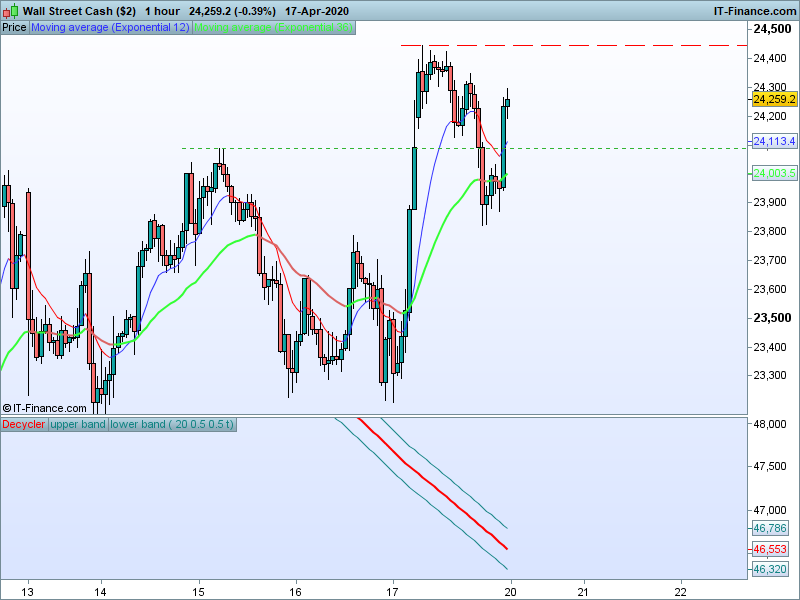
    I having problem with plotting indicator (itf. file) on the chart , it was plotted below from the chart.

    How do set this indicator on the chart.

    #126728 quote
    Nicolas
    Keymaster
    Master

    Add it on the price, by clicking on “price” then “add indicator”.

    #126747 quote
    vcharlesc
    Participant
    Average

    Dear Nicolas,

    Thanks for your prompt response.

    #242381 quote
    vcharlesc
    Participant
    Average

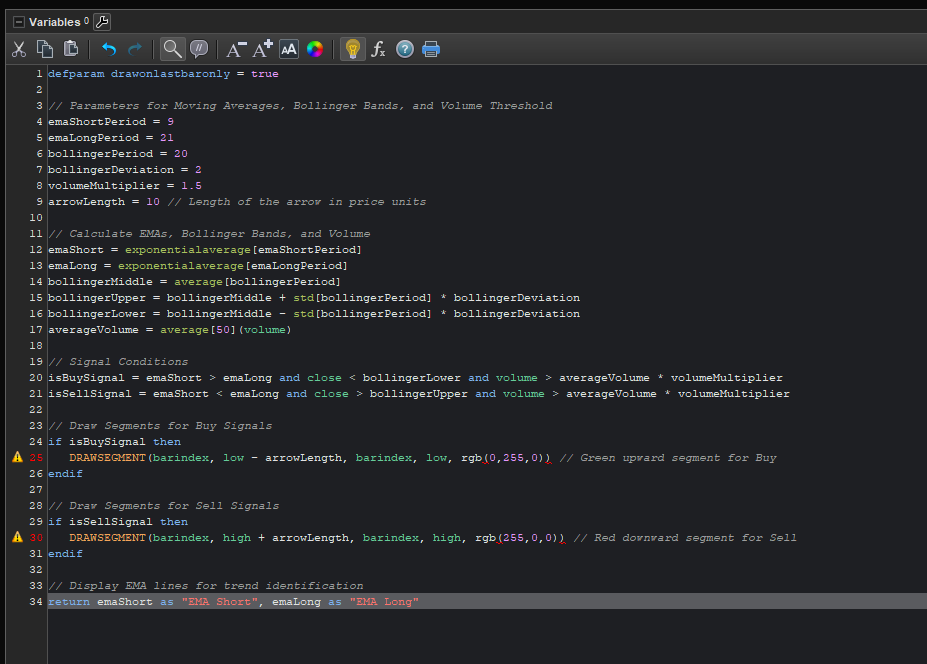
    defparam drawonlastbaronly = true

    // Parameters for Moving Averages, Bollinger Bands, and Volume Threshold
    emaShortPeriod = 9
    emaLongPeriod = 21
    bollingerPeriod = 20
    bollingerDeviation = 2
    volumeMultiplier = 1.5
    arrowLength = 10 // Length of the arrow in price units

    // Calculate EMAs, Bollinger Bands, and Volume
    emaShort = exponentialaverage[emaShortPeriod]
    emaLong = exponentialaverage[emaLongPeriod]
    bollingerMiddle = average[bollingerPeriod]
    bollingerUpper = bollingerMiddle + std[bollingerPeriod] * bollingerDeviation
    bollingerLower = bollingerMiddle – std[bollingerPeriod] * bollingerDeviation
    averageVolume = average[50](volume)

    // Signal Conditions
    isBuySignal = emaShort > emaLong and close < bollingerLower and volume > averageVolume * volumeMultiplier
    isSellSignal = emaShort < emaLong and close > bollingerUpper and volume > averageVolume * volumeMultiplier

    // Draw Segments for Buy Signals
    if isBuySignal then
    DRAWSEGMENT(barindex, low – arrowLength, barindex, low, rgb(0,255,0)) // Green upward segment for Buy
    endif

    // Draw Segments for Sell Signals
    if isSellSignal then
    DRAWSEGMENT(barindex, high + arrowLength, barindex, high, rgb(255,0,0)) // Red downward segment for Sell
    endif

    // Display EMA lines for trend identification
    return emaShort as “EMA Short”, emaLong as “EMA Long”

    #242383 quote
    vcharlesc
    Participant
    Average

    defparam drawonlastbaronly = true

    // Parameters for Moving Averages, Bollinger Bands, and Volume Threshold

    emaShortPeriod = 9

    emaLongPeriod = 21

    bollingerPeriod = 20

    bollingerDeviation = 2

    volumeMultiplier = 1.5

    arrowLength = 10 // Length of the arrow in price units

    // Calculate EMAs, Bollinger Bands, and Volume

    emaShort = exponentialaverage[emaShortPeriod]

    emaLong = exponentialaverage[emaLongPeriod]

    bollingerMiddle = average[bollingerPeriod]

    bollingerUpper = bollingerMiddle + std[bollingerPeriod] * bollingerDeviation

    bollingerLower = bollingerMiddle – std[bollingerPeriod] * bollingerDeviation

    averageVolume = average[50](volume)

    // Signal Conditions

    isBuySignal = emaShort > emaLong and close < bollingerLower and volume > averageVolume * volumeMultiplier

    isSellSignal = emaShort < emaLong and close > bollingerUpper and volume > averageVolume * volumeMultiplier

    // Draw Segments for Buy Signals

    if isBuySignal then

    DRAWSEGMENT(barindex, low – arrowLength, barindex, low, rgb(0,255,0)) // Green upward segment for Buy

    endif

    // Draw Segments for Sell Signals

    if isSellSignal then

    DRAWSEGMENT(barindex, high + arrowLength, barindex, high, rgb(255,0,0)) // Red downward segment for Sell

    endif

    // Display EMA lines for trend identification

    return emaShort as “EMA Short”, emaLong as “EMA Long”

    Help me fix this error

    #242394 quote
    JC_Bywan
    Moderator
    Master

    Hi,

    DRAWSEGMENT(barindex, low – arrowLength, barindex, low, rgb(0,255,0)) // Green upward segment for Buy

    … is not the correct syntax to assign a color to your segment, instead it should be written as follows:

    DRAWSEGMENT(barindex, low – arrowLength, barindex, low) coloured(0,255,0) // Green upward segment for Buy


    Same thing for the red one and its incorrect rgb(255,0,0), full line to be replaced with:

    DRAWSEGMENT(barindex, high + arrowLength, barindex, high) coloured(255,0,0) // Red downward segment for Sell

    vcharlesc thanked this post
Viewing 6 posts - 1 through 6 (of 6 total)

  • You must be logged in to reply to this topic.

Plot indicator on the Chart


ProBuilder: Indicators & Custom Tools

New Reply
Author
author-avatar
vcharlesc @vcharlesc Participant
Summary

This topic contains 5 replies,
has 2 voices, and was last updated by JC_Bywan

1 year ago.

Topic Details
Forum: ProBuilder: Indicators & Custom Tools
Language: English
Started: 04/18/2020
Status: Active
Attachments: 2 files
Logo Logo
Loading...