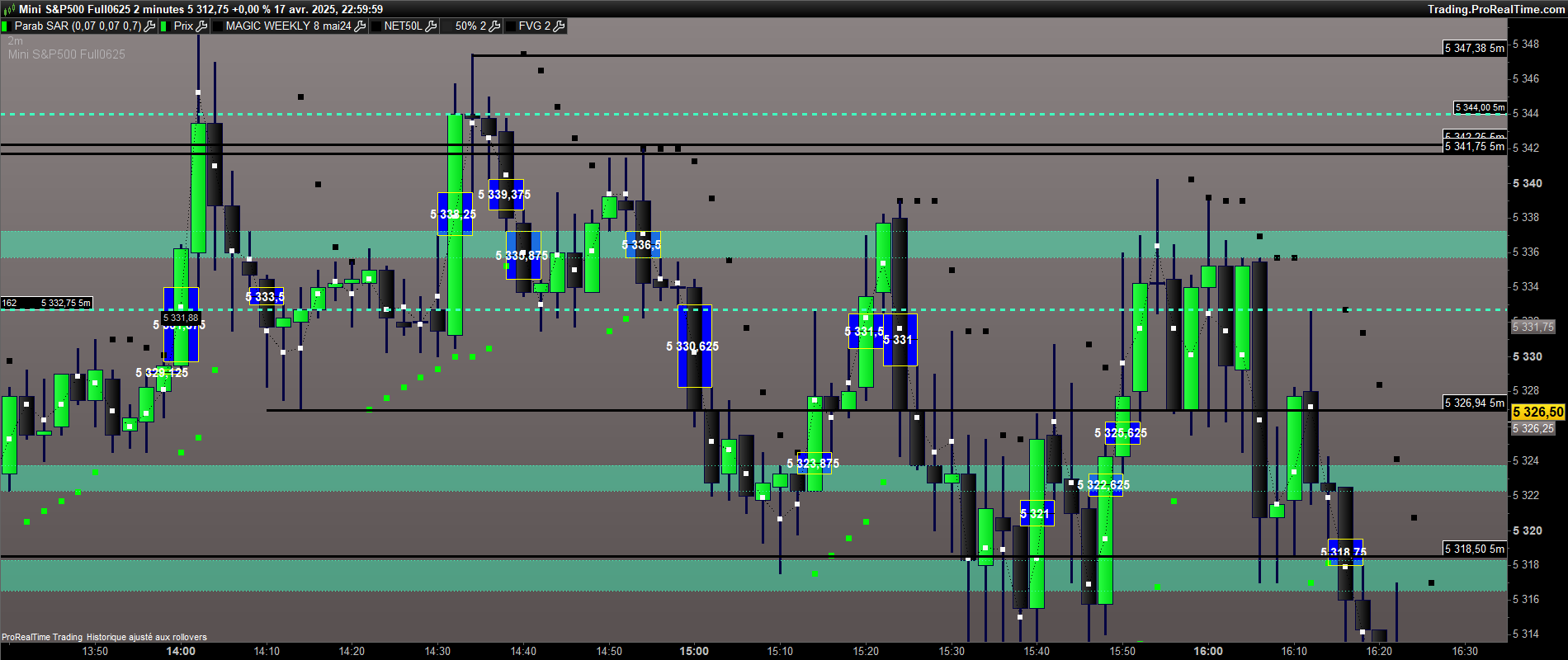
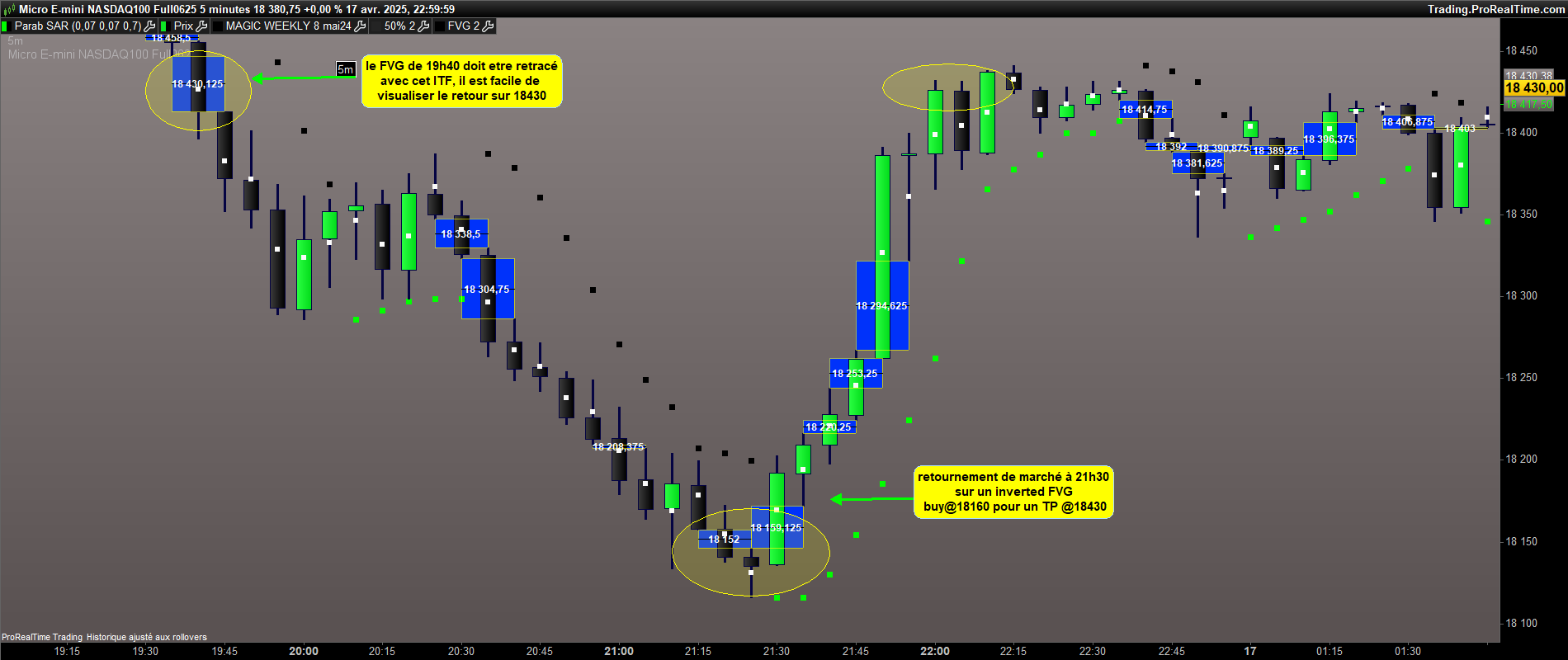
parametrer les FVG

Viewing 9 posts - 16 through 24 (of 24 total)
  • Author
    Posts
  • #246117 quote
    JS
    Participant
    Senior
    //@version=5
    //indicator("Fair Value Gap (FVG)", overlay=true)
    
    // Parameters
    fvgLookback = 2//input.int(1, title="Lookback (candle before and after)", minval=1)
    
    // Données des bougies
    prevHigh = high[fvgLookback]
    prevLow = low[fvgLookback]
    nextHigh = high[0]
    nextLow = low[0]
    
    // Calcul du FVG
    bullishFVG = low > prevHigh
    bearishFVG = high < prevLow
    
    // Affichage des FVGs
    If bullishFVG then
    DrawRectangle((BarIndex-fvgLookback),prevHigh,BarIndex,low)Coloured("Green",255)FillColor(0,50,0)
    Median=prevHigh+(Low-prevHigh)/2
    DrawSegment(BarIndex-fvgLookback,Median,BarIndex,Median)Coloured("Green")
    DrawText("#Median#",BarIndex-1,Median,SansSerif,Bold,16)Coloured("Yellow")
    EndIf
    
    If bearishFVG then
    DrawRectangle(BarIndex,High,(BarIndex-fvgLookback),prevLow)Coloured("Red",255)FillColor(50,0,0)
    Median=High+(prevLow-High)/2
    DrawSegment(BarIndex-fvgLookback,Median,BarIndex,Median)Coloured("Red")
    DrawText("#Median#",BarIndex-1,Median,SansSerif,Bold,16)Coloured("Yellow")
    EndIf
    
    Return
    #246119 quote
    geroniman
    Participant
    Junior

    voila ça donne ça.


    //@version=5
    //indicator(“Fair Value Gap (FVG)”, overlay=true)

    // Parameters
    fvgLookback = 2//input.int(1, title=”Lookback (candle before and after)”, minval=1)

    // Données des bougies
    prevHigh = high[fvgLookback]
    prevLow = low[fvgLookback]
    nextHigh = high[0]
    nextLow = low[0]

    // Calcul du FVG
    bullishFVG = low > prevHigh
    bearishFVG = high < prevLow

    // Affichage des FVGs
    If bullishFVG then
    DrawRectangle((BarIndex-fvgLookback),prevHigh,BarIndex,low)Coloured(“YELLOW”,255)FillColor(0,0,250)
    Median=prevHigh+(Low-prevHigh)/2
    DrawSegment(BarIndex-fvgLookback,Median,BarIndex,Median)Coloured(“BLACK”)
    DrawText(“#Median#”,BarIndex-1,Median,dialog,bold,15)
    EndIf

    If bearishFVG then
    DrawRectangle(BarIndex,High,(BarIndex-fvgLookback),prevLow)Coloured(“YELLOW”,255)FillColor(0,0,250)
    Median=High+(prevLow-High)/2
    DrawSegment(BarIndex-fvgLookback,Median,BarIndex,Median)Coloured(“BLACK”)
    DrawText(“#Median#”,BarIndex-1,Median,dialog,bold,15)
    EndIf

    Return

    JS thanked this post
    #246121 quote
    geroniman
    Participant
    Junior

    Pour completer , l idée serait en effet de faire une extension à droite pour les 50% de FVG qui n’ont pas été atteint. Dés que le  niveaux est touché , il faudrait que le trait disparaisse.

    #246122 quote
    JS
    Participant
    Senior

    Ce sera difficile, alors vous devrez travailler avec des « arrays »…
    Malheureusement, les « arrays » ne sont pas pour moi…

    #246130 quote
    geroniman
    Participant
    Junior

    Voici un itf qui trace des traits vers la droite sur chaque 50% de bougies non retracées. Dés que le cours revient sur ce prix, le trait disparait. C’est possible de s’en inspirer pour l’ ITF du FVG


    defparam drawonlastbaronly=true

    Mid=low+(High-low)/2

    if(islastbarupdate) then
    lo=low[0]
    hi=high[0]

    for i=1 to 1000

    if (Mid[i]>hi or Mid[i]<lo) then
    DRAWRAY(barindex-i, Mid[i], barindex+5, Mid[i]) coloured(0,250,250)style(line, 2)
    endif
    lo=min(lo,low[i])
    hi=max(hi,high[i])
    next

    endif

    return Mid

    #246132 quote
    JS
    Participant
    Senior

    Je m’y intéresserai demain…

    #246133 quote
    geroniman
    Participant
    Junior
    sur le NQ visualisation des TP =50% de FVG
    #246145 quote
    JS
    Participant
    Senior

    Ce que vous voulez comme dernière option n’est pas possible sans utiliser des « arrays »…

    #246151 quote
    geroniman
    Participant
    Junior
    ok Merci JS
Viewing 9 posts - 16 through 24 (of 24 total)
  • You must be logged in to reply to this topic.

parametrer les FVG


ProBuilder : Indicateurs & Outils Personnalisés

New Reply
Author
author-avatar
geroniman @geroniman Participant
Summary

This topic contains 23 replies,
has 3 voices, and was last updated by geroniman
9 months, 2 weeks ago.

Topic Details
Forum: ProBuilder : Indicateurs & Outils Personnalisés
Language: French
Started: 04/19/2025
Status: Active
Attachments: 10 files
Logo Logo
Loading...