parametrer les FVG

Viewing 9 posts - 16 through 24 (of 24 total)
  • Author
    Posts
  • #246117 quote
    JSJS
    Participant
    Master
    //@version=5
    //indicator("Fair Value Gap (FVG)", overlay=true)
    
    // Parameters
    fvgLookback = 2//input.int(1, title="Lookback (candle before and after)", minval=1)
    
    // Données des bougies
    prevHigh = high[fvgLookback]
    prevLow = low[fvgLookback]
    nextHigh = high[0]
    nextLow = low[0]
    
    // Calcul du FVG
    bullishFVG = low > prevHigh
    bearishFVG = high < prevLow
    
    // Affichage des FVGs
    If bullishFVG then
    DrawRectangle((BarIndex-fvgLookback),prevHigh,BarIndex,low)Coloured("Green",255)FillColor(0,50,0)
    Median=prevHigh+(Low-prevHigh)/2
    DrawSegment(BarIndex-fvgLookback,Median,BarIndex,Median)Coloured("Green")
    DrawText("#Median#",BarIndex-1,Median,SansSerif,Bold,16)Coloured("Yellow")
    EndIf
    
    If bearishFVG then
    DrawRectangle(BarIndex,High,(BarIndex-fvgLookback),prevLow)Coloured("Red",255)FillColor(50,0,0)
    Median=High+(prevLow-High)/2
    DrawSegment(BarIndex-fvgLookback,Median,BarIndex,Median)Coloured("Red")
    DrawText("#Median#",BarIndex-1,Median,SansSerif,Bold,16)Coloured("Yellow")
    EndIf
    
    Return
    Scherm­afbeelding-2025-04-19-om-20.03.08.png Scherm­afbeelding-2025-04-19-om-20.03.08.png
    #246119 quote
    geronimangeroniman
    Participant
    Average

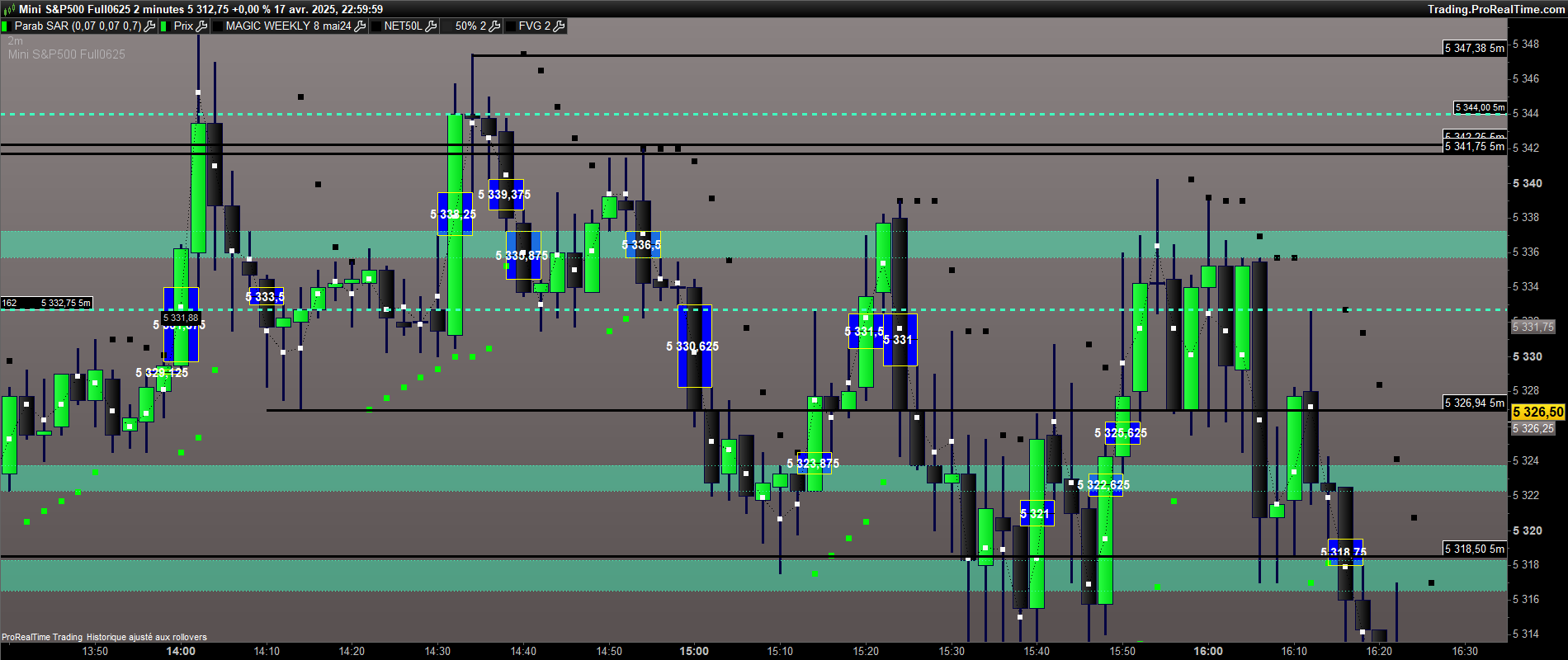
    voila ça donne ça.


    //@version=5
    //indicator(“Fair Value Gap (FVG)”, overlay=true)

    // Parameters
    fvgLookback = 2//input.int(1, title=”Lookback (candle before and after)”, minval=1)

    // Données des bougies
    prevHigh = high[fvgLookback]
    prevLow = low[fvgLookback]
    nextHigh = high[0]
    nextLow = low[0]

    // Calcul du FVG
    bullishFVG = low > prevHigh
    bearishFVG = high < prevLow

    // Affichage des FVGs
    If bullishFVG then
    DrawRectangle((BarIndex-fvgLookback),prevHigh,BarIndex,low)Coloured(“YELLOW”,255)FillColor(0,0,250)
    Median=prevHigh+(Low-prevHigh)/2
    DrawSegment(BarIndex-fvgLookback,Median,BarIndex,Median)Coloured(“BLACK”)
    DrawText(“#Median#”,BarIndex-1,Median,dialog,bold,15)
    EndIf

    If bearishFVG then
    DrawRectangle(BarIndex,High,(BarIndex-fvgLookback),prevLow)Coloured(“YELLOW”,255)FillColor(0,0,250)
    Median=High+(prevLow-High)/2
    DrawSegment(BarIndex-fvgLookback,Median,BarIndex,Median)Coloured(“BLACK”)
    DrawText(“#Median#”,BarIndex-1,Median,dialog,bold,15)
    EndIf

    Return

    JS thanked this post
    ESXXXX-2-minutes-2.png ESXXXX-2-minutes-2.png
    #246121 quote
    geronimangeroniman
    Participant
    Average

    Pour completer , l idée serait en effet de faire une extension à droite pour les 50% de FVG qui n’ont pas été atteint. Dés que le  niveaux est touché , il faudrait que le trait disparaisse.

    #246122 quote
    JSJS
    Participant
    Master

    Ce sera difficile, alors vous devrez travailler avec des « arrays »…
    Malheureusement, les « arrays » ne sont pas pour moi…

    #246130 quote
    geronimangeroniman
    Participant
    Average

    Voici un itf qui trace des traits vers la droite sur chaque 50% de bougies non retracées. Dés que le cours revient sur ce prix, le trait disparait. C’est possible de s’en inspirer pour l’ ITF du FVG


    defparam drawonlastbaronly=true

    Mid=low+(High-low)/2

    if(islastbarupdate) then
    lo=low[0]
    hi=high[0]

    for i=1 to 1000

    if (Mid[i]>hi or Mid[i]<lo) then
    DRAWRAY(barindex-i, Mid[i], barindex+5, Mid[i]) coloured(0,250,250)style(line, 2)
    endif
    lo=min(lo,low[i])
    hi=max(hi,high[i])
    next

    endif

    return Mid

    #246132 quote
    JSJS
    Participant
    Master

    Je m’y intéresserai demain…

    #246133 quote
    geronimangeroniman
    Participant
    Average
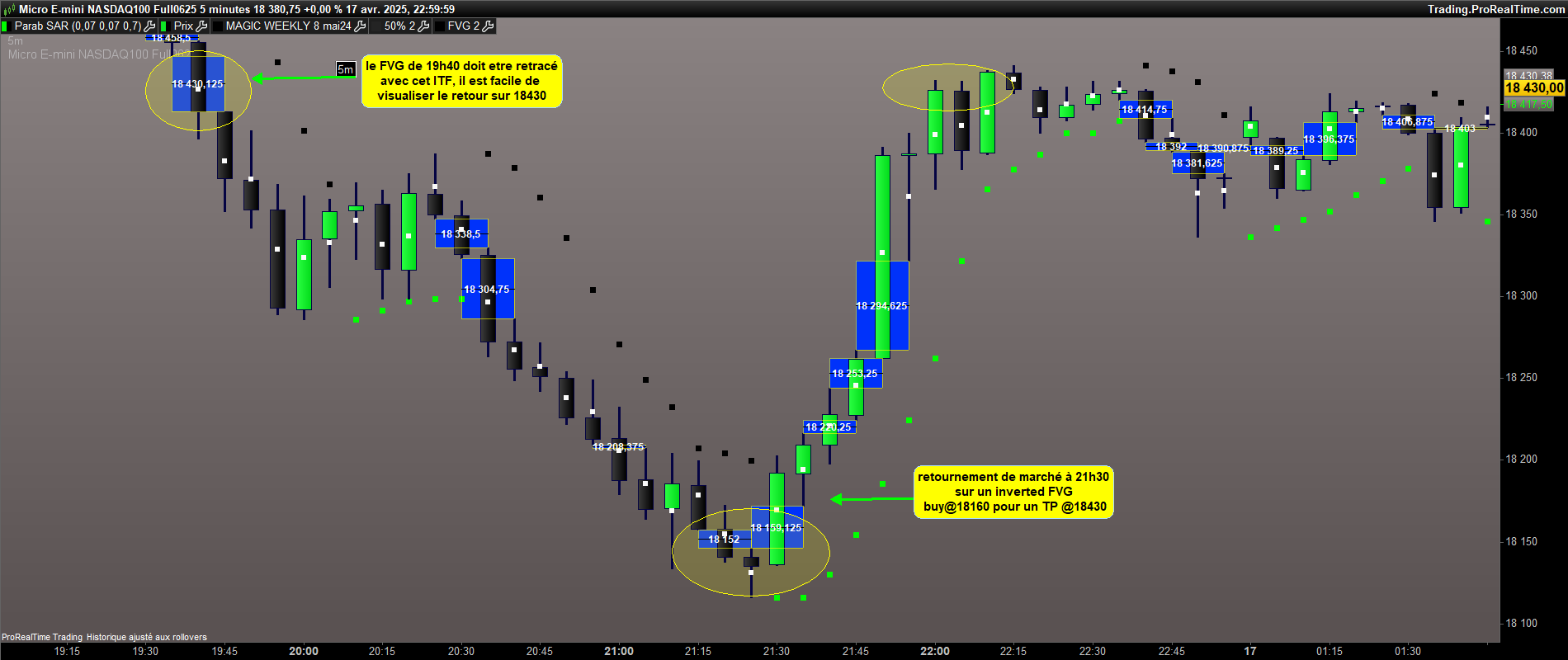
    sur le NQ visualisation des TP =50% de FVG
    MNQXXXX-5-minutes-1.png MNQXXXX-5-minutes-1.png
    #246145 quote
    JSJS
    Participant
    Master

    Ce que vous voulez comme dernière option n’est pas possible sans utiliser des « arrays »…

    #246151 quote
    geronimangeroniman
    Participant
    Average
    ok Merci JS
Viewing 9 posts - 16 through 24 (of 24 total)
  • You must be logged in to reply to this topic.

ProRealAI ProRealAI New

Stuck on this ProBuilder code?

Describe what this topic is trying to build, in plain English, and ProRealAI writes the ProRealTime™ indicator, screener or system for you.

Available in 7 languages
Try ProRealAI

parametrer les FVG


ProBuilder : Indicateurs & Outils Personnalisés

New Reply
Author
author-avatar
geroniman @geroniman Participant
Summary

This topic contains 23 replies,
has 3 voices, and was last updated by geronimangeroniman
1 year, 4 months ago.

Topic Details
Forum: ProBuilder : Indicateurs & Outils Personnalisés
Language: French
Started: 04/19/2025
Status: Active
Attachments: 10 files
ProRealCode ProRealCode
Loading...