 tonb
tonbParticipant
Junior
Can someone help me, i get an error with outsidebar code: the following variable is not defined: Signalbarheight
//SignalbarHeight=5
if range>=SignalbarHeight*pipsize then
if high>high[1] and close<low[1] then
bear=1
bull=0
elsif low<low[1] and close>high[1] then
bull=1
bear=0
else
bear=0
bull=0
endif
else
bear=0
bull=0
endif
offset=AverageTrueRange[14](close)*2
if bear then
DRAWARROWDOWN(barindex, high+offset) coloured(255,0,0)
elsif bull then
DRAWARROWUP(barindex, low–offset) coloured(0,255,0)
endif
return
Uncomment line 1 (remove the two leading slashes).
Hi,
try deleting the // at beginning of the first line: //SignalbarHeight=5
SignalbarHeight=5
if range>=SignalbarHeight*pipsize then
if high>high[1] and close<low[1] then
bear=1
bull=0
elsif low<low[1] and close>high[1] then
bull=1
bear=0
else
bear=0
bull=0
endif
else
bear=0
bull=0
endif
offset=AverageTrueRange[14](close)*2
if bear then
DRAWARROWDOWN(barindex, high+offset) coloured(255,0,0)
elsif bull then
DRAWARROWUP(barindex, low–offset) coloured(0,255,0)
endif
return
tonbParticipant
Junior
Can someone help me, i get the following message when i want to add an alert to the oudsidebar code: not possible because it contains an undefined value
What code are you using to define your outside bar?
tonbParticipant
Junior
This is de code i use.
SignalbarHeight=5
if range>=SignalbarHeight*pipsize then
if high>high[1] and close<low[1] then
bear=1
bull=0
elsif low<low[1] and close>high[1] then
bull=1
bear=0
else
bear=0
bull=0
endif
else
bear=0
bull=0
endif
offset=AverageTrueRange[14](close)*2
if bear then
DRAWARROWDOWN(barindex, high+offset) coloured(255,0,0)
elsif bull then
DRAWARROWUP(barindex, low-offset) coloured(0,255,0)
endif
Have you got the word ‘Return’ at the end of your code that you are using (it needs to be for the code to work)?
I say above because ‘Return’ is not visible at the end of the code you posted above.
tonbParticipant
Junior
Yes the code contains return at the end see the first post
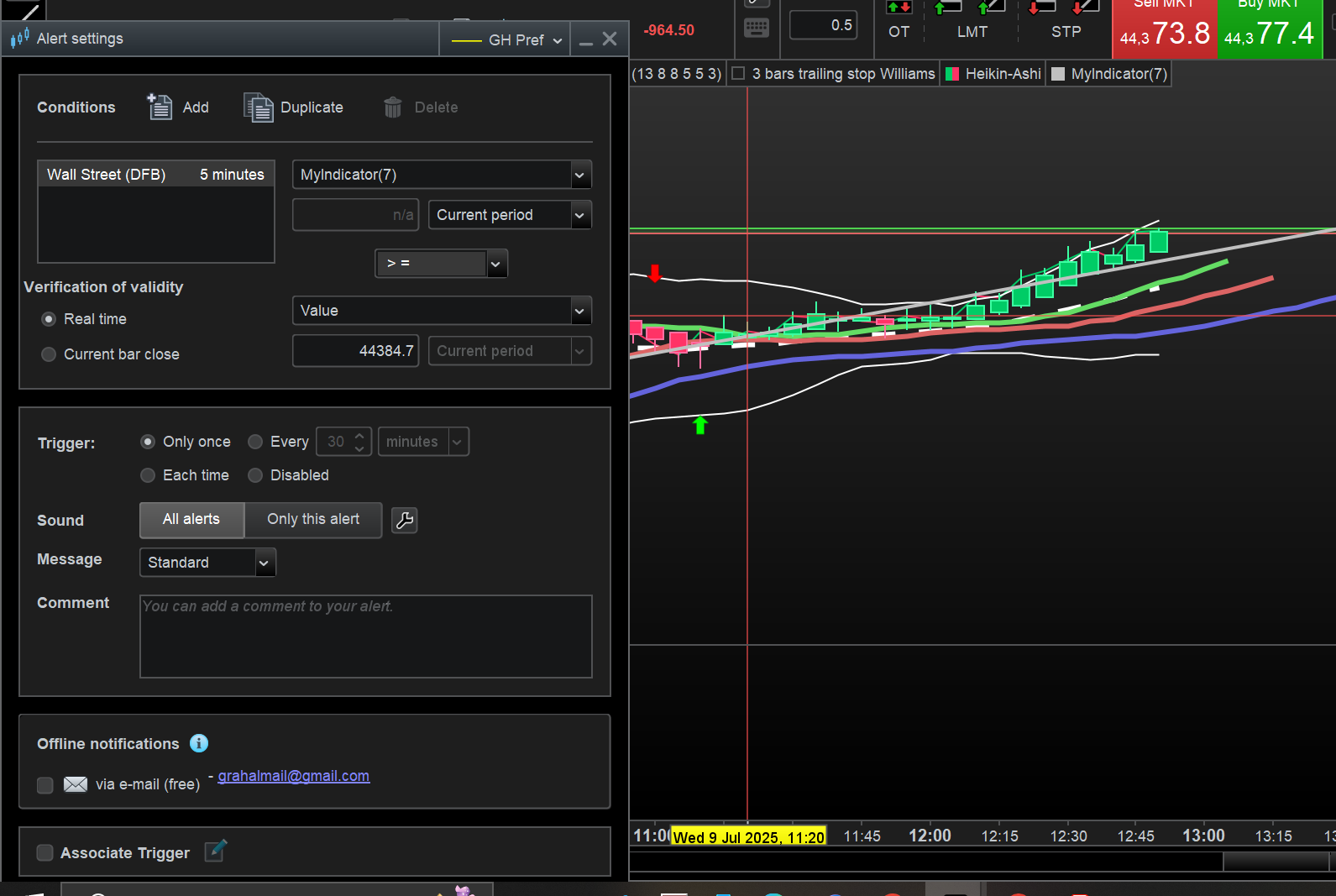
So using the attached Settings for Alerts … which conditions are you using to try and set an Alert for the Outside bar?
As you cannot set an Alert for when an ‘Arrow’ is visible – the only other option surely – is you would need to set conditions for all the Conditions that make up the Indicator (and thus be independent of the Indicator code producing Arrows??) ?
Maybe I need more coffee?? 🙂
Idea – rejig the code so it gives a ‘1’ for red / down arrow and ‘2’ for green / up arrow and then add the Indicator in it’s own / separate chart (below price) then set an Alert on the values ‘1’ and ‘2’ ?
The last code you posted (after appending RETURN), works like a charm on different timeframes and different units:
SignalbarHeight=5

if range>=SignalbarHeight*pipsize then
   if high>high[1] and close<low[1] then
      bear=1
      bull=0
   elsif low<low[1] and close>high[1] then
      bull=1
      bear=0
   else
      bear=0
      bull=0
   endif
else
   bear=0
   bull=0
endif
offset=AverageTrueRange[14](close)*2
if bear then
   DRAWARROWDOWN(barindex, high+offset) coloured(255,0,0)
elsif bull then
   DRAWARROWUP(barindex, low-offset) coloured(0,255,0)
endif
RETURN
In any case I suggest using this simplified version:
SignalbarHeight=5
bear=0
bull=0
if range>=SignalbarHeight*pipsize then
   if high>high[1] and close<low[1] then
      bear=1
   elsif low<low[1] and close>high[1] then
      bull=1
   endif
endif
offset=AverageTrueRange[14](close)*2
if bear then
   DRAWARROWDOWN(barindex, high+offset) coloured(255,0,0)
elsif bull then
   DRAWARROWUP(barindex, low-offset) coloured(0,255,0)
endif
RETURN
Here you go.
Add the code below as a ‘New Panel’ and then set Alert on value = 1 (bull) or value = -1 (bear)
SignalbarHeight=5

if range>=SignalbarHeight*pipsize then
if high>high[1] and close<low[1] then
bear=1
bull=0
elsif low<low[1] and close>high[1] then
bull=1
bear=0
else
bear=0
bull=0
endif
else
bear=0
bull=0
endif
//offset=AverageTrueRange[14](close)*2
if bear then
bear = -1
//DRAWARROWDOWN(barindex, high+offset) coloured(255,0,0)
elsif bull then
bull = 1
//DRAWARROWUP(barindex, low-offset) coloured(0,255,0)
endif
Return bear, bull
tonbParticipant
Junior
Thanks for figuring it out, unfortunattley i’m not knowledgeable enough to implement this in the code
tonbParticipant
Junior
Sorry i’m only now seeing the code, thanks for looking it up