ProRealCode - Trading & Coding with ProRealTime™
Hi
I think I know the answer to this already but is it possible to associate a label with array entries so that they stay in the correct place after an arraysort?
In the hypothetical example below, it works until I sort the array and then you would lose the label order obviously.
defparam drawonlastbaronly = true
ema5 = exponentialaverage[5](close)
ema10 = exponentialaverage[10](close)
ema21 = exponentialaverage[21](close)
sma50 = average[50](close)
sma100 = average[100](close)
sma200 = average[200](close)
// create ma array
$ma[1] = ema5
$ma[2] = ema10
$ma[3] = ema21
$ma[4] = sma50
$ma[5] = sma100
$ma[6] = sma200
// output ma array
for j = 1 to lastset($ma)
mymas = $ma[j]
drawtext("#mymas#",barindex+50,j*0.1) coloured("blue")
next
// create ma label array
$malabel[1] = 5
$malabel[2] = 10
$malabel[3] = 21
$malabel[4] = 50
$malabel[5] = 100
$malabel[6] = 200
// output may label array
for j = 1 to lastset($malabel)
mymalabel = $malabel[j]
drawtext("ma #mymalabel#",barindex,j*0.1) coloured("blue")
next
return
Is there a way this could be achieved?
Thanks
Rob
You need to use two arrays, 1 for data and 1 for labels, then sort them using custom code (such as bubble sort), provided arrays arrays are not too large.
Hi
I have bubble sorted my array and realised I have duplicates to remove which I have kind of done by using a second array.
However, I would like to use the same array but I end up with ‘n/a’ displaying (after drawtext) where the duplicates have been removed.
Could someone please help? Been going round in circles!
Thanks, Rob
j = 0
for i = 0 to lastset($ma)
if $ma[i] <> $ma[i+1] then
$temp[j] = $ma[i]
j = j + 1
endif
$ma[i] = $temp[i]
next
It’s because I and J retain different values.
It may happen that in line 7 $temp[i] has not yet been created,
Thanks Roberto.
Is it possible to just use the same array, I would like to try example 2 of this pseudo code but have struggled to translate it in ProBuilder?
https://www.codesdope.com/blog/article/remove-duplicate-elements-from-sorted-array/
Thanks again.
EDITED
This code is incorrect. The correct one is at https://www.prorealcode.com/topic/output-array-with-label-after-sort/page/2/#post-236336
This is the Bubble Sort snippet:
// Data array $da
// Label Array $la
//
MaxElement = lastset($da)
FOR i = 0 TO MaxElement
FOR j = 0 TO MaxElement
IF $da[j] > $da[i] THEN
// swap data
temp = $da[j]
$da[j] = $da[i]
$da[i] = temp
// swap labels
temp = $la[j]
$la[j] = $la[i]
$la[i] = temp
ENDIF
NEXT
NEXT
EDITED
The code for the BUBBLE SORT is incorrect. The correct one is at https://www.prorealcode.com/topic/output-array-with-label-after-sort/page/2/#post-236336
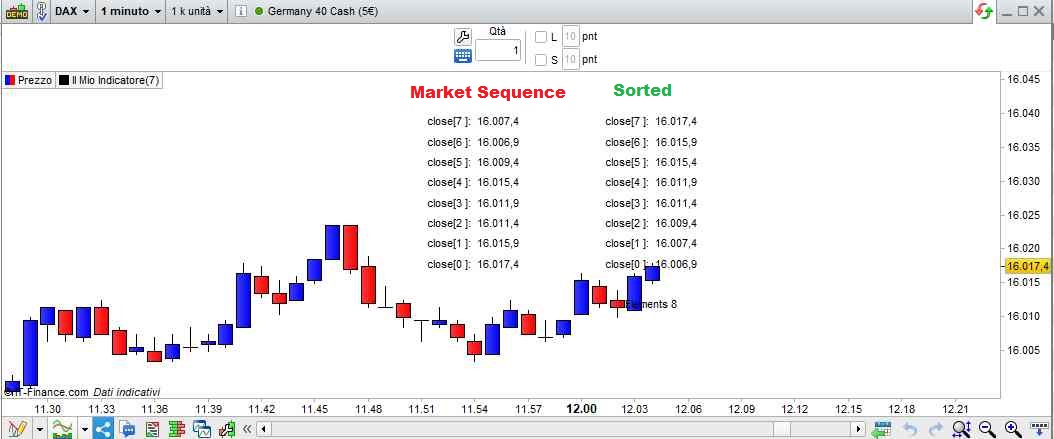
This an indicator (example) to be added ON the price chart:
// Data array $da
// Label Array $la
//
defparam drawonlastbaronly = true
// fill up both arrays
for k = 0 to 7
$da[k] = close[k] //data (CLOSE from the current one backwards to the previous 7 bars)
$la[k] = k //labels (index reference)
next
MaxElement = lastset($da)
temp = MaxElement+1
drawtext("Elements #temp#",BarIndex,low - range)
for k = 0 to MaxElement
x = $da[k]
drawtext("close[#k#]: #x#",BarIndex-10,high + (range * k))
next
// Bubble Sort
FOR i = 0 TO MaxElement
FOR j = 0 TO MaxElement
IF $da[j] > $da[i] THEN
// swap data
temp = $da[j]
$da[j] = $da[i]
$da[i] = temp
// swap labels
temp = $la[j]
$la[j] = $la[i]
$la[i] = temp
ENDIF
NEXT
NEXT
temp = MaxElement+1
drawtext("Elements #temp#",BarIndex,low - range)
for k = 0 to MaxElement
x = $da[k]
drawtext("close[#k#]: #x#",BarIndex,high + (range * k))
next
return
Perfect!
Thank you.
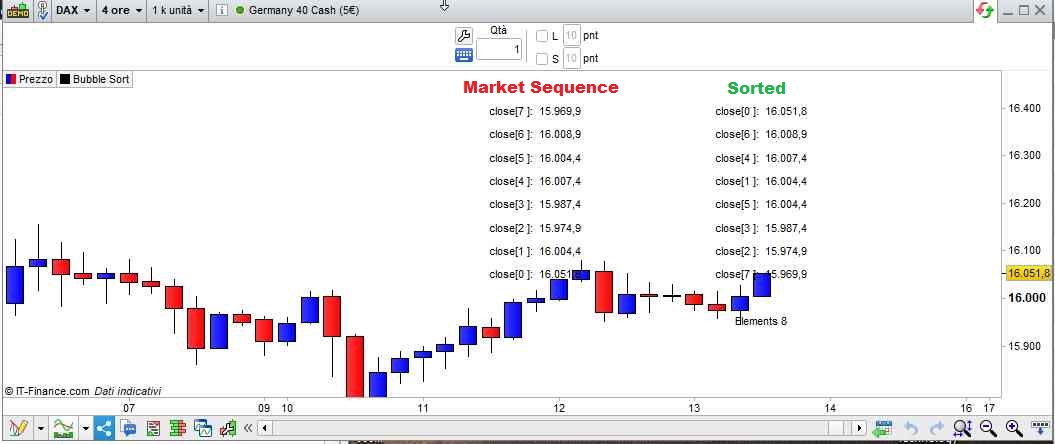
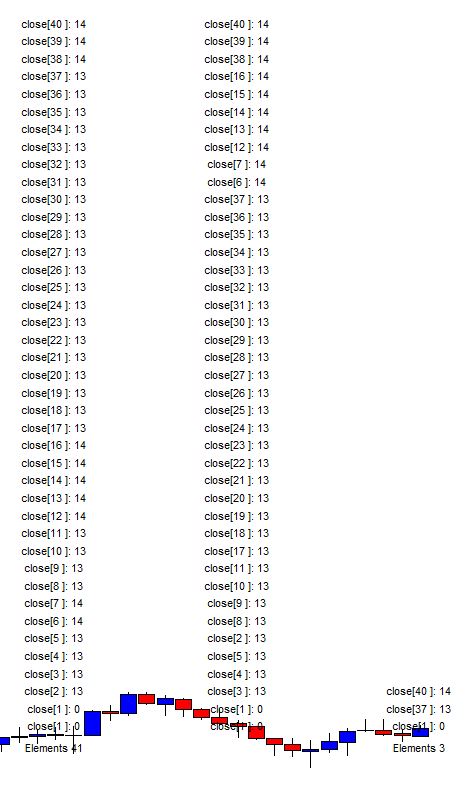
Sorry, I just realized there’s an error in my pic and in the example (it’s an error concerning display only, the sorting code is correct). This is correct:
// Data array $da
// Label Array $la
//
defparam drawonlastbaronly = true
for k = 0 to 7
$da[k] = close[k]
$la[k] = k
next
MaxElements = lastset($da)
temp = MaxElements+1
drawtext("Elements #temp#",BarIndex,low - range)
for k = 0 to MaxElements
x = $da[k]
y = $la[k]
drawtext("close[#y#]: #x#",BarIndex-10,high + (range * k))
next
//sorting
FOR i = 0 TO MaxElements
FOR j = 0 TO MaxElements
IF $da[j] > $da[i] THEN
// swap data
temp = $da[j]
$da[j] = $da[i]
$da[i] = temp
// swap labels
temp = $la[j]
$la[j] = $la[i]
$la[i] = temp
ENDIF
NEXT
NEXT
temp = MaxElements+1
drawtext("Elements #temp#",BarIndex,low - range)
for k = 0 to MaxElements
x = $da[k]
y = $la[k]
drawtext("close[#y#]: #x#",BarIndex,high + (range * k))
next
return
the error was in DRAWTEXT. The second block prints the correct (sorted) data, but the wrong labels (as they shall NOT sorted, as they follow the sorted data).
Thanks, is it possible to remove duplicates after the array/s have been sorted?
I’m guessing the non duplicates may need to go into a new array or can we reset the original array and then copy the non dupliate values in? This is the bit I’m struggling with. I thought I was there earlier and then tried it on some different values and my code clearly doesn’t work.
Thanks again. Rob
This version removes duplicates (I created two new, separate, arrays):
// Data array $da ($dx is new array without duplicates)
// Label Array $la ($lx is new array without duplicates)
//
defparam drawonlastbaronly = true
// fill up the array with CLOSE and Bar ID (label)
for k = 0 to 7
$da[k] = round((close[k] - 0.5))
$la[k] = k
next
MaxElements = lastset($da)
//////////////////////////////////////////////////////////////////
// plot unsorted arrays
temp = MaxElements + 1
Offset = average[10](range[1])
drawtext("Elements #temp#",BarIndex-20,low - range)
for k = 0 to MaxElements
x = $da[k]
y = $la[k]
drawtext("close[#y#]: #x#",BarIndex-20,high + (Offset * k))
next
//////////////////////////////////////////////////////////////////
// (Bubble Sort)
FOR i = 0 TO MaxElements
FOR j = 0 TO MaxElements
IF $da[j] > $da[i] THEN
// swap data
temp = $da[j]
$da[j] = $da[i]
$da[i] = temp
// swap labels
temp = $la[j]
$la[j] = $la[i]
$la[i] = temp
ENDIF
NEXT
NEXT
//////////////////////////////////////////////////////////////////
// plot Sorted arrays
for k = 0 to MaxElements
x = $da[k]
y = $la[k]
drawtext("close[#y#]: #x#",BarIndex-10,high + (Offset * k))
next
//////////////////////////////////////////////////////////////////
// remove duplicates by comparing the current element to the next one (creating 2 new arrays)
NewMaxElements = 0
FOR i = 0 TO MaxElements
IF ($da[i] <> $da[i + 1]) OR (i = MaxElements) THEN
$dx[NewMaxElements] = $da[i] //save datum to new array, when different
$lx[NewMaxElements] = $la[i] //save label, too
NewMaxElements = NewMaxElements + 1
ENDIF
NEXT
//////////////////////////////////////////////////////////////////
// plot new Arrays (without duplicates)
temp = NewMaxElements
drawtext("Elements #temp#",BarIndex,low - range)
FOR k = 0 to NewMaxElements - 1
x = $dx[k]
y = $lx[k]
drawtext("close[#y#]: #x#",BarIndex,high + (Offset * k))
NEXT
return
Thanks so much Roberto!
I’ve just wasted the morning doing it old school without arrays and then I see this!
Hopefully it will get added to the code snippet spreadsheet so others can benefit.
Really appreciate this a lot.
Thank you.
Hi @robertogozzi
I’m having some troubles with the above bubble sort code.
I’m trying to use an array for $da[k].
So, as per the code below, I’m using an array to sum up ($da[k]) the number of crosses at close of moving average k back to calculateonlastbars, with the moving average period k also being stored for identification in $la[k].
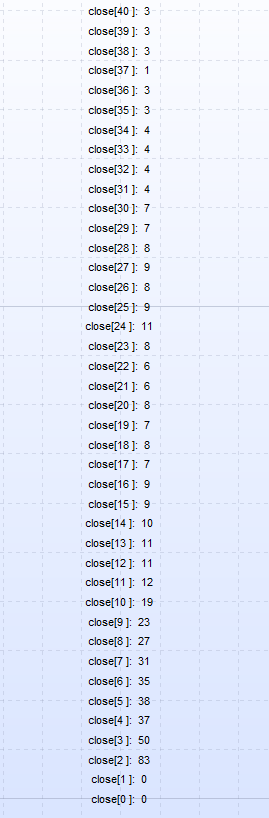
What seems to be happening, is that if I delete all of the bubble sort and remove duplicates code, $da[k] seems to fill with the correct data, and work as it should. The code I’m using for that is below, to show that $da[k] is filling correctly, and giving an answer of 2 or so, which is what you would expect.
defparam drawonlastbaronly = true
defparam calculateonlastbars=100
// fill up the array with CLOSE and Bar ID (label)
for k = 1 to 40
averageline = average[k](close)
if (close>averageline and open<averageline) or (close<averageline and open>averageline) then
newcount = 1
else
newcount=0
endif
once $da[k]=0
$da[k] = newcount+$da[k]
$la[k] = k
next
FOR k = 0 to 40
x = $da[k]
y = $la[k]
drawtext("close[#y#]: #x#",BarIndex+2, (y*2))
next
return
For this, have a look at the attached pic, MA crossover array dump no bubble sort
The code with the bubble sort and duplicate removal that I am using is below:
defparam drawonlastbaronly = true
defparam calculateonlastbars=100
// fill up the array with CLOSE and Bar ID (label)
for k = 1 to 40
averageline = average[k](close)
if (close>averageline and open<averageline) or (closeaverageline) then
newcount = 1
else
newcount=0
endif
once $da[k]=0
$da[k] = newcount+$da[k]
$la[k] = k
next
MaxElements = lastset($da)
//////////////////////////////////////////////////////////////////
// plot unsorted arrays
temp = MaxElements + 1
Offset = average[10](range[1])
drawtext(“Elements #temp#”,BarIndex-20,low – range)
for k = 0 to MaxElements
x = $da[k]
y = $la[k]
drawtext(“close[#y#]: #x#”,BarIndex-20,high + (Offset * k))
next
//////////////////////////////////////////////////////////////////
// (Bubble Sort)
FOR i = 0 TO MaxElements
FOR j = 0 TO MaxElements
IF $da[j] > $da[i] THEN
// swap data
temp = $da[j]
$da[j] = $da[i]
$da[i] = temp
// swap labels
temp = $la[j]
$la[j] = $la[i]
$la[i] = temp
ENDIF
NEXT
NEXT
//////////////////////////////////////////////////////////////////
// plot Sorted arrays
for k = 0 to MaxElements
x = $da[k]
y = $la[k]
drawtext(“close[#y#]: #x#”,BarIndex-10,high + (Offset * k))
next
//////////////////////////////////////////////////////////////////
// remove duplicates by comparing the current element to the next one (creating 2 new arrays)
NewMaxElements = 0
FOR i = 0 TO MaxElements
IF ($da[i] <> $da[i + 1]) OR (i = MaxElements) THEN
$dx[NewMaxElements] = $da[i] //save datum to new array, when different
$lx[NewMaxElements] = $la[i] //save label, too
NewMaxElements = NewMaxElements + 1
ENDIF
NEXT
//////////////////////////////////////////////////////////////////
// plot new Arrays (without duplicates)
temp = NewMaxElements
drawtext(“Elements #temp#”,BarIndex,low – range)
FOR k = 0 to NewMaxElements – 1
x = $dx[k]
y = $lx[k]
drawtext(“close[#y#]: #x#”,BarIndex,high + (Offset * k))
NEXT
return
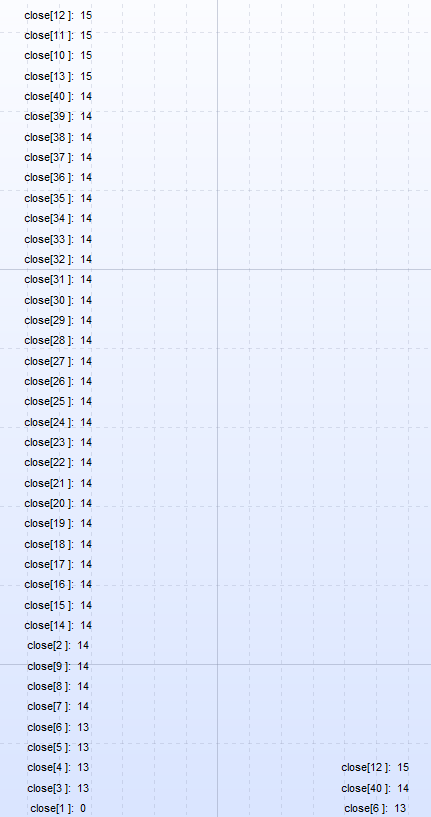
For the results of this, have a look at the attached pic, MA crossover with bubble sort code applied
It seems to be that the bubble sort/duplicate removal is causing an error in the initial correct filling of $da[k], and from this the wrong answer is then given.
Is there any way that this could be made to work as intended, so that the bubble sort will actually give the correct period with the maximum number of cross overs of the average?
Many thanks,
Finning
PS – try as I might, the insert code button doesn’t seem to be working!!

Hi Roberto,
thanks for having a look.
Yes, I agree, your code is working properly, and is plotting correctly.
However, that is not the problem that I’m having.
The problem is, is that the bubble sort and/or the duplication removal code, is changing the result of what I am trying the $da[k] array to store in the first place.
The bubble sort is changing what is making its way into the $da[k] array, and this is the problem that I need help with.
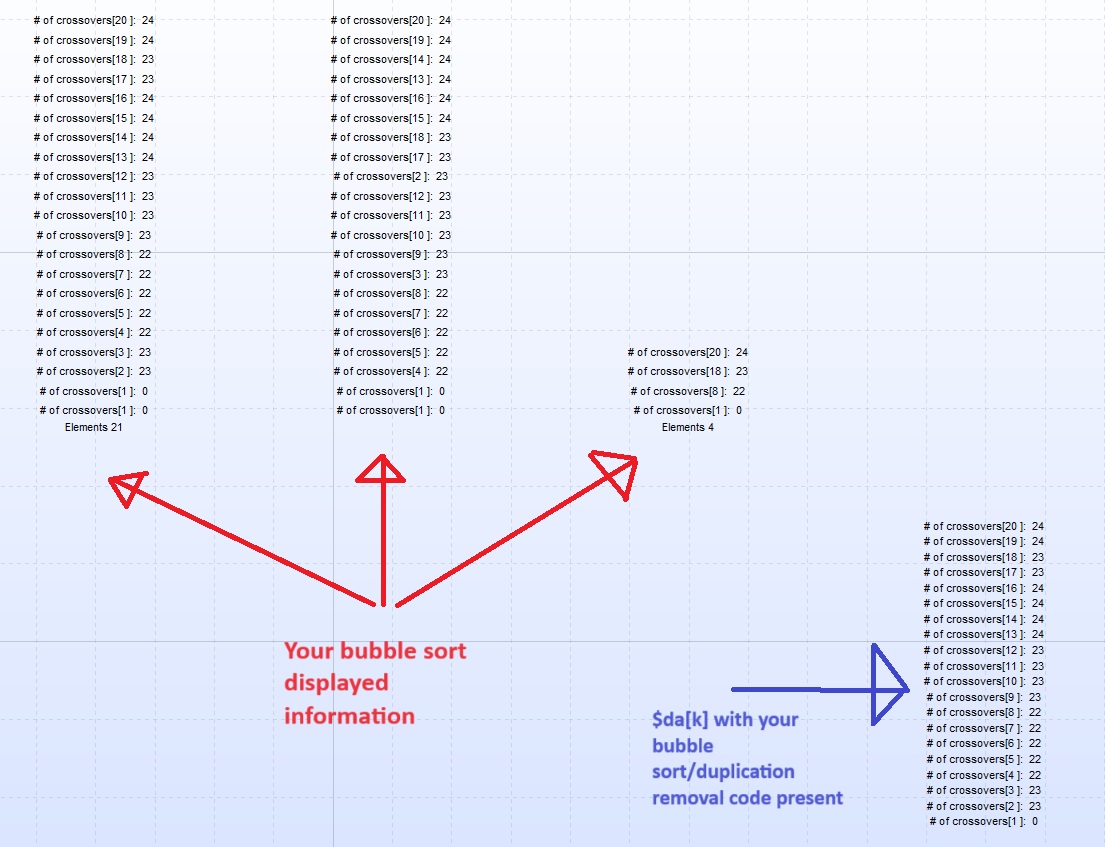
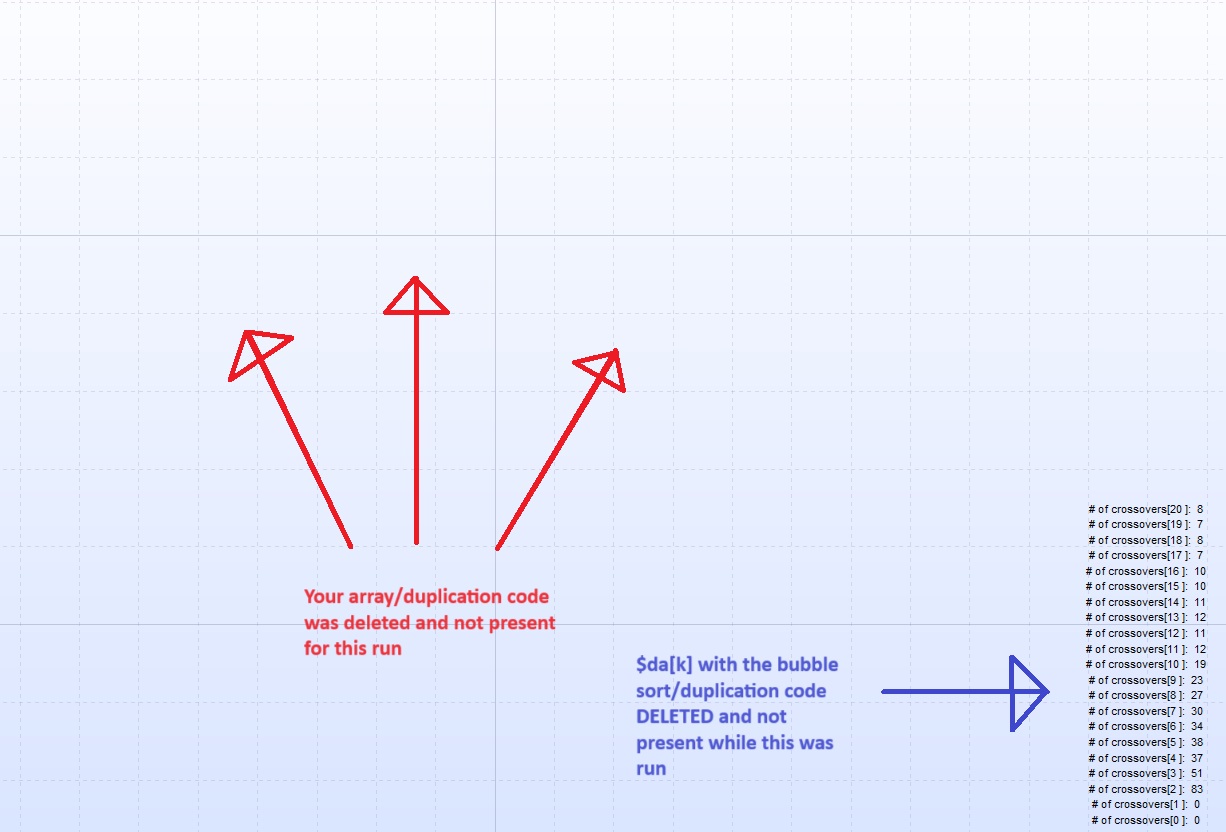
I have attached 2 picture output examples, using my code posted above (sorry I couldn’t get the above code to display properly despite trying) to show this, and I slightly changed where the plot offsets were on the screen to make it all fit, and changed the loop size to 20, to make it all fit.
One pic is of the $da[k] with the bubble sort/duplication removal code present, and the other pic is $da[k] the bubble sort/duplication removal code NOT present (deleted).
This shows the problem that I am having with the bubble sort/duplication removal code affecting what is stored in $da[k]. This is the problem I need help with please.
In the pic above that you sent me, the bubble sort/duplication deletion was working fine, yes, the only problem is the data that it was sorting stored in $da[k] was wrong.
I hope I have made the problem I am having a bit more clear, and I sure do hope that you could help!
Many thanks,
Finning
Output array with label AFTER sort?
This topic contains 30 replies,
has 4 voices, and was last updated by
robertogozzi
1 year, 6 months ago.
| Forum: | ProBuilder: Indicators & Custom Tools |
| Language: | English |
| Started: | 01/09/2022 |
| Status: | Active |
| Attachments: | 22 files |
The information collected on this form is stored in a computer file by ProRealCode to create and access your ProRealCode profile. This data is kept in a secure database for the duration of the member's membership. They will be kept as long as you use our services and will be automatically deleted after 3 years of inactivity. Your personal data is used to create your private profile on ProRealCode. This data is maintained by SAS ProRealCode, 407 rue Freycinet, 59151 Arleux, France. If you subscribe to our newsletters, your email address is provided to our service provider "MailChimp" located in the United States, with whom we have signed a confidentiality agreement. This company is also compliant with the EU/Swiss Privacy Shield, and the GDPR. For any request for correction or deletion concerning your data, you can directly contact the ProRealCode team by email at privacy@prorealcode.com If you would like to lodge a complaint regarding the use of your personal data, you can contact your data protection supervisory authority.