ON OFF Button for drawing

Viewing 4 posts - 1 through 4 (of 4 total)
  • Author
    Posts
  • #200719 quote
    ZeroCafeineZeroCafeine
    Participant
    Senior

    Hi every one

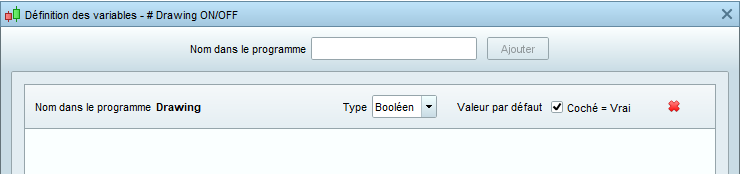
    Would you have more beautiful or ergonomic solutions to activate or deactivate drawings, I add one Boolen button as a condition

    // # Drawing ON/OFF
    
    MA20 = Average[20](Close)
    MA50 = Average[50](Close)
    C1 = MA20 Crosses Over MA50
    
    IF C1  AND Drawing Then
    DRAWARROWUP(barindex,MA50) COLOURED(255,0,0)
    ENDIF
    
    Return MA20, MA50

    also if it’s possible for MA20 and MA50 if possible

    bol-but.png bol-but.png
    #200743 quote
    fifi743fifi743
    Participant
    Master
    MA20 = Average[20](Close)
    MA50 = Average[50](Close)
    C1 = MA20 Crosses Over MA50
     
    IF C1 Then
    DRAWARROWUP(barindex,MA50) COLOURED(255,0,0)
    ENDIF
     if drawing=0 then
    ma20=undefined
    ma50=undefined
    endif
    Return MA20, MA50
    ZeroCafeine and Nicolas thanked this post
    #200744 quote
    fifi743fifi743
    Participant
    Master

    tested it works

    ZeroCafeine thanked this post
    #200746 quote
    ZeroCafeineZeroCafeine
    Participant
    Senior

    Hoop, tks you too much for your help, so like that you answered to my other questions, tks again, I will try tomorrow on my computer 🙂

Viewing 4 posts - 1 through 4 (of 4 total)

  • You must be logged in to reply to this topic.

ProRealAI ProRealAI New

Stuck on this ProBuilder code?

Describe what this topic is trying to build, in plain English, and ProRealAI writes the ProRealTimeā„¢ indicator, screener or system for you.

Available in 7 languages
Try ProRealAI

ON OFF Button for drawing


ProBuilder: Indicators & Custom Tools

New Reply
Author
Summary

This topic contains 3 replies,
has 2 voices, and was last updated by ZeroCafeineZeroCafeine
4 years ago.

Topic Details
Forum: ProBuilder: Indicators & Custom Tools
Language: English
Started: 09/13/2022
Status: Active
Attachments: 1 files
ProRealCode ProRealCode
Loading...