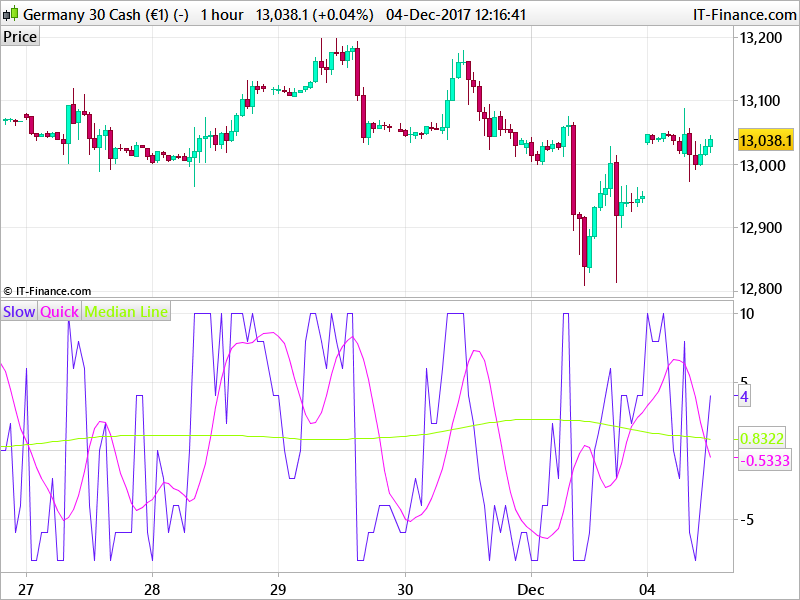
Old good code for Chande's Trendscore indicator to be fixed

Viewing 5 posts - 1 through 5 (of 5 total)
  • Author
    Posts
  • #53799 quote
    andreapedrottaandreapedrotta
    Participant
    Junior

    Hi,

    I have this code for Chande’s Trendscore indicator which worked very well with old versions of prorealtime but gives error with the new. I dont know how to adjust the formula.

    Can anyone help please?

    Thanks

    Andrea


    Once False = 0
    Once True = 1
    Once Noft = -1
    Once PI = 3.141592653

    If False = True and Noft = False and Not True Then
    endif

    P2=Round(3 * PI)
    AB=P2 + 1

    TS=False
    C=False
    P1=AB
    P3=10
    P4=100

    Noft = Noft + True and Not False

    For Q=1 to P1 Do
    If Close >= Close[P2 – C] Then
    TS=TS+1
    endif
    c=c+True
    Next

    C=False

    For Q=True to P1 Do
    If close<close[P2-c] Then
    TS=TS-True
    Endif
    c=c+True
    next

    TT= TriangularAverage[P3](TS)
    TV=TriangularAverage[P4](TS)

    If Barindex<P2 Then
    TS=undefined
    TV=undefined
    TT=undefined
    Endif

    Return TS Coloured(100,25,250) as “Slow”,TT Coloured(250,10,250) as “Quick”,TV Coloured(155,255,0) as “Median Line”

    #53803 quote
    robertogozzirobertogozzi
    Moderator
    Legend

    Please use the “Insert PRT code” identified by “<>” on the grey bar above your text when posting, to make your code  more readable:

    Once False = 0
    Once True = 1
    Once Noft = -1
    Once PI = 3.141592653
    
    If False = True and Noft = False and Not True Then
    endif
    
    P2=Round(3 * PI)
    AB=P2 + 1
    
    TS=False
    C=False
    P1=AB
    P3=10
    P4=100
    
    Noft = Noft + True and Not False
    
    For Q=1 to P1 Do
    If Close >= Close[P2 – C] Then
    TS=TS+1
    endif
    c=c+True
    Next
    
    C=False
    
    For Q=True to P1 Do
    If close<close[P2-c] Then
    TS=TS-True
    Endif
    c=c+True
    next
    
    TT= TriangularAverage[P3](TS)
    TV=TriangularAverage[P4](TS)
    
    If Barindex<P2 Then
    TS=undefined
    TV=undefined
    TT=undefined
    Endif
    
    Return TS Coloured(100,25,250) as "Slow",TT Coloured(250,10,250) as "Quick",TV Coloured(155,255,0) as "Median Line"

      Roberto

    #54068 quote
    NicolasNicolas
    Keymaster
    Legend

    The code is giving error because of the wrong copy/paste of quotation marks on the last line. I changed the code from Roberto in the above post to be perfectly usable. Let us know if it still doesn’t work for you. 

    andreapedrotta thanked this post
    #54537 quote
    andreapedrottaandreapedrotta
    Participant
    Junior

    Hi Nicolas,

    thanks for your answer. I tried again but the cose indicates always the same error at each false or true variables.

    #54690 quote
    NicolasNicolas
    Keymaster
    Legend

    Sorry, I haven’t well read the code at the first glance, this is fixed: 

    Once fFalse = 0
    Once tTrue = 1
    Once Noft = -1
    Once PI = 3.141592653
    
    //If fFalse = 1 and Noft = False and Not True Then
    //endif
    
    P2=Round(3 * PI)
    AB=P2 + 1
    
    TS=fFalse
    C=fFalse
    P1=AB
    P3=10
    P4=100
    
    Noft = Noft + tTrue and Not fFalse
    
    For Q=1 to P1 Do
    If Close >= Close[P2 - C] Then
    TS=TS+1
    endif
    c=c+tTrue
    Next
    
    C=fFalse
    
    For Q=tTrue to P1 Do
    If close<close[P2-c] Then
    TS=TS-tTrue
    Endif
    c=c+tTrue
    next
    
    TT= TriangularAverage[P3](TS)
    TV=TriangularAverage[P4](TS)
    
    If Barindex<P2 Then
    TS=undefined
    TV=undefined
    TT=undefined
    Endif
    
    Return TS Coloured(100,25,250) as "Slow",TT Coloured(250,10,250) as "Quick",TV Coloured(155,255,0) as "Median Line"


    Chandes-Trendscore.png Chandes-Trendscore.png
Viewing 5 posts - 1 through 5 (of 5 total)
  • You must be logged in to reply to this topic.

ProRealAI ProRealAI New

Stuck on this ProBuilder code?

Describe what this topic is trying to build, in plain English, and ProRealAI writes the ProRealTime™ indicator, screener or system for you.

Available in 7 languages
Try ProRealAI

Old good code for Chande's Trendscore indicator to be fixed


ProBuilder: Indicators & Custom Tools

New Reply
Author
Summary

This topic contains 4 replies,
has 3 voices, and was last updated by NicolasNicolas

8 years, 10 months ago.

Topic Details
Forum: ProBuilder: Indicators & Custom Tools
Language: English
Started: 11/24/2017
Status: Active
Attachments: 1 files
ProRealCode ProRealCode
Loading...