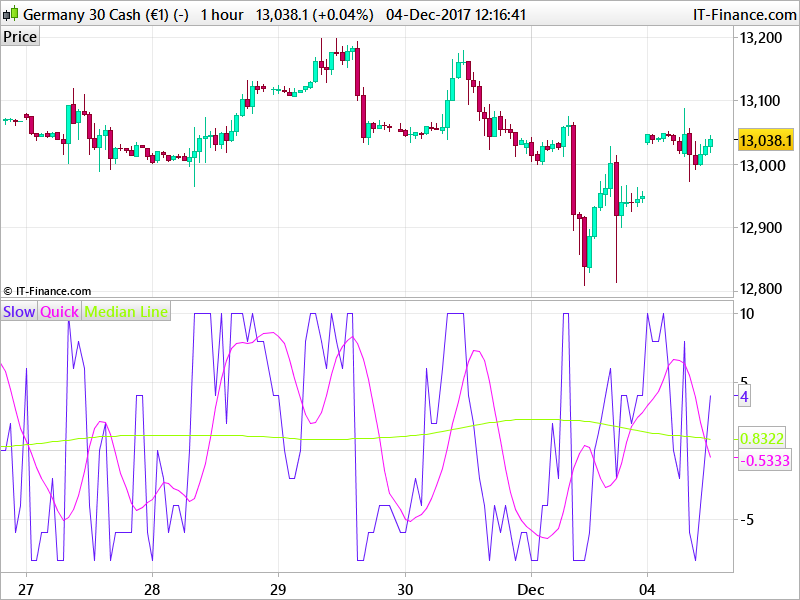
Old good code for Chande's Trendscore indicator to be fixed

Viewing 5 posts - 1 through 5 (of 5 total)
  • Author
    Posts
  • #53799 quote
    andreapedrotta
    Participant
    Junior

    Hi,

    I have this code for Chande’s Trendscore indicator which worked very well with old versions of prorealtime but gives error with the new. I dont know how to adjust the formula.

    Can anyone help please?

    Thanks

    Andrea


    Once False = 0
    Once True = 1
    Once Noft = -1
    Once PI = 3.141592653

    If False = True and Noft = False and Not True Then
    endif

    P2=Round(3 * PI)
    AB=P2 + 1

    TS=False
    C=False
    P1=AB
    P3=10
    P4=100

    Noft = Noft + True and Not False

    For Q=1 to P1 Do
    If Close >= Close[P2 – C] Then
    TS=TS+1
    endif
    c=c+True
    Next

    C=False

    For Q=True to P1 Do
    If close<close[P2-c] Then
    TS=TS-True
    Endif
    c=c+True
    next

    TT= TriangularAverage[P3](TS)
    TV=TriangularAverage[P4](TS)

    If Barindex<P2 Then
    TS=undefined
    TV=undefined
    TT=undefined
    Endif

    Return TS Coloured(100,25,250) as “Slow”,TT Coloured(250,10,250) as “Quick”,TV Coloured(155,255,0) as “Median Line”

    #53803 quote
    robertogozzi
    Moderator
    Master

    Please use the “Insert PRT code” identified by “<>” on the grey bar above your text when posting, to make your code  more readable:

    Once False = 0
    Once True = 1
    Once Noft = -1
    Once PI = 3.141592653
    
    If False = True and Noft = False and Not True Then
    endif
    
    P2=Round(3 * PI)
    AB=P2 + 1
    
    TS=False
    C=False
    P1=AB
    P3=10
    P4=100
    
    Noft = Noft + True and Not False
    
    For Q=1 to P1 Do
    If Close >= Close[P2 – C] Then
    TS=TS+1
    endif
    c=c+True
    Next
    
    C=False
    
    For Q=True to P1 Do
    If close<close[P2-c] Then
    TS=TS-True
    Endif
    c=c+True
    next
    
    TT= TriangularAverage[P3](TS)
    TV=TriangularAverage[P4](TS)
    
    If Barindex<P2 Then
    TS=undefined
    TV=undefined
    TT=undefined
    Endif
    
    Return TS Coloured(100,25,250) as "Slow",TT Coloured(250,10,250) as "Quick",TV Coloured(155,255,0) as "Median Line"

      Roberto

    #54068 quote
    Nicolas
    Keymaster
    Master

    The code is giving error because of the wrong copy/paste of quotation marks on the last line. I changed the code from Roberto in the above post to be perfectly usable. Let us know if it still doesn’t work for you. 

    andreapedrotta thanked this post
    #54537 quote
    andreapedrotta
    Participant
    Junior

    Hi Nicolas,

    thanks for your answer. I tried again but the cose indicates always the same error at each false or true variables.

    #54690 quote
    Nicolas
    Keymaster
    Master

    Sorry, I haven’t well read the code at the first glance, this is fixed: 

    Once fFalse = 0
    Once tTrue = 1
    Once Noft = -1
    Once PI = 3.141592653
    
    //If fFalse = 1 and Noft = False and Not True Then
    //endif
    
    P2=Round(3 * PI)
    AB=P2 + 1
    
    TS=fFalse
    C=fFalse
    P1=AB
    P3=10
    P4=100
    
    Noft = Noft + tTrue and Not fFalse
    
    For Q=1 to P1 Do
    If Close >= Close[P2 - C] Then
    TS=TS+1
    endif
    c=c+tTrue
    Next
    
    C=fFalse
    
    For Q=tTrue to P1 Do
    If close<close[P2-c] Then
    TS=TS-tTrue
    Endif
    c=c+tTrue
    next
    
    TT= TriangularAverage[P3](TS)
    TV=TriangularAverage[P4](TS)
    
    If Barindex<P2 Then
    TS=undefined
    TV=undefined
    TT=undefined
    Endif
    
    Return TS Coloured(100,25,250) as "Slow",TT Coloured(250,10,250) as "Quick",TV Coloured(155,255,0) as "Median Line"


Viewing 5 posts - 1 through 5 (of 5 total)
  • You must be logged in to reply to this topic.

Old good code for Chande's Trendscore indicator to be fixed


ProBuilder: Indicators & Custom Tools

New Reply
Author
Summary

This topic contains 4 replies,
has 3 voices, and was last updated by Nicolas

8 years, 2 months ago.

Topic Details
Forum: ProBuilder: Indicators & Custom Tools
Language: English
Started: 11/24/2017
Status: Active
Attachments: 1 files
Logo Logo
Loading...