Hi,
on the mobile version (maybe also with the java client), when i change the timeframe, i lose all my drawings/objects. Is there anything i could do to prevent this ? Some settings to change maybe ?
thanks
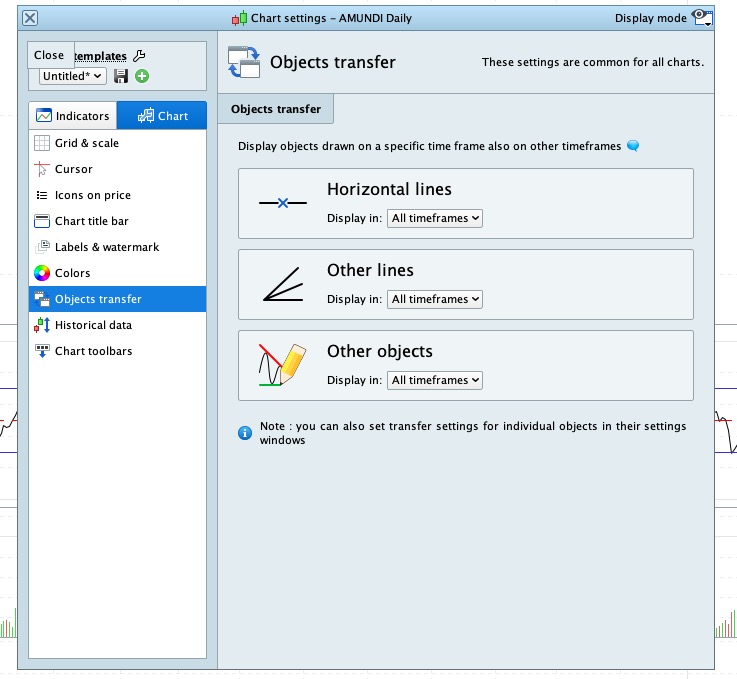
On a Desktop there is a Setting to show (or not show) Objects on Higher and / or Lower Timeframes.
Settings > Platfrom > Charts > Right Hand side 2nd from bottom (my snippett tool is playing up sorry … else I would post a screenshot).
I found the settings. It had an effect in the desktop application, but on the mobile version, I still lose all of my drawings when I change the time frame
Is there not a separate Setting for the mobile version?
What mobile version anyway … mobile PRT (as below via m.prorealtime.com) or mobile IG App?
https://www.prorealtime.com/en/market-data-smartphone-app
I meant m.prorealtime.com
from m.prorealtime.com, I managed from the preferences to show the drawings on the smaller time frame, but nothing on bigger timeframe. That’s a shame. On the desktop version, we can choose to show the drawing on smaller+bigger T.F.
If you show / set up your preferred Objects on highest timeframe you are likely to use then these Objects will show on all lower timeframes?
Yeah, i guess i could redo my drawings on a higher TF, but then it’ll be complicated to precisely create the objects on a monthly TF if i want to be able to see them on an hourly TF…
Can you not set Objects up on 2 or 3 separate Templates (or Workspaces I think they are now called) and then save each as a separate Name, e.g, Monthly, Weekly, Daily, Hourly?
Takes a few seconds to open a saved Workspace?
Just ideas that are occuring to me.
Hello, you can do this on the mobile version by selecting the objet on your chart and pressing the 3 vertical dots at the top right of the screen to open the settings menu. Then bottom right press “Use platform options settings” and you’ll have the various options there.
RafaelN, nice suggestion, but unfortunately, it is not working. I inspected the settings of a drawn rectangle with the 3 dot button. It was set to “resume platform settings”. In the desktop app, it is set to transfer objects to all timeframes (see screenshot), but it is just not working. My rectangle disappear if I switch a bigger TF. If I switch to a smaller TF, then the rectangle is still there. I don’t get it…
The setting of reusing the settings of the platform doesn’t seem to work well (I’ve just sent a message to PRT’s tech team so they would look into it), but otherwise the other settings (in the same menu) where you can manually chose to transfer object to so or so timeframes does work and is saved correctly from what I saw when testing it.
FYI the PRT tech team advised that this would be fixed in the next update of the mobile version, so probably between now and in a couple of weeks
Realise this is a slightly older thread but hopefully still alive?
Having similar issue on ProRealTime v12 via IG. I’ve changed settings in Chart Settings (Objects Transfer) to show all objects in all timeframes, but when I draw any line (e.g. a ray) on any timeframe, I cannot for the life of me get it to show on any other timeframe. I’ve tried higher and low. I want to draw once and then see it on all timeframes. When I go to the configuration menu for the line, it shows it is drawn in a specific timeframe (e.g. 1 hour) but it’s ‘greyed out’ so I can’t change it.
Also on the chart study window I cannot change it.
Can someone please advise how to get around this?
many thanks
Might your problem have anything to do with the Renko Indicator you are using?