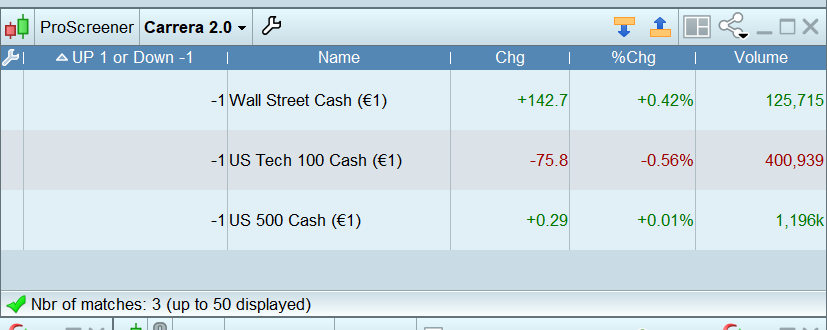
Here is the screener.
Wish to have a column saying “up” or “down”…
Thank you…
// The following code is related to this timescale:10 minutes
TIMEFRAME(2 minutes)
c1 = (close > close[1])
MySMA2m = Average[8](close)
c2 = (close > MySMA2m)
c22 = (close crosses over MySMA2m )
TIMEFRAME(10 minutes)
c3 = (close > close[1])
MySMA10mn = Average[8](close)
c4 = (close > MySMA10mn)
// The following code is related to this timescale:1 hour
TIMEFRAME(1 hour)
c5 = (close > close[1])
MySMA1hr = Average[8](close)
c6 = (close > MySMA1hr)
//DownTrend
TIMEFRAME(2 minutes)
c7 = (close < close[1])
MySMA2m = Average[8](close)
c8 = (close < MySMA2m)
c88 = (close crosses under MySMA2m)
TIMEFRAME(10 minutes)
c9 = (close < close[1])
MySMA10mn = Average[8](close)
c10 = (close < MySMA10mn)
// The following code is related to this timescale:1 hour
TIMEFRAME(1 hour)
c11 = (close < close[1])
MySMA1hr = Average[8](close)
c12 = (close < MySMA1hr)
// The following code is related to this timescale:DEFAULT
TIMEFRAME(DEFAULT)
SCREENER[(c1 AND c2 AND c22 AND c3 AND c4 AND c5 AND c6) OR (c7 and c8 and c88 AND c9 and c10 and c11 and c12)] (Variation AS “%Chg prev bar”)
Always use the ‘Insert PRT Code’ button when putting code in your posts to make it easier for others to read.
Thank you 🙂
TIMEFRAME(weekly)
REM RSIWL = RSI Weekly Long
RSIWL = RSI[5](close)
c1 = (RSIWL > RSIWL[1])
REM RSIWS = RSI Weekly Short
RSIWS = RSI[5](close)
c3 = (RSIWS<RSIWS[1])
TIMEFRAME(daily)
REM RSIDL = RSI Daily Long
RSIDL = RSI[5](close)
c2 = (RSIDL>RSIDL[1])
REM RSIDS = RSI Daily Short
RSIDS = RSI[5](close)
c4 = (RSIDS<RSIDS[1])
LONG = c1 AND c2
SHORT = c3 AND c4
IF LONG then
Criteria = 1
ELSIF SHORT then
Criteria = -1
ENDIF
SCREENER [(LONG) OR (SHORT)](Criteria as "BULL 1 BEAR -1")
Foun it on my own file… :))
Screeners can only return positive numbers, so 1/2, or 10/20, etc…
No UP/DN, nor -1/1.
Hi Roberto,
It does on mine but we may not talk about the same results.