LeoParticipant
New
Hi,
I am trying to filter data in a screener script in which I use another custom made indicator by the call function. After that I made a condition, but in the results there are items which should not be destilled. Is the code below correct anyway? Are nested clausule possible?
indicator10, ignored, ignored = CALL DS(Close)
c10 = (indicator10[0] <= 10 or (indicator10[1] <= 10) and indicator10[0] <= 15)
By the way, is there a Debug option in Proscreener in which I can verify why results are destilled?
Any help is appreciated.
ProScreener does not support GRAPH to debug. You should convert your code to a temp strategy to debug it.
Since line 2 has an AND operator, for c10 to be true the condition
indicator10[0] <= 15
must ALWAYS be true, in addition to eventually other OR conditions. The correct use of parenthesis will be beneficial to your code.
Roberto
LeoParticipant
New
Hi,
Thanks for reply. I used the AND clause wrong. I changed it to below, but still some items in the results should not be there, i.e. bar[0] has a value of “27” and bar[1] has a value of “6” for indicator10, so c10 should have a result of false (or -1?), shouldn’t it?
indicator10, ignored, ignored = CALL DS(Close)
c10 = (indicator10[0] <= 10 or (indicator10[1] <= 10 and indicator10[0] <= 15))
any tips appreciated.
What is the “DS” indicator please? Could you post a screenshot?
LeoParticipant
New
Hi,
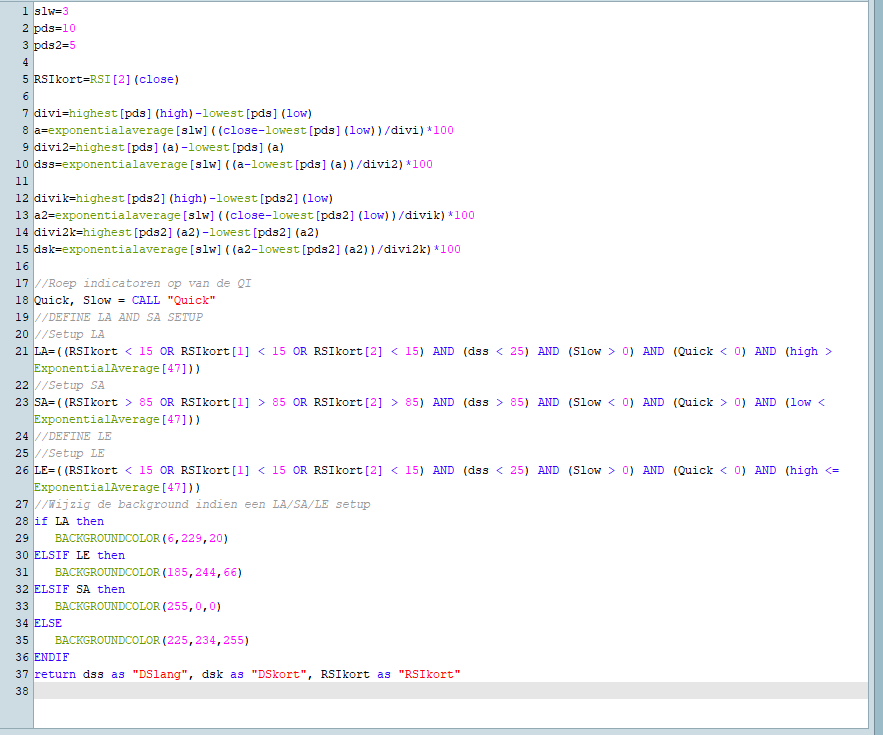
Attached the DS indicator.
It’s not possible to analyze the indicator without the complete source code.
I attach a screenshot of a table of different values (not all possible variations) where I replaced the conditions with some values.
I also highlighted some odd (though they may well be right) conditions, where you test INDICATOR[0] both against 10 and 15.
I don’t know whether your indicator is right or wrong, but you should thoroughly test your conditions to make sure they reflect what you want.
Your called indicator “CALL” another one named “QUICK”.. This is difficult to know how the whole thing is combined to give result in your screener. Please post the code in text format next time, much easier for us to help with a simple copy/paste of your codes into our own platform! 😐
LeoParticipant
New
Hi Nicolas,
Appreciating your help! About the OR/AND clause test data: It is what I want. Or candle[0] needs to be below a particular value, or candle[1] needs that to be, but then candle[0] must not having a specific high value anymore.
I attached the DS indicator in text now. If you could take another look would be great help. The screener destills this stock: AMT. But that stock has candle[0]=28.7 and candle[1]=7.76 in the weekly chart. Using this code in proscreener script:
c10 = (indicator10[0] <= 10 or (indicator10[1] <= 10 and indicator10[0] <= 15))
should filter AMT in my opinion.
This is the DS indicator, but we also need the “QUICK” one (line 18 of the DS indicator).