“Code is invalid. Please correct it. Line 18: Characters missing. Suggestions: end of code”
Which file are you referring to above??
The .itf I posted starts and runs on ProOrder (no errors) … see attached running since last night (no trades yet).
I have been experimenting with v5.3 on different markets
It seemed to be the same type of problem LaurentBZH35 experienced on v7.5.
When MM=0, does it then matter at all the settings for MM?
if MM = 0 then the rest is irrelevant, positionsize just stays the same.
Sorry
How can I test with long AND SHORT position
????
Thanks
How can I test with long AND SHORT position
Rework the code to introduce conditions for short positions , then optimise all the many variables, then Walk Forward Test, then Monte Carlo Test then Robustness Test then share the code with us all so we can all then Demo Forward Test short positions. 🙂
Actually with NAS-2m-HULL-SAR-v5.3L.itf you can also change Tradetype = 1 to go Long/Short but it was never very successful, so Grahal’s is the better answer!
How can I test with long AND SHORT position
Rework the code to introduce conditions for short positions , then optimise all the many variables, then Walk Forward Test, then Monte Carlo Test then Robustness Test then share the code with us all so we can all then Demo Forward Test short positions. 🙂
Of course I’ll do all that you write…. but I don’t understand why T.S. doesn’t go short with this instructions…..
// Conditions to enter short positions
IF not shortonmarket and Ctime and c2 and c2a AND C4a and c4b and c4c AND C6a and c6b THEN
sellshort positionsize*0 CONTRACT AT MARKET
elsif shortonmarket and Ctime and c2 and c2a and c4 and c4a and c6 and COUNTOFSHORTSHARES < MaxPositionsAllowed then
sellshort positionsize*0 CONTRACT AT MARKET
SET STOP %LOSS 1
SET TARGET %PROFIT 1.4
ENDIF
because positionsize*0 = 0
it should be
// Conditions to enter short positions
IF not shortonmarket and Ctime and c2 and c2a AND C4a and c4b and c4c AND C6a and c6b THEN
sellshort positionsize CONTRACT AT MARKET
elsif shortonmarket and Ctime and c2 and c2a and c4 and c4a and c6 and COUNTOFSHORTSHARES < MaxPositionsAllowed then
sellshort positionsize CONTRACT AT MARKET
SET STOP %LOSS 1
SET TARGET %PROFIT 1.4
ENDIF
Of course I’ll do all that you write
Apologies for my ‘outburst‘, I should have checked the code, I was not getting any short trades either, so I kinda was telling myself I needed to do all I wrote! 🙂
Of course I’ll do all that you write
Apologies for my ‘outburst‘, I should have checked the code, I was not getting any short trades either, so I kinda was telling myself I needed to do all I wrote! 🙂
Absolutely no problem. You and others in this forum are doing an amazing job EVEN for someone like me who is starting programming with PRT. Personally I just have to thank you for that
I have been experimenting with v5.3 SHORT versions (Tradetype = 3 to go Short) on different markets but can´t make it work at all.
I use MM = 0 and Cumulateorders = false.
-If I try to start attached “Dow 2m HULL-SAR v5.3S” in Proorder I get the message:
“Code is invalid. Please correct it.
Line 24:
Characters missing. Suggestions: end of code”
-If I remove the first line “// 2021-03-08: Optimerat…” I don´t get the error message above any more.
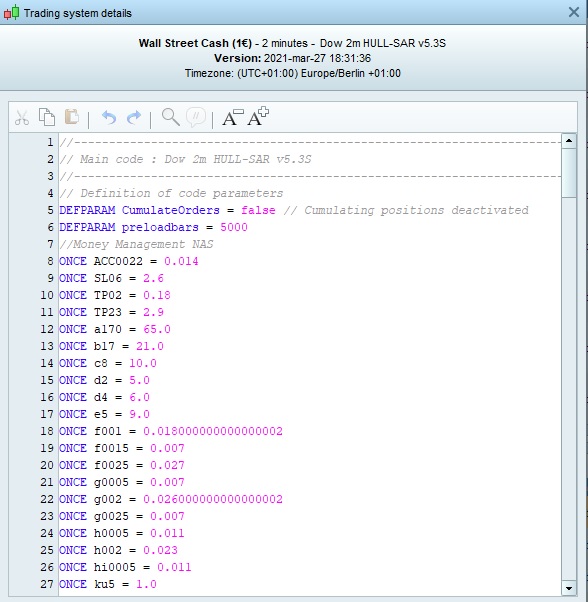
-I then proceed with “Prepare for automatic trading”. Now the values at line 18 and 22 gets changed for some reason (see image) and I can´t change it back at this stage.
-I can start it in Proorder but it soon stops due to “Division by zero”.
I would be very grateful if someone could take a look at this and find a solution! I think there is some potential with this algo also on the short side fore several markets.
I have made a copy with fixed values in the code instead to work around if the problem was that line 18 and 22 gets changed as in the Picture above.
-I then don´t get the “Code is invalid…” even if I have the first line “// 2021-03-08: Optimerat…” is in the code.
-I can start it in Proorder but it soon stops due to “Division by zero”.
line 18 and 22 gets changed for some reason
Changed to … as shown in the image … or changed from … what is shown in the image?
Weird … 17 decimal places, optimiser doesn’t accept more than 6 decimal places.
Changed to … as shown in the image … or changed from … what is shown in the image?
Changed to whats shown in image with a lot of decimals.