


multiple filter criteria not working

Viewing 3 posts - 1 through 3 (of 3 total)
  • Author
    Posts
  • #232513 quote
    liorp
    Participant
    New

    Hello,

    I am using the multiple filter criteria as described in the documentation – programming guide : Market scans .
    I am following the example on “Use multiple filter criterias” in chapter II
    what I am seeing is that in some cases , at the output of the screener, there is still only one criteria displayed.

    I don’t understand what the problem is .
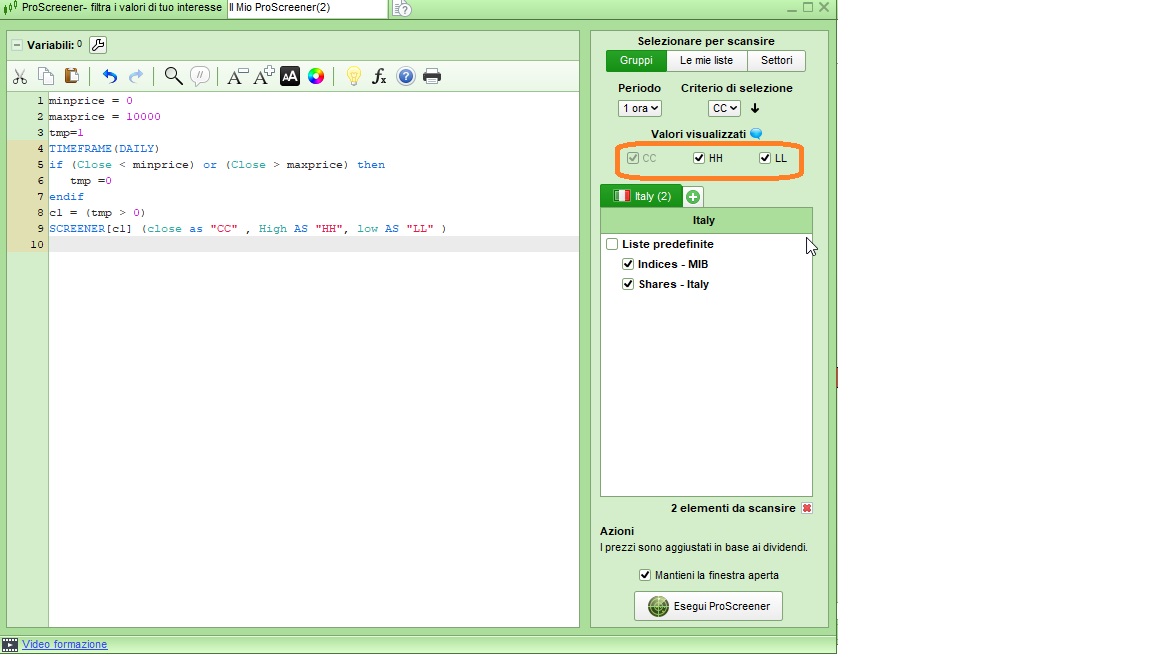
    For example, I created this simple code (below) , that should have 3 columns , but only one is displayed – the one marked as “CC”.
    Any ideas on why this is happening and how to resolve?

    This is the code :

    minprice = 0
    maxprice = 10000
    tmp=1
    TIMEFRAME(DAILY)
    if (Close < minprice) or (Close > maxprice) then
    tmp =0
    endif
    c1 = (tmp > 0)
    SCREENER[c1] (close as “CC” , High AS “HH”, low AS “LL” )

    #232514 quote
    robertogozzi
    Moderator
    Master

    Check that all criteria have been selected in the settings, as from attached pic.

    liorp thanked this post
    Screener-with-multiple-criteria.jpg Screener-with-multiple-criteria.jpg
    #232545 quote
    liorp
    Participant
    New

    Thanks !!!

Viewing 3 posts - 1 through 3 (of 3 total)
  • You must be logged in to reply to this topic.

multiple filter criteria not working


ProScreener: Market Scanners & Detection

New Reply
Author
author-avatar
liorp @liorp Participant
Summary

This topic contains 2 replies,
has 2 voices, and was last updated by liorp

1 year, 10 months ago.

Topic Details
Forum: ProScreener: Market Scanners & Detection
Language: English
Started: 05/09/2024
Status: Active
Attachments: 1 files
Logo Logo
Loading...

