Multiple Line IF Statement

Viewing 4 posts - 1 through 4 (of 4 total)

  • Author
    Posts
  • #247480 quote
    MacroTMacroT
    Participant
    Average

    I have a multiple line if statement used to filter out a series of constraints. I would like to know if there is a function to exit the if statement if a condition is met without running through the whole statement.


    Eg

    IF Condition A then

    X = 0

    ELSIF Condition B then

    X = 1

    ELSIF Condition C then

    X = 0

    ELSE

    X=1

    ENDIF

    In the example above assume there is an overlap between Condition A and B.

    If the code runs on this overlap, then X is set to 0 as it fulfils Condition A but is then set back to 1 as it fulfils Condition B

    I would like to know if there is a way to exit the statement as soon as the condition is set to 0, without it moving through the whole IF statement ?


    Thanks

    #247488 quote
    JSJS
    Participant
    Master

    An “early” exit is not possible… One possible solution is to adjust your conditions, for example:

    If Condition A and Condition B then

        X = 0

    ElsIf Condition B then

        X = 1

    Iván González and MacroT thanked this post
    #247509 quote
    robertogozzirobertogozzi
    Moderator
    Legend
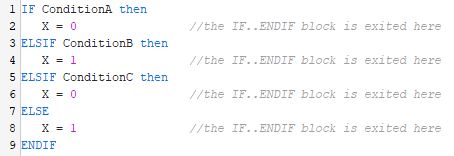
    ELSIF and ELSE are only executed alternatively:
    IF ConditionA then
       X = 0                //the IF..ENDIF block is exited here
    ELSIF ConditionB then
       X = 1                //the IF..ENDIF block is exited here
    ELSIF ConditionC then
       X = 0                //the IF..ENDIF block is exited here
    ELSE
       X = 1                //the IF..ENDIF block is exited here
    ENDIF
    I can’t see any condition overlapping any of the other ones.
    Iván González and MacroT thanked this post
    x-4.jpg x-4.jpg
    #247512 quote
    Iván GonzálezIván González
    Moderator
    Legend
    Hi! In ProBuilder, the structure IF ... ELSIF ... ELSE ... ENDIF is specifically designed to stop evaluating as soon as one condition is met. That means, if Condition A is true, the subsequent conditions (Condition B, C, etc.) are not evaluated at all. So, the behavior you’re describing, where X gets reassigned after meeting Condition A,should not happen if you’re using a proper ELSIF chain. Here you have an example:
    ema=average[50](close)
    if close > ema then
    count1=1+count1
    elsif close crosses over ema then
    count2=1+count2
    endif
    
    return count1, count2 
    Count2 will always be 0. If you use to if endif then it will be different:
    ema=average[50](close)
    if close > ema then
    count1=1+count1
    endif
    if close crosses over ema then
    count2=1+count2
    endif
    
    return count1, count2 
    MacroT thanked this post
Viewing 4 posts - 1 through 4 (of 4 total)

  • You must be logged in to reply to this topic.

ProRealAI ProRealAI New

Stuck on this ProBuilder code?

Describe what this topic is trying to build, in plain English, and ProRealAI writes the ProRealTime™ indicator, screener or system for you.

Available in 7 languages
Try ProRealAI

Multiple Line IF Statement


ProOrder: Automated Strategies & Backtesting

New Reply
Author
author-avatar
MacroT @macrot Participant
Summary

This topic contains 3 replies,
has 4 voices, and was last updated by Iván GonzálezIván González

1 year, 3 months ago.

Topic Details
Forum: ProOrder: Automated Strategies & Backtesting
Language: English
Started: 05/22/2025
Status: Active
Attachments: 1 files
ProRealCode ProRealCode
Loading...